
Google Workspace Marketplace


HourSync: Clockify for Google Sheets™
Import your Clockify hours into the Google Sheets™ spreadsheet you already invoice from. Own tab, your formulas untouched.
Дата оновлення:24 серпня 2026 р.
Підтримує:
Немає відгуків
12


Огляд
Your invoice already lives in a spreadsheet. HourSync fills in the hours.

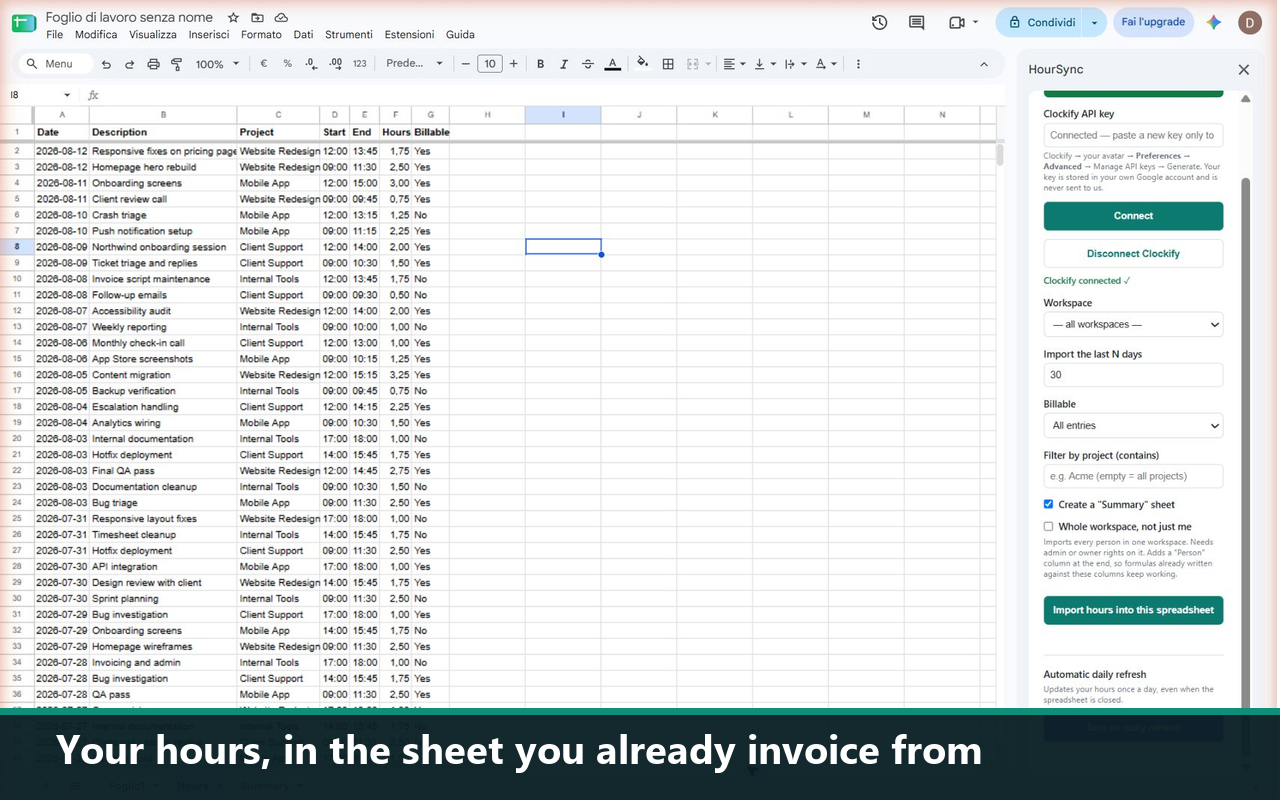
Pick a workspace and a date range in the side panel, and your Clockify time entries land in a tab of the spreadsheet you are already working in — Date, Description, Project, Start, End, Hours, Billable. Your invoice template, your rates and your formulas stay exactly where they are.

WHAT IT DOES

• One-click import of your Clockify time entries into the current spreadsheet
• Whole-workspace mode: an admin imports every person's hours, with a Person column
• Filter by project, or by billable status
• Summary sheet: hours totalled per project, and per person
• Automatic daily refresh, so the sheet is current before you invoice

WHY NOT JUST EXPORT A CSV

You can. That is not the part that costs you. The cost is doing it again next month: download, open, copy, paste into the right columns, fix the dates, re-point the formulas. HourSync writes into the sheet you already built, in the same place every time.

HOW YOUR DATA IS HANDLED

There is no HourSync server and no HourSync database. The code runs inside Google Apps Script under your own Google account. Your Clockify API key is stored in your own Google account, never sent anywhere else. HourSync asks for the spreadsheets.currentonly scope, so it can only touch the one spreadsheet you open it in — not your Drive, not your other files.

PRICING

14 days free, starting from your first import. No credit card, no signup, nothing to cancel. After that it is €19 a month, or €190 a year. One flat price: no per-row metering and no task counter.

If HourSync is not for you, email me within 14 days of your first payment and I refund it in full.

REQUIREMENTS

A Clockify account and its API key, which you generate yourself in Clockify. Billable rates and the Billable column come from a paid Clockify workspace; on a free Clockify account those columns will be empty.

Built and supported by one person. Write to danibarbers13@gmail.com and you get an answer from whoever wrote the code.
Додаткова iнформацiя
sell
ЦіниБезкоштовна пробна версія
code
Розробник
email
Підтримка
lock
Політика конфіденційності
description
Умови використання
flag
СкаргаПоскаржитися




Пошук
Очистити пошук
Закрити пошук
Додатки Google
Головне меню