
Google Workspace Marketplace


HubSpot for Google Chat™
For Conversations Inbox, Help Desk, etc.
बनाने वाली कंपनी:
लिस्टिंग को पिछली बार अपडेट किया गया:24 मार्च 2025
इनके साथ काम करता है:
86 हज़ार+



अवलोकन
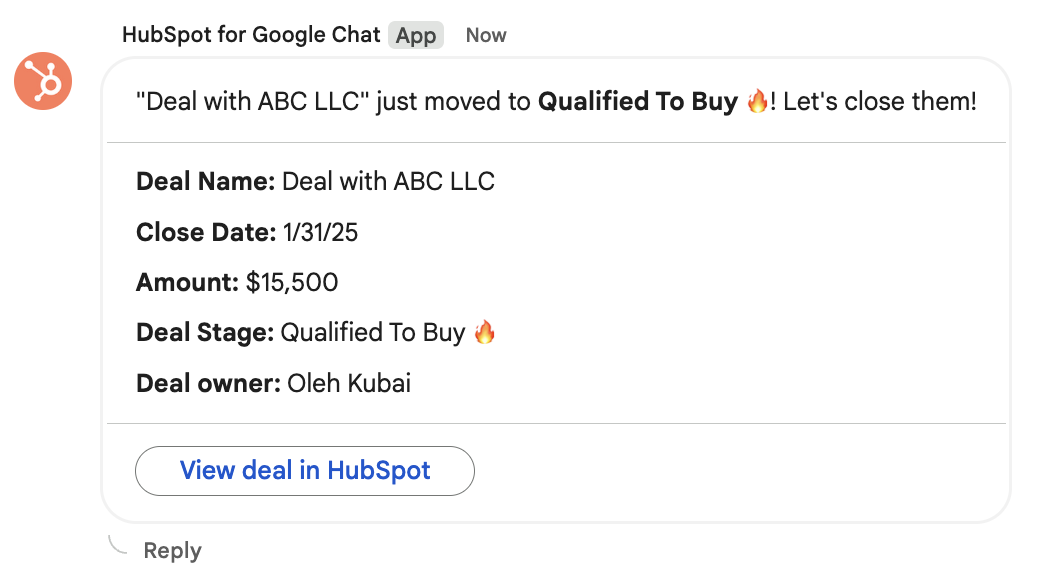
The new HubSpot and Google Chat™ integration enhances communication, productivity, and efficiency for teams. Keep stakeholders informed through real-time notifications about key customer interactions, improve response times by replying directly to customer messages, and foster cross collaborative ticket resolution - all without leaving your favorite collaboration tool.

1. Notifications

Receive Notifications: Stay connected to activities in your HubSpot CRM by receiving notifications for reminders, mentions, form submissions, and more

Send Google Chat™ Notifications through Workflows:* Set up a workflow to send notifications to a specific Google Chat™ Space or user


2. Connect HubSpot Inbox with Google Chat™

Google Chat™ seamlessly integrates with HubSpot conversations:

• Get notified in a designated Google Chat™ Space about incoming Inbox messages across any Inbox channel type like team email, live chat, or form submissions
• Respond to incoming messages in Google Chat™


3. Connect HubSpot Help Desk with Google Chat™

Service teams can connect their HubSpot help desk to Google Chat™ to drive collaborative ticket resolution. Teams can:

• Configure the types of tickets sent to a Google Chat™ space
• Send relevant new tickets to selected Google Chat™ spaces
• Sync threaded replies from Google Chat™ with ticket comments in HubSpot, including at-mentions
• Enable quick actions from the ticket in Google Chat™, like updating ticket properties
अतिरिक्त जानकारी
sell
कीमतबिना किसी शुल्क के
code
डेवलपर
व्यापारी नहीं है
email
सहायता
lock
निजता नीति
description
सेवा की शर्तें
flag
शिकायत करेंआपत्तिजनक ऐप्लिकेशन की शिकायत करें



खोजें
खोज हटाएं
खोज बंद करें
Google ऐप
मुख्य मेन्यू