
Google Workspace Marketplace


IEP Insight Special Ed. Caseload & Data Tracker
Automated IEP data tracking for Special Education teachers. Log goals, calculate mastery, and generate progress reports in Google Sheets™.
정보 업데이트:2026년 10월 7일
호환 기기:
422




개요
IEP Insight: Special Education Data Tracker & Caseload Manager

Save yourself from the documentation panic!

IEP Insight streamlines special education data collection directly inside Google Sheets™. Designed specifically for the demands of an active SPED caseload, it automates the math, mastery tracking, and longitudinal graphing so you can spend less time organizing paperwork and more time teaching.

100% Free for up to 3 students. No credit card required.

━━━━━━━━━━━━━━━━━━━━━━━━━━━━

WHY EDUCATORS USE IEP INSIGHT

Traditional data collection like scattered tally sheets, paper binders, and convoluted spreadsheet formulas is time consuming and error prone. IEP Insight pairs the accessibility of Google Sheets™ with a dedicated caseload manager.

✨ Guided Caseload Wizard
No need to manually format spreadsheet columns. Set up your students, IEP dates, custom mastery criteria, and short-term benchmarks through an intuitive, step-by-step setup wizard in under a minute.

⏱️ Fast "Logbook" Entry
Never scroll through endless data rows during a lesson. Open the popup Logbook to record trial scores, frequency, duration, or rubric levels for any student and goal in two clicks.

📈 Clear, Visual Progress Reports
Turn raw observation data into objective visual evidence for IEP meetings, annual reviews, and parent communication:
• Automatic Trend Lines: Track longitudinal growth across quarters and marking periods.
• Mastery Calculation: Automatically tallies criteria status (e.g., "Met 4 of 5 consecutive trials").
• Multi-Metric Support: Tracks Percentages (%), Frequency counts, Duration (minutes), and Rubric scales.

🔒 Private & FERPA-Conscious by Design
• Zero PII Storage: Your student data remains entirely within your own Google Drive™; we never collect or view student names or records.
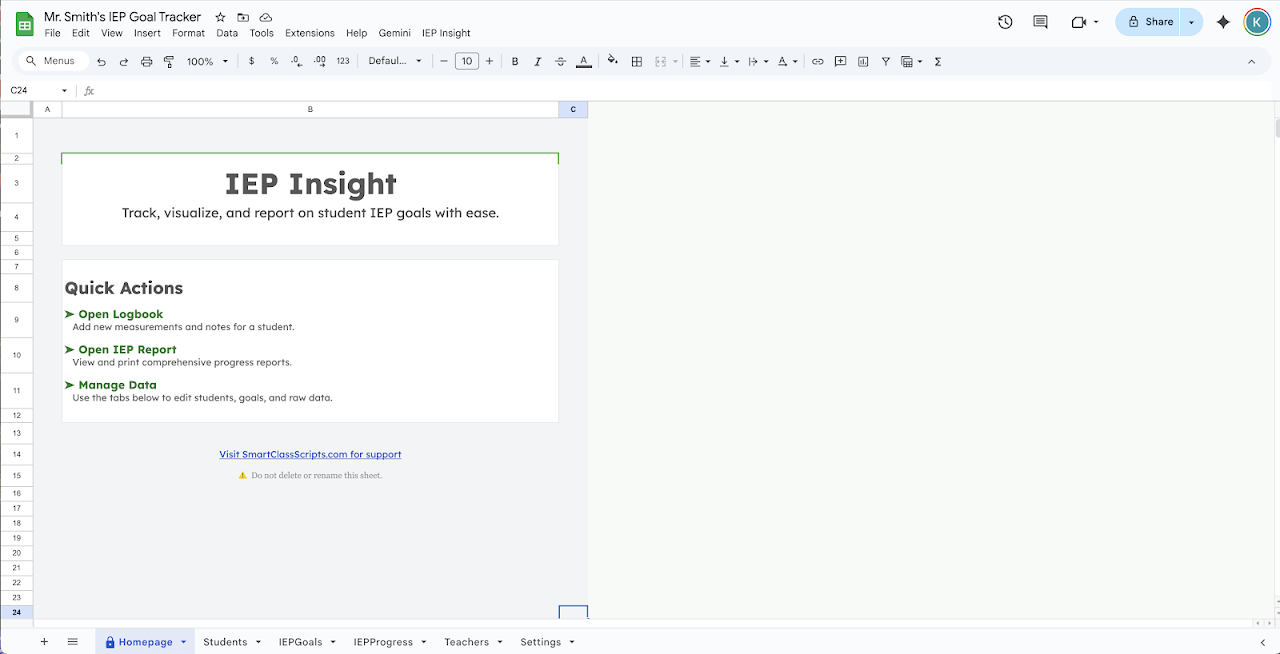
• Projection Shield: Opens by default to a neutral Homepage so confidential student names are never exposed when connected to a classroom projector, or when on video calls.

👥 Team Collaboration
Paraprofessionals, service providers (OT/PT/SLP), and co-teachers can log measurements directly into a shared central spreadsheet (additional licenses required).

━━━━━━━━━━━━━━━━━━━━━━━━━━━━

HOW IT WORKS

1. Launch Setup: Initialize your tracker and open the Caseload Wizard to add your students and goal criteria.
2. Log Daily Data: Use the clean Logbook dialog to record progress on the fly.
3. Review & Print: Generate visual summary reports with one click for meetings and quarterly updates.

━━━━━━━━━━━━━━━━━━━━━━━━━━━━

PRICING & TIERS

• Free Tier (Forever Free): Full, unrestricted access to all features (Logbook, Wizard, Visual Reports, Exports) for up to 3 students on your caseload. No credit card needed.
• Pro Tier ($2.50/month): Unlock unlimited students for larger caseloads, multi-year archiving, and dedicated support.

━━━━━━━━━━━━━━━━━━━━━━━━━━━━

COMMUNITY & SUPPORT

Need help getting started, want to request features, or explore more educator automation tools? Join our teacher community on Discord or visit SmartClassScripts.com for guides and resources.
추가정보



검색
검색어 지우기
검색 닫기
Google 앱
기본 메뉴