
Google Workspace Marketplace


Inkable Docs & Slides: AI accessibility compliance
Inkable for Google Docs™ & Google Slides™ is an AI add-on that auto-fixes accessibility issues in Docs & Slides, helping you meet WCAG & PDF/UA standards and create tagged, accessible PDFs with ease.
Kehittäjä:
Tiedot päivitetty:9. lokakuuta 2026
Yhteensopiva seuraavien kanssa:

44 t.+



Yleiskatsaus
INKABLE DOCS — GOOGLE DOCS™ & GOOGLE SLIDES™ ACCESSIBILITY CHECKER


The most comprehensive accessibility tool for Google Docs™ and Google Slides™. Check, analyze, and fix accessibility issues in real-time with AI-powered insights. Move faster toward WCAG-aware workflows and content that’s inclusive by default.

🚀 WHY INKABLE DOCS?
Inkable Docs uses advanced AI to scan your files for barriers, turning complex findings into clear recommendations.

With Inkable Docs, you can:
●  Analyze structure: Check headings, organization, and deck flow.
●  Audit alt text: Instantly identify missing descriptions for images.
●  Prevent rework: Catch basics before they become expensive compliance issues.
●  Jump to issues: Navigate directly to the problem area inside your file.
●  Build inclusively: Make accessibility a day-one habit, not a panic.

✨ MAIN FEATURES & BENEFITS
Comprehensive Analysis
■  AI-Powered Intelligence: Deep scans for both Docs and Slides.
■  Heading Hierarchy: Ensure logical structure for screen readers.
■  Media Assessment: Identify what breaks PDF exports and reader flows.
■  Severity Detection: Prioritize fixes based on the impact on the user.

Smart Recommendations
■  Actionable Guidance: No jargon—just clear steps on what to fix and why.
■  Contextual Alt Text: AI-driven suggestions for images and visuals.
■  Priority Ranking: Focus on the most critical compliance issues first.

Seamless Integration
■  Native Workflow: Works entirely inside Google Docs™ and Google Slides™.
■  One-Click Checks: Rapid iteration loops for fast-moving teams.
■  Click-to-Jump: Stop hunting for errors; click to go to the exact spot.

🛠 USE CASES
✅  Education — Course packs, assignments, and lecture slides.
✅  Corporate — Memos, HR policies, and internal sales decks.
✅  Government — Citizen-facing documents and public materials.
✅  Marketing — Inclusive one-pagers and pitch decks.
✅  Non-Profit — Advocacy documents and fundraising materials.

⏱ GETTING STARTED (FAST)
1) Install the Inkable Docs add-on.

2) Sign up via the Inkable Docs web app to authenticate.

3) Open any Doc or Slide deck and click "Launch."

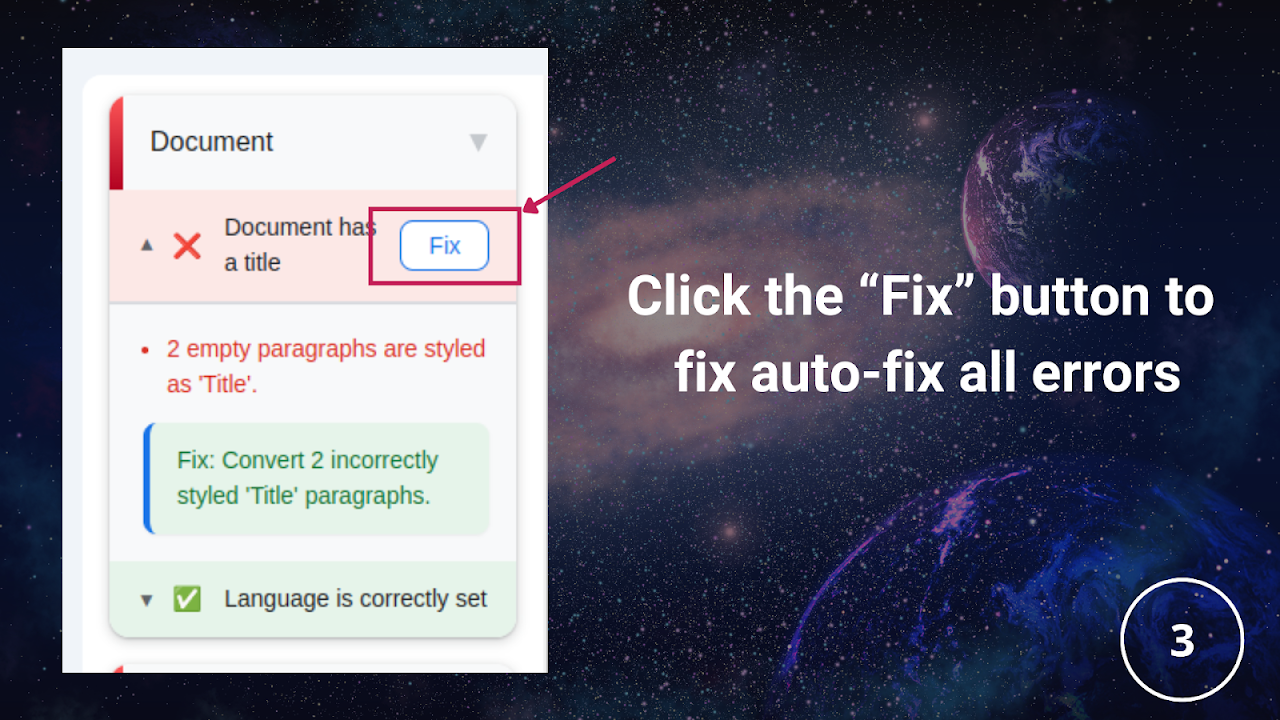
4) Run a one-click accessibility check.

5) Review results and apply improvements with confidence.

THE INKABLE DOCS ADVANTAGE
→ AI-powered analysis for deeper insights.
→ Docs + Slides native for a familiar workflow.
→ Real-time feedback to prevent "oops" moments.
→ Standards-aware (WCAG) for better tagged PDFs.

Transform how you create. Make inclusive publishing feel inevitable, not optional.

Google Workspace™, Google Docs™, Google Slides™, and Google Drive™ are trademarks of Google LLC.
Lisätietoja
sell
HinnatMaksuttomia ja maksullisia ominaisuuksia
code
Kehittäjä
email
lock
Tietosuojakäytäntö
description
Käyttöehdot
flag
Tee ilmoitusMerkitse sopimattomaksi




Haku
Tyhjennä haku
Sulje haku
Google-sovellukset
Päävalikko