Turn any Google Sheet™ of addresses into a filterable map in minutes. No API key, no setup. Filter, plan routes, export — free to try.
Listing updated:July 1, 2026
Works with:
No reviews
113
Overview
InstaMaps — Turn Any Spreadsheet Into a Map

Got a list of addresses in a Google Sheet™ — customers, stores, delivery stops, sites to visit? InstaMaps finds your address columns automatically and puts every row on a filterable Google Map™. No API key. No setup. No IT project. Free to try, no login or card required.

YOUR SPREADSHEET IS ALREADY A MAP. YOU JUST CAN'T SEE IT YET.

HOW IT WORKS (UNDER 5 MINUTES)
1. Open any Google Sheet™ with addresses — exported from your CRM or just typed in. No CSV files.
2. Name your data tab starting with "layer_" (e.g. layer_Stores)
3. Open InstaMaps from the Extensions menu → Load Map. AI detects your address columns — street, city, state, ZIP, postcode, or lat/lng — and geocodes every row automatically.
4. Filter, route, export, share.

WHAT YOU CAN DO

🗺️ See it all on a map
Every row appears as a marker in seconds. Spot clusters, gaps, and outliers instantly. One tab per team, region, store type, or route — each layer color-coded to match your tab colors.

🎯 Filter in real time
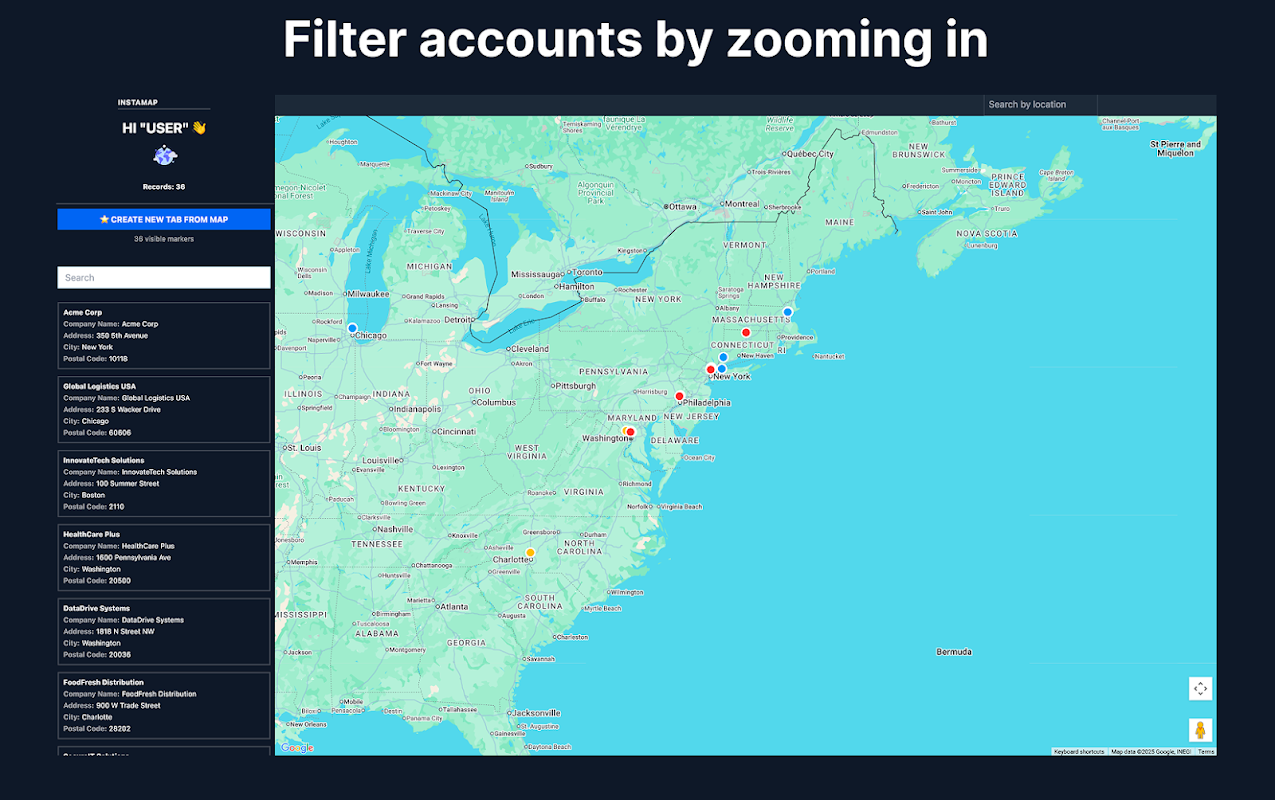
Filter by owner, status, category, region — any column in your sheet. Zoom into a city and see only the rows in that viewport. Filters combine instantly.

🚚 Plan routes through your stops
Select locations on the map and generate an optimized route through 50–100 stops, with drive times and distances. Built for delivery rounds, installation schedules, and field-visit days. Export the stop list back to your sheet.

📤 Push results back to Sheets
One-click export of filtered rows to a new tab — all columns preserved. The loop runs FROM your sheet TO the map and BACK: pull, visualize, filter, push, repeat.

🌐 Share or embed your map
Share the Google Sheet™ and teammates see the same map. Or embed the live map on your website — a store locator straight from a spreadsheet.

📈 Free Salesforce Maps alternative
Export any Salesforce or CRM report to Google Sheets™ and see accounts by owner, stage, or region on a territory map. Salesforce Maps charges $75/user/month for that view. No package install, no admin setup.

WHY TEAMS PICK INSTAMAPS
✅ Geocode addresses automatically — no API key, no daily quota, no manual pinning
✅ AI address detection — one column or split columns, any language, any sheet structure
✅ Your data stays in YOUR sheet — we only access spreadsheets you open InstaMaps in (per-spreadsheet permission, not all your files)
✅ Free to try — no login, no credit card, no trial timer that flips to paid

COMMON QUESTIONS

Q: Does my sheet need a specific format?
A: No. Full address in one column, split columns (street / city / state / ZIP), or lat/lng coordinates — AI detects them all. Works in any language.

Q: How many addresses can I map?
A: Geocoding runs server-side, so the usual 1,000-per-day add-on limit doesn't apply. Map hundreds of rows in one go.

Q: Can I map a Salesforce or HubSpot report?
A: Yes — export it to Google Sheets™ from your CRM, then open InstaMaps. Any user with report access can do it.

Q: Can I put the map on my website?
A: Yes — every map can be shared by link or embedded, so a spreadsheet becomes a store locator or coverage map on your site.

Q: Is it really free?
A: Free to try with no login or card. Advanced features (larger routes, synced maps, embeds without branding) are paid — pricing is on our site, no surprises.

Google Sheets™, Google Maps™ and Google Workspace™ are trademarks of Google LLC. Salesforce is a trademark of Salesforce, Inc. InstaMaps is not affiliated with Salesforce, Inc.
Additional information
PricingFree of charge
Privacy policy
Terms of service
InstaMaps will ask for the permissions shown below. Learn more
InstaMaps will need access to your Google account
This will allow InstaMaps to :
View and manage spreadsheets that this application has been installed in
See, edit, create, and delete only the specific Google Drive files you use with this app
Display and run third-party web content in prompts and sidebars inside Google applications
Connect to an external service
See your primary Google Account email address
See your personal info, including any personal info you've made publicly available
Reviews
Language:
Sort by:
Google doesn't verify reviews or ratings. Learn more about reviews
No comments
Search
Clear search
Close search
Google apps
Main menu