
Google Workspace Marketplace


Label Maker - Compatible with Avery™ Labels
Mail Merge envelopes, labels, QR Codes and Barcodes from Google Docs™ and Google Sheets™. The best way to create and print labels using accurate compatible templates from Avery.
Készítette:
Adatlap frissítve:2026. október 2.
A következőkkel működik:

5 M+




Áttekintés
✔️ Design and format your label template and you are ready to print professional labels with this label app compatible with Avery® label app.✔️ No sign-up required. ✔️Free and fast customer service. ✔️Free from advertising or watermarks.✔️ This label maker is the best way to mail merge labels from Google Docs™ or Google Sheets™. ✔️Define your own custom label or pick a standard template.
👇 Read more about our features, help, tutorials and pricing.


🏷 HOW IS THIS LABEL MAKER USEFUL?

These are some use cases to mail merge into compatible Avery® labels:


➤ Business Cards
➤ Supermarkets, mini-markets, convenience shops and stores can use it for food labels, bottle labels, water labels, wine labels, etc
➤ Organize your professional kitchen
➤ Hand sanitizer labels for COVID-19
➤ Create an efficient shipping system
➤ Christmas labels and Xmas cards -  create labels for Christmas cards mailings
➤ Vacation and holiday mailing labels
➤ A school librarian can use it for his library to service lots of students
➤ A school, university, college and those in education can merge student records such as exam results or parent reports
➤ Make your health & beauty products labels compliant. Includes candles, CBD products, beer, coffee, etc
➤ Candle warning safety labels
➤ Food & Beverage labels, included baked goods
➤ Parties & Events. Merging wedding addresses for invitations, invites
➤ Generate and send New Year cards and wishes
➤ Create name tags (or badge name) for Convention Badges, Event badges, Conference badges, Lapel Badges with attendees' names
➤ Return labels, Return address labels, Clothing labels
➤ Download Avery 8160 ® template for Google Docs ™ and Google Sheets ™ in PDF & Microsoft Word format
➤ Print #10 envelopes with this Google Docs ™ add on


🆘 NEED HELP AND SUPPORT?

Don’t worry. We don’t use robots with artificial intelligence. We have real intelligent people answering your questions with an average response time of less than 3 hours. However, we usually reply much faster than that. Whether you are using the free or premium version, we do not charge for customer support. Help comes in the form of email communication, or as an alternative, we also provide a remote desktop session.

We offer a 30 day MONEY BACK GUARANTEE. This applies if we cannot help you with your issue using the product.

We pride ourselves on having the best customer care.

You can also help yourself by searching our FAQ (Frequently Asked Questions):
https://label-maker.quicklution.com/help

If you do not find the answer feel free to contact us here:
https://label-maker.quicklution.com/contact-us


📼 INTRODUCTORY VIDEO

If you feel that the add-on is not intuitive and easy enough you can quickly watch this step-by-step tutorial on YouTube to show you how to label merge https://label-maker.quicklution.com/home#h.p_v_67E7vAcNt7


➤ Step by Step Instructions on how to merge labels from Google Docs™
https://label-maker.quicklution.com/home/create-print-Avery®-labels-google-docs-online-label-maker

➤ Step by Step Instructions on how to merge labels from Google Sheets™
https://label-maker.quicklution.com/home/create-print-Avery®-labels-google-sheets-online-label-maker


🕵️ EXTENSION HIGHLIGHTS TO CREATE Avery® LABELS

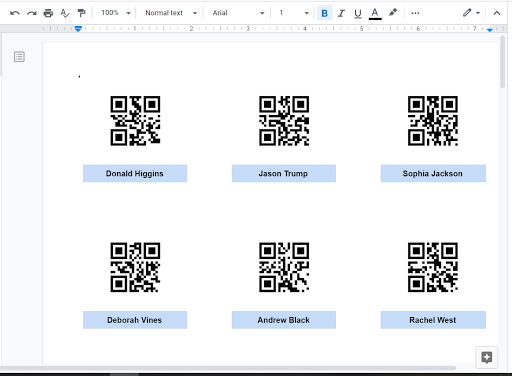
★ Mail Merge Images. Automatically replace *|Merge Fields|* with images. Ideal for QR Code, Barcode, profile photo, etc. https://label-maker.quicklution.com/help/mergeimages
★ Opt to print only selected/filtered rows of data.
★ No limit to how many labels you can generate or print.
★ No limit to how many merge fields you can enter.
★ No computer skills required.
★ Personalize each label and generate in bulk/mass.
★ Design awesome mailing labels from Google Spreadsheet.
★ Supports compatible Avery® Products in US Letter and A4 paper sizes.
★ Supports different kind of compatible Avery® labels templates such as rectangle stickers, address labels, round stickers,  labels for parcels and packages, oval stickers, labels for organizing and filing, labels for products and pricing, labels for security and protection, GHS / Chemicals labels,  printable tags, name tags, shelf talker, promotional cards, glossy labels, etc.
★ If you cannot do a Label Merge because you cannot find a particular template or it is missing from Google Docs ™ or Google Sheets ™,  please contact us so we include the compatible Avery® label template for you. This applies even if a template has been discontinued.
★ Use this app to design software to print labels online though the Google Workspace Marketplace. No need to download anything. Avery® print and labelling is as easy as it can get.
★ If the Avery® template you are looking for is missing you can also create your custom labels. These custom labels can be done by setting the label’s width, height, page margins and spacing between labels.
★ Download Avery 5160 ® template for Google Docs ™ and Google Sheets ™ in PDF & Microsoft Word format.
★ Stop hand writing labels thanks to this GDocs extension.
★ You will fall in love with this Label Maker extension by Quicklution. A Google Docs™and Google Sheets™ add-on that you will never do without as it will make your label printing a breeze.


🖃 THE FOLLOWING ENVELOPES TEMPLATE FOR GOOGLE DOCS ARE SUPPORTED
Print Envelope #10 in Google Docs ™
Print Envelope #6 3/4, #9, #11, #12, #14  in Google Docs ™
Print Envelope B4, B5, B6, C3, C4, C5, C6, C65, DL, E4, E5, E6, E65, Italian, Monarch, US Legal, US Letter in Google Docs ™


🏷 SUPPORTED LABEL TEMPLATES
Popular Avery® label templates such as 5160, 8160, 5163, 8163, 18160, 5162  are also downloadable in PDF & Microsoft Word at https://label-maker.quicklution.com/Avery®-labels-compatible-templates-google-docs-sheets

Other popular templates from OnlineLabels.com and SheetLabels.com are also available.


💰 PRICING / COST

https://label-maker.quicklution.com/pricing


🆕 RELEASE NOTES


https://label-maker.quicklution.com/home/releasenotes


🔒 PRIVACY POLICY


https://label-maker.quicklution.com/home/privacypolicy


𝑾 TRANSITION TO G SUITE/MARKETPLACE FROM MS WORD

Was it hard to switch from Microsoft Word to Google Docs ™ because it did not have a mail merge add-on? Quicklution is here to help you make the transition from Microsoft to GSuite as smooth as possible.

This add-on combines the power of Google solutions to replace mail merge solutions: Microsoft Mail Merge (also known as MS mail merge, MS Word mail merge, MS Word's "envelopes & labels", MS wizard, Mail merge Excel), Mail merge Libreoffice / Libre Office, Pages and Numbers mail merge. Now you can mail merge from Google Docs™, Google Sheets™ and Google Drive ™ instead of a mail merge from Excel.

This extension can be used from your Chromebook, Mac, PC or any other platform with a browser. It makes your move to Chromebooks easy!


🛈 OTHER INFORMATION


Avery® is a trademark of Avery Products Corporation, one of the world’s leading manufacturers of labels and other products. Quicklution is not affiliated with Avery®.
Kiegészítő adatok
sell
ÁrakDíjmentes próbaidőszak
code
Fejlesztő
email
Ügyfélszolgálat
lock
Adatvédelmi irányelvek
description
Általános Szerződési Feltételek
flag
JelentésMegjelölés kifogásolhatóként




Keresés
Keresés törlése
A keresés bezárása
Google-alkalmazások
Főmenü