
Google Workspace Marketplace


Leadmonk
Online FREE Appointment Scheduling Software for Google Calendar™
Listing updated:10 юни 2024 г.
294 хил.+




Общ преглед
Leadmonk is a mobile-first scheduling platform that offers flexible booking options, automated reminders, and promotional landing pages.

It reduces the booking friction by giving the flexibility to your customers to book appointments using their mobile number or email address without the back-and-forth emails or messages.

You can let invitees opt-in for WhatsApp or SMS notifications if they book with their mobile number, so they get updates on the go.

Leadmonk is ideal for small businesses and customer facing teams.

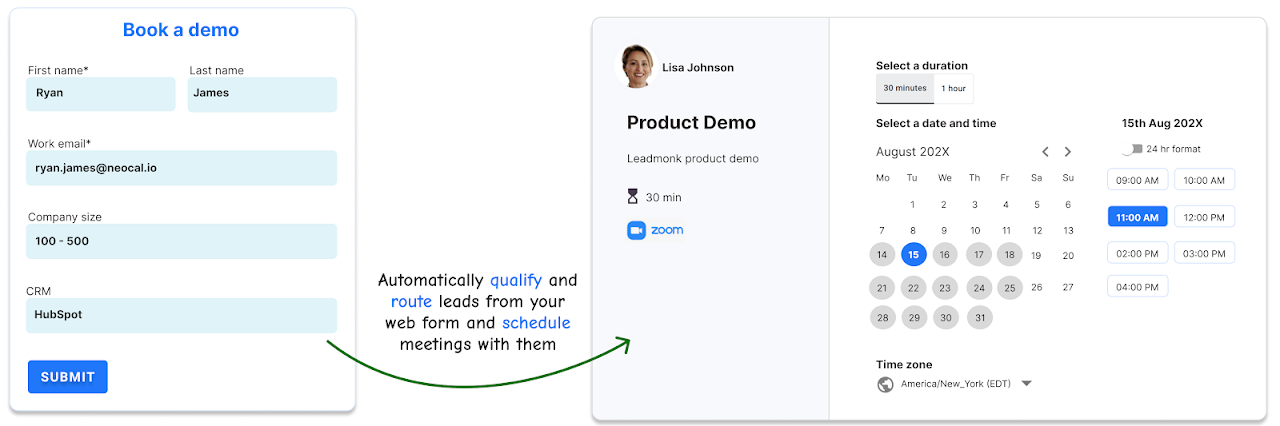
It also helps B2B revenue teams convert leads into meetings by qualifying, routing, and scheduling in real-time.

"Easy Repeat Business with Packages" - Sell multi-appointment bundles, combine different types of appointments, and even include group classes in your packages.

Give "multiple duration options" to invitees. At the time of appointment booking, the invitee can choose his/her preferred meeting duration.

Give "multiple meeting location options" to invitees. At the time of appointment booking, the invitee can choose his/her preferred location.

It integrates natively with G-Suite, Google Calendar, Google Meet, Outlook, Office365 Calendar, MS Teams, Zoom, Stripe, PayPal, HubSpot, Salesforce, Pipedrive, Zoho CRM, Marketo and other popular business apps to support your business in a wide range of prospect and customer scheduling scenarios.

When meetings are scheduled in Leadmonk, the following actions can be done in HubSpot:
a) Create contacts
b) Create and update engagements
c) Create deals
d) Update contact owner

When meetings are scheduled in Leadmonk, the following actions can be done in Salesforce:
a) Create Contacts
b) Create Leads
c) Create Account
d) Create Opportunity
e) Create and update engagements [meetings]
f) Update Contact Owner
g) Update Lead Owner

When meetings are scheduled in Leadmonk, the following actions can be done in Pipedrive:
a) Create contacts
b) Create and update engagements

🔹 Meet one-on-one or in a group or as a team (One-on-One, Group, Collective, and Round Robin). Leadmonk supports all meeting combinations.

You can have booking pages in English, Spanish, Deutsch, French, Italian, Portuguese, Dutch, Greek, Finnish, Romanian, Polish, Swedish, Russian, Korean, Arabic, Ukrainian, and Japanese languages.

Make use of workflow automation that is triggered throughout the appointment lifecycle, from the time an appointment is scheduled all the way through your follow-up with attendees.

You can customize workflow steps and email and SMS templates as per your business requirements.

It’s a versatile online meeting scheduling platform. It simplifies scheduling meetings with your prospects, customers, candidates, and other external stakeholders.

Leadmonk meets appointment booking requirements of customer-facing teams such as Sales, Marketing, Customer Success, and Freelancers/Consultants. It can also be used to manage bookings of Meeting Rooms and shared resources.

It is also suitable for industry sectors such as Educators, Coaches, Recruiters, and Professional Services companies such as Legal, Accounting, and Real Estate.

It is perfect for any person or business no matter if you are starting off or have been around for a while.

Save time on scheduling. Spend time on the things that matter.
__________________________________________________________________________
PRICING
Online Appointment Booking system for Google Workspace (Google or GSuite Calendar) -

1️⃣ Free plan: In this plan, you'll have access to basic scheduling features with unlimited one-on-one and group meeting types. Its suitable for individuals.

2️⃣ Essential Plan - $12/user/month (annual plan) - When you need team scheduling features.

3️⃣ Advanced Plan - $25/user/month (annual plan) - For teams requiring routing form, lead qualification and routing automation features.
__________________________________________________________________________
INSTALLATION
Click on the "Install" button and accept the calendar permissions to be able to use the app. Those permissions are required to add/manage appointments to your calendar and to read free/busy availability from your calendar.

Login credential protection
Leadmonk never collects passwords for Google Calendar connections. A secure OAuth connection to sync the calendar only grants LeadMonk access to your calendar account through a secure token from your email provider. This also enables you to set additional security precautions with that provider including 2-factor authentication (2FA).

User provisioning and de-provisioning
The calendar connection is removed automatically when your account is canceled/deleted. Users can also delink connected calendars within the app.

➡️ Go to https://app.leadmonk.io after installing the app.

Happy Scheduling!
Additional information
sell
PricingFree of charge with paid features
code
email
Поддръжка
lock
Декларация за поверителност
description
Общи условия
flag
Подаване на сигналFlag as inappropriate




Търсене
Изчистване на търсенето
Затваряне на търсенето
Приложения на Google
Главно меню