
Google Workspace Marketplace

MagicForm App - GPT for Forms™ | Quiz Builder
Generate Quiz with AI (ChatGPT) right inside Google Forms™ from Just Topic, Youtube Video, Website Url or PDF/Docx file.
Listing updated:March 28, 2026
Works with:
100K+


Overview
 Create quizzes, tests, and assessments in seconds using AI. Paste text, enter a
  topic, or provide a YouTube video, PDF, or webpage URL — MagicForm generates quiz
  questions instantly inside Google Forms.


  4 WAYS TO CREATE QUIZZES

  Topic to Quiz
  Enter any topic — "Photosynthesis", "World War II", "Python Programming" — and
  MagicForm generates relevant quiz questions instantly. Perfect for quick assessments
   when you already know the subject.

  YouTube to Quiz
  Paste any YouTube video URL. MagicForm automatically extracts the transcript and
  generates quiz questions from the video content. Ideal for flipped classrooms,
  training videos, lecture recordings, and online courses.

  PDF to Quiz
  Link or upload any PDF document — textbooks, research papers, policy documents,
  training manuals, compliance handbooks — and generate questions directly from the
  content. No need to read through 50-page documents to write questions manually.

  URL to Quiz
  Paste any webpage URL — Wikipedia articles, blog posts, news articles, documentation
   pages — and MagicForm scrapes the content and creates quiz questions. Great for
  current events quizzes, reading comprehension tests, and research assessments.


  QUESTION TYPES

  - Multiple Choice (MCQ) — 4 options with correct answer auto-marked
  - True/False — Simple binary questions
  - Paragraph/Short Answer — Open-ended questions for deeper assessment


  BLOOM'S TAXONOMY SUPPORT

  Generate questions at specific cognitive complexity levels:

  - Level 1 - Remember: Recall facts and basic concepts
  - Level 2 - Understand: Explain ideas and concepts
  - Level 3 - Apply: Use information in new situations
  - Level 4 - Analyze: Draw connections among ideas
  - Level 5 - Evaluate: Justify a decision or course of action
  - Level 6 - Create: Produce new or original work
  - All Levels: Mix of questions across all Bloom's levels in one quiz

  This makes MagicForm one of the only quiz generators that lets educators control the
   cognitive depth of their assessments — not just surface-level recall questions.


  FEATURES

  - Multiple AI models for fast, reliable generation with automatic fallback
  - Questions inserted directly into Google Forms with correct answers marked
  - Multiple language support
  - Adjustable number of questions
  - Character and word limits based on your plan
  - Works entirely inside Google Forms — no switching between apps
  - Generate more questions on the same topic with one click


WHO IS MAGICFORM FOR?

1. Teachers and Schools
Teachers Stop spending hours writing the same types of questions. Generate fresh question sets from your textbook chapters, lecture notes, or any teaching material.
Use Bloom's taxonomy levels to create assessments that test different thinking skills — from basic recall to critical analysis.

2. Corporate Training and HR Teams
HR & Professionals Create assessments from compliance documents, employee handbooks, and training materials.

When policies change, generate an updated test in under 2 minutes. Use PDF to Quiz to turn a 100-page policy document into a 20-question assessment instantly.

3. Online Course Creators
Turn your YouTube lectures and course PDFs into quizzes automatically. Add assessments to every module without the manual work. Use URL to Quiz to create quizzes from your published course pages.

4. Publishers and EdTech Companies
Replace outsourced assessment creation with faster in-house workflows. Generate question banks from textbook content at scale. Use different Bloom's levels to create varied difficulty across question sets.

5. Students
Create practice quizzes from your study material, textbook PDFs, lecture recordings on YouTube, or class notes. Test yourself before exams using the same content your  teacher covers.

6. Tutoring Centers and Coaching Institutes
Generate weekly practice tests from different source materials. Use Topic to Quiz for quick topic reviews and PDF to Quiz for chapter-wise assessments.

HOW IT WORKS

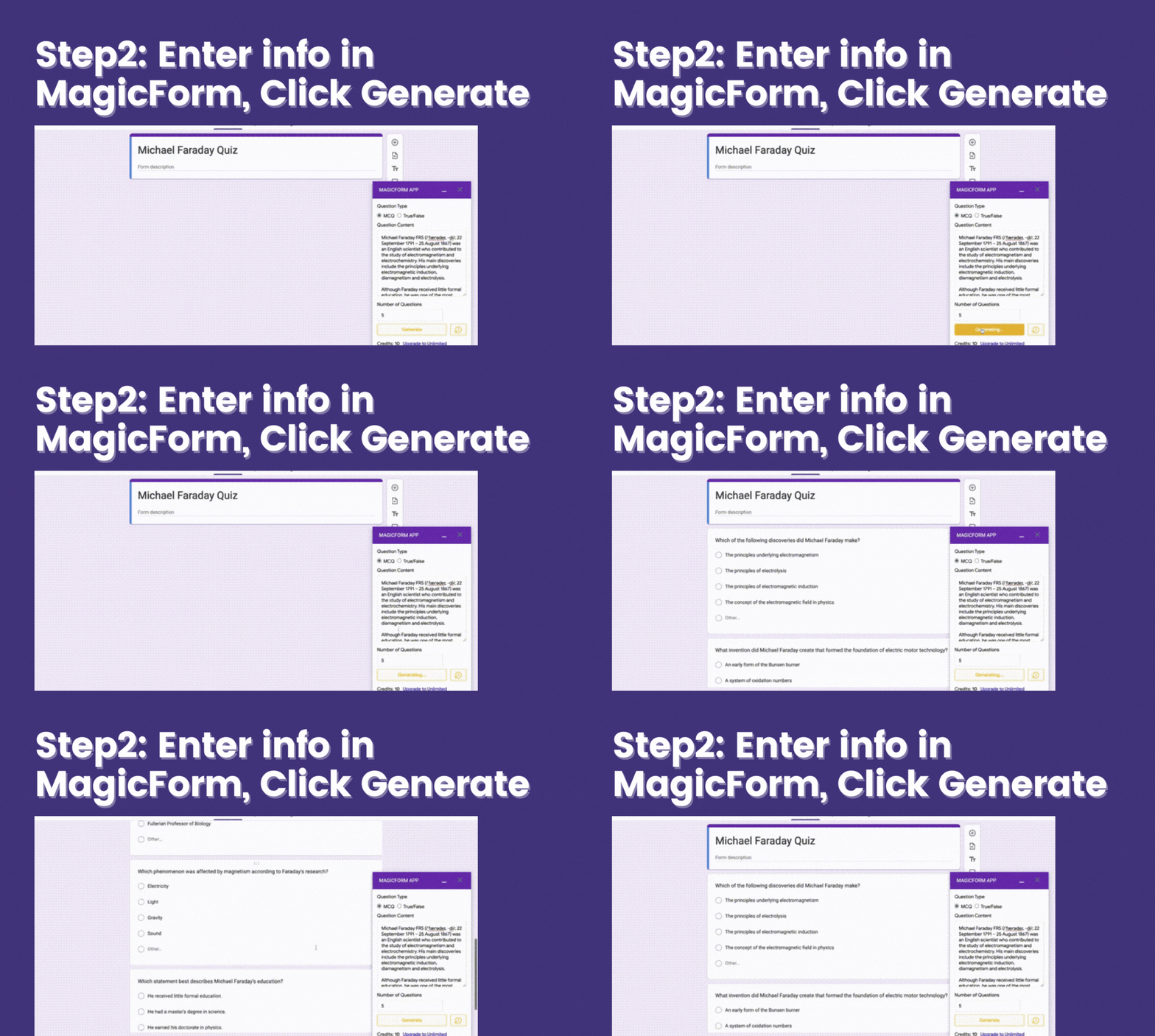
  1. Open Google Forms, click Extensions, then MagicForm
  2. Choose your source: Topic, YouTube, PDF, or URL
  3. Select question type, number of questions, difficulty level, and language
  4. Click Generate — questions appear in your Google Form with correct answers marked
  5. Publish your form and share with students or employees


USE CASES

  - Weekly classroom quizzes from textbook chapters (PDF to Quiz)
  - Video comprehension tests from YouTube lectures (YouTube to Quiz)
  - Compliance assessments from policy PDFs (PDF to Quiz)
  - Current events quizzes from news articles (URL to Quiz)
  - Interview screening tests from job descriptions (Topic to Quiz)
  - Reading comprehension tests from any webpage (URL to Quiz)
  - Practice tests from study material (PDF to Quiz / Topic to Quiz)
  - Onboarding assessments from training documents (PDF to Quiz)
  - Research paper comprehension checks (PDF to Quiz)
  - Language learning quizzes from foreign language articles (URL to Quiz)


FREE TO START

Install MagicForm and start generating quizzes immediately. No credit card required.
Free plan includes questions every month to try the full experience.


SUPPORT

Email: support@magicform.app
Website: https://www.magicform.app
Demo Video: https://youtu.be/J_S34tZd9Ao


PRIVACY

We do not access or share your data. We only store what is needed to make the extension work. See our privacy policy at https://www.magicform.app/privacy-policy


FAQ

Q: What happens after I purchase?
A: Your Google account is upgraded automatically. Follow the setup guide at magicform.app.

Q: Can someone buy a license for me?
A: Yes. Licenses are tied to the user's Gmail, not the purchaser.

Q: What does support cover?
A: Installation, licensing, and usage issues via email during your support period.

Q: Do you access my data?
A: No. We prioritize privacy and never look at or share customer data.

Q: How are users counted?
A: One user equals one Google Account. Use on any device with the same login.Additional information
sell
PricingFree of charge with paid features
code
Developer
email
Support
lock
Privacy policy
description
Terms of service
flag
ReportFlag as inappropriate



Search
Clear search
Close search
Google apps
Main menu