
Google Workspace Marketplace


Mail Merge for Gmail™ Sheets™
Mail Merge for Gmail, Sheets to send personalized bulk emails from Google Sheets™. Track opens, clicks, replies, bounces. Schedule emails, attach files, use custom fields, boost replies with ChatGPT
דף האפליקציה עודכן בתאריך:20 ביולי 2025
האפליקציה פועלת עם:

+23K


סקירה כללית
Mail Merge for Gmail, Sheets  – Send Personalized Bulk Emails using Gmail from Google Sheets™ 📩


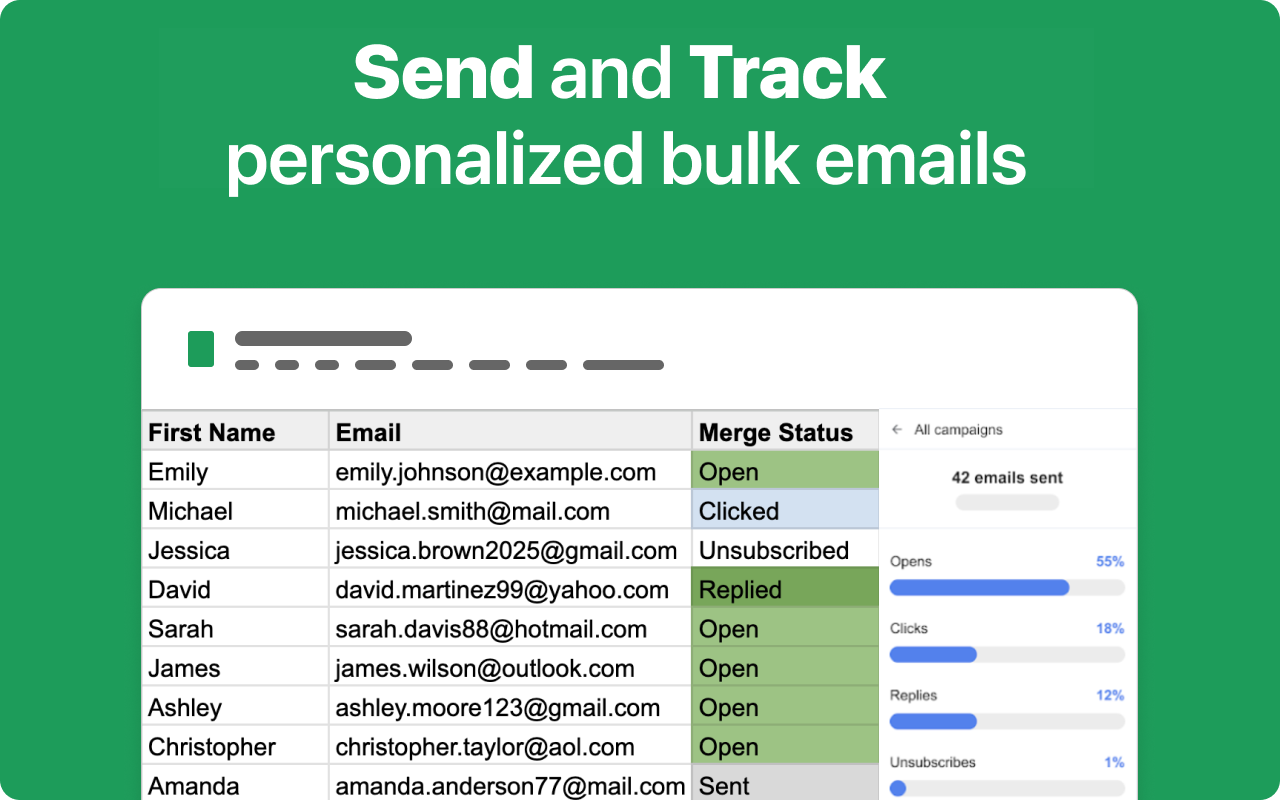
Send personalized mass emails using Gmail™ and Google Sheets™. This add-on makes it easy to launch professional email campaigns directly from your spreadsheet. Use custom fields, schedule sends, include attachments, and track opens, clicks, replies, bounces, and unsubscribes — all in real time.

No need to export data, manage third-party tools, or worry about data leaks. Your email list stays secure inside your Google Sheets™ account, and emails are sent directly through your Gmail™.

✅ Trusted. Secure. Compliant.
🔐 Your data is safe with us — our add-on has passed an independent security audit by TAS, following the Tier 2 Cloud Application Security Assessment standards.


UPDATES:
Jul 3 2025 - Add validation on  bot opening events

🌍 Fully GDPR-Compliant
We’re committed to your privacy. Our systems are built to meet EU data protection regulations, giving you peace of mind when working with customer data.

🙌 Join thousands of professionals who trust our add-on to deliver campaigns — securely and reliably.


UPDATES
20 Jun:
- Add Online Chat Support from Add-On

18 Jun:
- Add tracking unsubscribed emails

15 Jun:
- Improve UI/UX design

12 Jun:
- Improve onboarding

⸻

🚀 GETTING STARTED
	1.	Install the add-on from the Google Workspace Marketplace.
	2.	Open any Google Sheet containing your contact list.
	3.	Launch the add-on - Extensions > Mail Merge for Sheets Gmail
	4.	Create your email using a Gmail™ draft or type it directly.
	5.	Use custom fields like {{FirstName}}, {{Company}}, etc.
	6.	Send instantly or schedule for later.
	7.	Track every email’s status — opened, clicked, bounced, or replied.

⸻

🎯 USE CASES (20+ Real-World Scenarios)
	•	Sales outreach
	•	Cold email campaigns
	•	Recruiting and job offers
	•	Event invitations
	•	Internal company announcements
	•	Customer feedback requests
	•	Newsletters for clients or stakeholders
	•	Investor updates
	•	Onboarding sequences
	•	PR and press outreach
	•	Welcome emails
	•	Abandoned cart recovery
	•	Follow-up emails
	•	Webinar promotions
	•	School/university notices
	•	Freelance client updates
	•	Partner and affiliate communications
	•	User re-engagement emails
	•	B2B service promotions
	•	SaaS user onboarding
	•	Course launch announcements
	•	Volunteer or donor outreach

⸻

🛠️ MAIN BENEFITS AND FEATURES
	•	Gmail Mail Merge from Google Sheets™
	•	Send personalized bulk emails
	•	Insert unlimited custom fields (First name, Company, etc.)
	•	Use your Gmail™ drafts as templates
	•	Send as many emails as your Gmail™ account allows
	•	Schedule emails to send at the perfect time
	•	Attach personalized files (like invoices or certificates)
	•	Add CC and BCC fields per recipient
	•	Create and preview emails before sending
	•	Easy and intuitive interface for non-technical users
	•	Works with Gmail™ and Google Workspace accounts

⸻

📊 TRACKING FEATURES
	•	Real-time tracking of:
	•	Email opens
	•	Link clicks
	•	Replies
	•	Bounces
	•	Unsubscribes
	•	Visual status updates directly in Google Sheets™
	•	Simple filters to find and segment email engagement
	•	Accurate delivery insights without any external tracking servers

⸻

📤 SENDING FEATURES
	•	Use Gmail’s native delivery, not external SMTPs
	•	Respect Gmail™ send limits with automatic throttling
	•	Send now or schedule emails by date and time
	•	Automatically create Gmail™ drafts for review
	•	Send different files to each recipient (e.g., personalized attachments)
	•	Handle errors gracefully (invalid email detection, etc.)

⸻

🧠 ADVANTAGE – WHY USERS LOVE THIS ADD-ON
	•	Works inside your Google account — no new tools to learn
	•	Super fast to set up, no coding required
	•	Data never leaves your Google account
	•	Ideal for teams, freelancers, marketers, and founders
	•	Save hours compared to manual email sending
	•	Leverages Gmail™ reliability and deliverability
	•	Built-in AI personalization using ChatGPT to boost replies
	•	Simple pricing, no upsells, no hidden limits

⸻

🔒 SECURITY & PRIVACY

We take security and user privacy very seriously.
	•	We do not store, access, or transfer any of your personal data
	•	Your Google Sheets™ data stays in your Google Drive
	•	Your emails are sent directly via your Gmail™ account
	•	We do not keep copies of your email content, mailing lists, or analytics
	•	We do not store campaign data, recipient emails, or message content

Everything is processed in real time during the mail merge — nothing is saved to any external servers or databases.

⸻

✅ GDPR COMPLIANT

Yes, we are fully GDPR compliant. Since your mailing list and email content are stored in your own Google Sheets™ and Gmail™, we never collect or process personal data on our servers. This ensures compliance with data protection laws and gives you full control over your data.

No need for a Data Processing Agreement (DPA) — we don’t touch your user data at all.

⸻

This add-on is the most secure, scalable, and user-friendly Gmail™ mail merge solution on the Google Workspace Marketplace. Whether you’re a solopreneur or running a large team, you’ll love how fast and simple it is to send personalized, trackable emails — with zero risk to your data.

Alternatives to Mailmeteor, Gmass for Gmail™, Yet Another Mail Merge, yamm, Quicklution, Email marketing by Scriptit, Sheetgo, Jivrus Technologies,  mail track, make.com, zapier.com, ahref, Talarian (talarian.io), Sheets Magic, GPT for Work (gptforwork.com), awesome table, Copy.AI, Anyword, Frase.io, Scalenut, Grammarly Business, Writesonic, Jasper, Rytr, Pepper Content, sheetgpt.ai, sheetai.app


👍 Try also:
GPT, Gemini, Claude AI for Sheets™ : https://docgpt.ai/gpt-for-sheets/
Google Doc AI: https://docgpt.ai/google-doc-ai/
GPT Quiz Generation in Google Forms™ : https://docgpt.ai/quiz-maker-ai/
Google Slides™ AI: https://docgpt.ai/google-slide-ai/מידע נוסף
sell
תמחורבחינם עם תכונות בתשלום
code
מפתח
email
lock
מדיניות הפרטיות
description
תנאים והגבלות
flag
דיווחסימון כבלתי הולמת






חיפוש
ניקוי החיפוש
סגירת החיפוש
אפליקציות Google
התפריט הראשי