
Google Workspace Marketplace


Mail Merge - With Auto Formatting
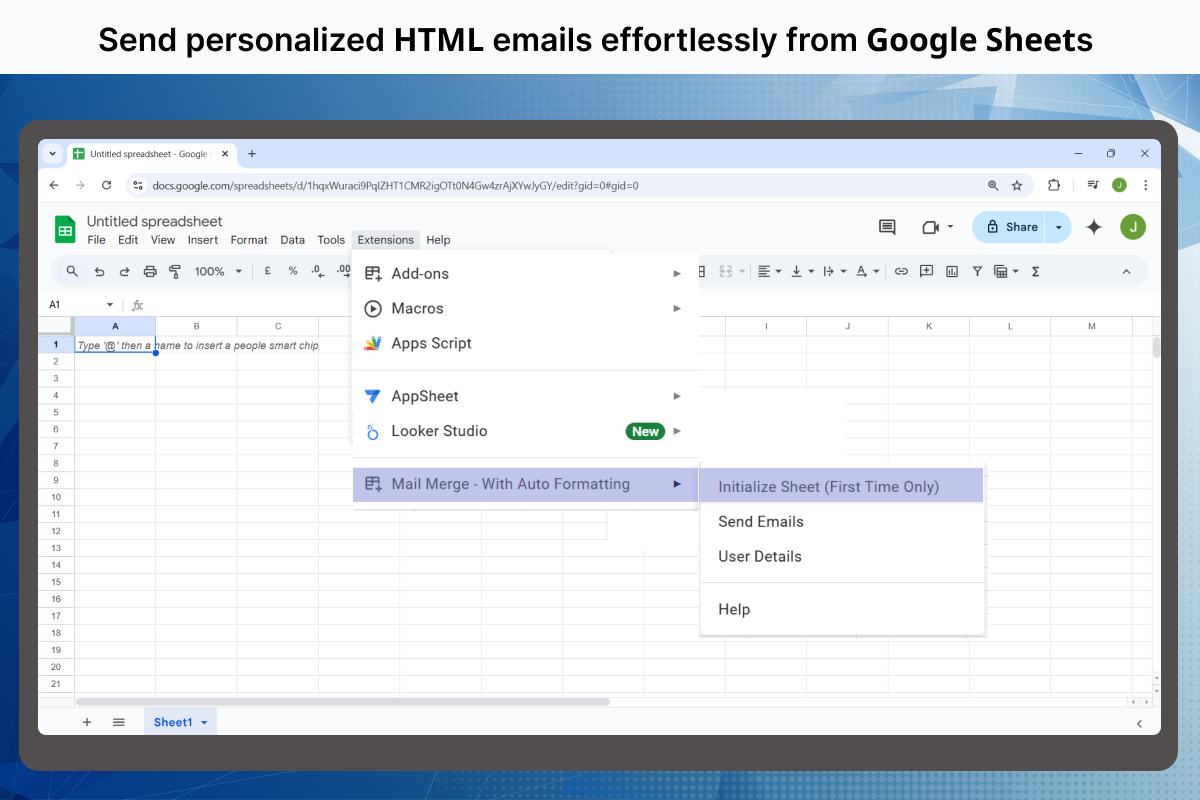
Send HTML emails from google spreadsheet. The formatting for the email is picked up from google doc file.
Listing updated:৩০ আগস্ট, ২০২৫
Works with:
১৪ হা+


এক নজরে
✔️ Completely Free ✔️ No Registration Needed ✔️ Ad-Free & Unbranded ✔️ Fully Web-Based ✔️ Perfect for Marketing Campaigns

Easily send personalized bulk emails directly from Gmail™ using Google Sheets 𝗠𝗮𝗶𝗹 𝗠𝗲𝗿𝗴𝗲. Our intuitive tool makes it simple to create professional campaigns, automate follow-ups, and ensure messages land in the primary inbox for maximum engagement.

✨ 𝗙𝗲𝗮𝘁𝘂𝗿𝗲𝘀 𝗧𝗵𝗮𝘁 𝗠𝗮𝗸𝗲 𝗨𝘀 𝗦𝘁𝗮𝗻𝗱 𝗢𝘂𝘁

Personalized Campaigns – Use Gmail™ drafts with placeholders (e.g., {{First Name}}) to send tailored emails, complete with attachments, images, and professional signatures.

Real-Time Tracking – Monitor opens, clicks, replies, bounces, and unsubscribes—right inside Google Sheets Mail Merge.

Seamless Automation – Automate follow-ups for Google Forms™ responses or schedule campaigns in advance.

Flexible File Integration – Generate personalized documents, certificates, and letters directly in Google Docs™.

🌍 𝗗𝗲𝘀𝗶𝗴𝗻𝗲𝗱 𝗳𝗼𝗿 𝗘𝘃𝗲𝗿𝘆𝗼𝗻𝗲

Education & Nonprofits – Share announcements, communicate with students, or manage fundraising campaigns.

Sales & Marketing – Drive lead generation, send PR pitches, and launch targeted cold-email outreach with mail merge from Google Sheets.

Event Management – Send personalized invitations, RSVP requests, and automated follow-ups for webinars, workshops, and conferences.

Custom Use Cases – From job applications to payment reminders or festive greetings, this mail merge for Google Sheets adapts to any workflow.

💡 𝗪𝗵𝘆 𝗖𝗵𝗼𝗼𝘀𝗲 𝗢𝘂𝗿 𝗚𝗼𝗼𝗴𝗹𝗲 𝗪𝗼𝗿𝗸𝘀𝗽𝗮𝗰𝗲 𝗠𝗮𝗶𝗹 𝗠𝗲𝗿𝗴𝗲?

Ad-Free Experience – 100% free of ads, watermarks, or branding.

Advanced Functionality – Add HTML email templates, QR codes, barcodes, images, and file attachments effortlessly.

Dedicated Support – Get quick, human support whenever you need it—always free.

🚀 𝗛𝗼𝘄 𝘁𝗼 𝗚𝗲𝘁 𝗦𝘁𝗮𝗿𝘁𝗲𝗱

Write your Gmail™ draft using placeholders like {{First Name}}.

Prepare your contact list in Google Sheets.

Launch the add-on, test your email, and hit send.

Track results in real-time and optimize campaigns directly from your spreadsheet.

Unlock the full power of Gmail™ and Google Workspace™ with the most reliable Google Sheets Mail Merge solution. Save time, simplify communication, and scale your reach effortlessly.
Additional information
sell
Pricingফ্রি
code
Developer
নন-ট্রেডার
email
সমর্থন
lock
গোপনীয়তা নীতি
description
পরিষেবার শর্তাদি
flag
রিপোর্ট করুনFlag as inappropriate





সার্চ করুন
সার্চ মুছুন
সার্চ বন্ধ করুন
Google অ্যাপ্লিকেশানগুলি
প্রধান মেনু