
Google Workspace Marketplace


MathFlow - LaTeX Math Equations Editor
Keyboard-first smart latex math equations editor. Easily create Math equations, Chemical structures & reactions, Mermaid diagrams. Insert symbols, change colors, fonts, AI integration, more
Listing updated:16 Σεπτεμβρίου 2026
Works with:



506 χιλ.+


Επισκόπηση
MathFlow is a keyboard-first, smart latex math equations editor to create math equations, chemical structures & reactions, Mermaid diagrams visually (+ markdown editor).

You can also ask integrated AI to create/modify math, chemistry, Mermaid diagram content (optional upgrade, no additional signup is needed to use all free features).

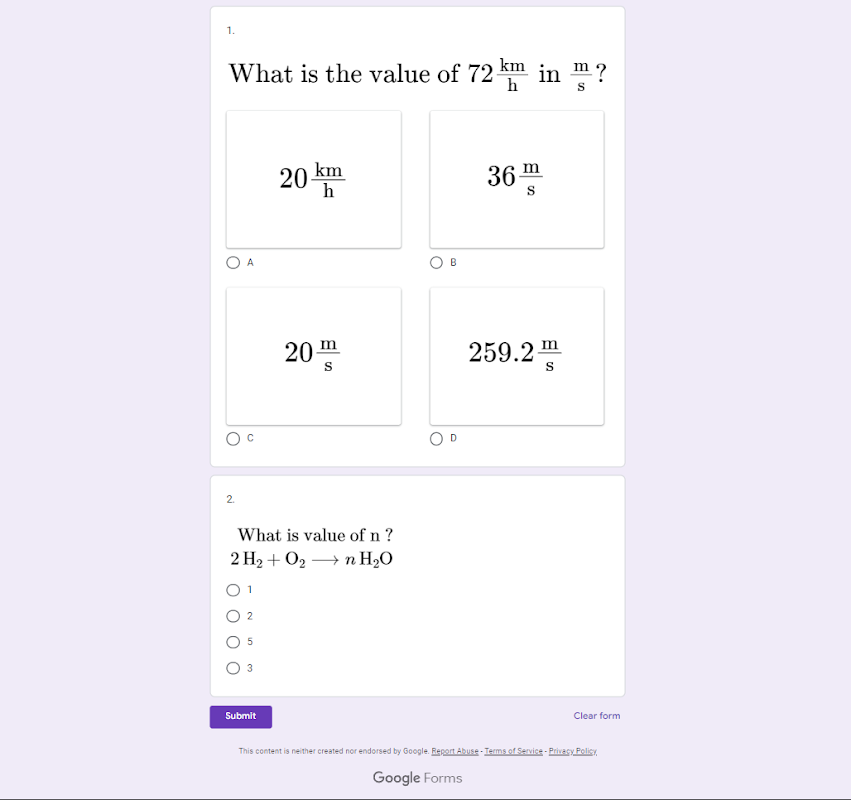
It renderes high-quality image output which you can use in your Docs, Slides, Sheets & Forms.

A quick overview of 𝘾𝙧𝙚𝙖𝙩𝙚 > 𝙍𝙚𝙣𝙙𝙚𝙧 > 𝙀𝙙𝙞𝙩 > 𝙄𝙣𝙨𝙚𝙧𝙩 > 𝘿𝙚-𝙧𝙚𝙣𝙙𝙚𝙧:

CREATE
¯¯¯¯¯¯¯¯¯
・𝗠𝗮𝘁𝗵𝗳𝗶𝗲𝗹𝗱 : Visual equations editor for maths and chemistry.
・Use \𝙘𝙤𝙢𝙢𝙖𝙣𝙙 directly in the Mathfield to insert symbols, operators, functions, execute latex commands, and more.

・𝘾𝙪𝙨𝙩𝙤𝙢𝙞𝙨𝙚 font, text color, background color, border, accents, decorators, and more.
・Use the advanced 𝗠𝗮𝘁𝗵 𝘃𝗶𝗿𝘁𝘂𝗮𝗹 𝗸𝗲𝘆𝗯𝗼𝗮𝗿𝗱 to insert operators, functions, symbols, and more.

・𝗠𝗮𝗿𝗸𝗱𝗼𝘄𝗻 𝗲𝗱𝗶𝘁𝗼𝗿
・Use markdown editor to write pure LaTeX, markdown with LaTeX, SMILES notation (2D Chemical structure), & Mermaid diagrams.

RENDER
¯¯¯¯¯¯¯¯¯
・Click "Render All" button to render the LaTeX  to math in docs.


EDIT
¯¯¯¯¯¯¯¯¯
・Select a rendered equation in docs/slides, click "Edit selection" to edit it.


INSERT
¯¯¯¯¯¯¯¯¯
・Click "Insert" button to insert/update the rendered equation in doc/slides.

DE-RENDER
¯¯¯¯¯¯¯¯¯
・Use "De-render All" to de-render all the images back to latex in docs.

EXPORT or BACKUP
¯¯¯¯¯¯¯¯¯¯¯¯¯¯¯¯¯¯¯¯
・In the history panel, you have the option to export all your render history data.
・Exported data contains the LaTeX and some associated information for each render in a JSON file.
・You can share this file with your students or colleagues.


IMPORT or RESTORE
¯¯¯¯¯¯¯¯¯¯¯¯¯¯¯¯¯¯¯¯¯
・The exported json data file can be imported through the history panel.
・Once imported, you can open any item in the editor to edit, evaluate, customize, and render as needed.

Currenly works with Docs, Slides, Sheets, and Forms.

PERMISSIONS
¯¯¯¯¯¯¯¯¯¯¯¯¯¯¯
- Display and run third-party web content in prompts and sidebars inside Google applications.
- Temporary access to the currently open document's content.
- Temporary access to the currently open slide's content.

If you are unable to install the add-on, you may have multiple google accounts logged-in in your browser. Create a new chrome profile with the account you want to install the add-on in. Then install the add-on and after that you may delete that chrome profile, now you should be able to use the add-on from your main profile.
Additional information
sell
PricingFree of charge with paid features
code
Developer
Μη έμπορος
email
Υποστήριξη
lock
Πολιτική απορρήτου
description
Όροι παροχής υπηρεσιών
flag
ΑναφοράFlag as inappropriate



Αναζήτηση
Διαγραφή αναζητήσεων
Κλείσιμο αναζήτησης
Εφαρμογές google
Κύριο μενού