Collaborative mind mapping, integrates with Google Drive™ and Google Workspace™
Listing updated:May 28, 2026
Works with:

10M+
Overview
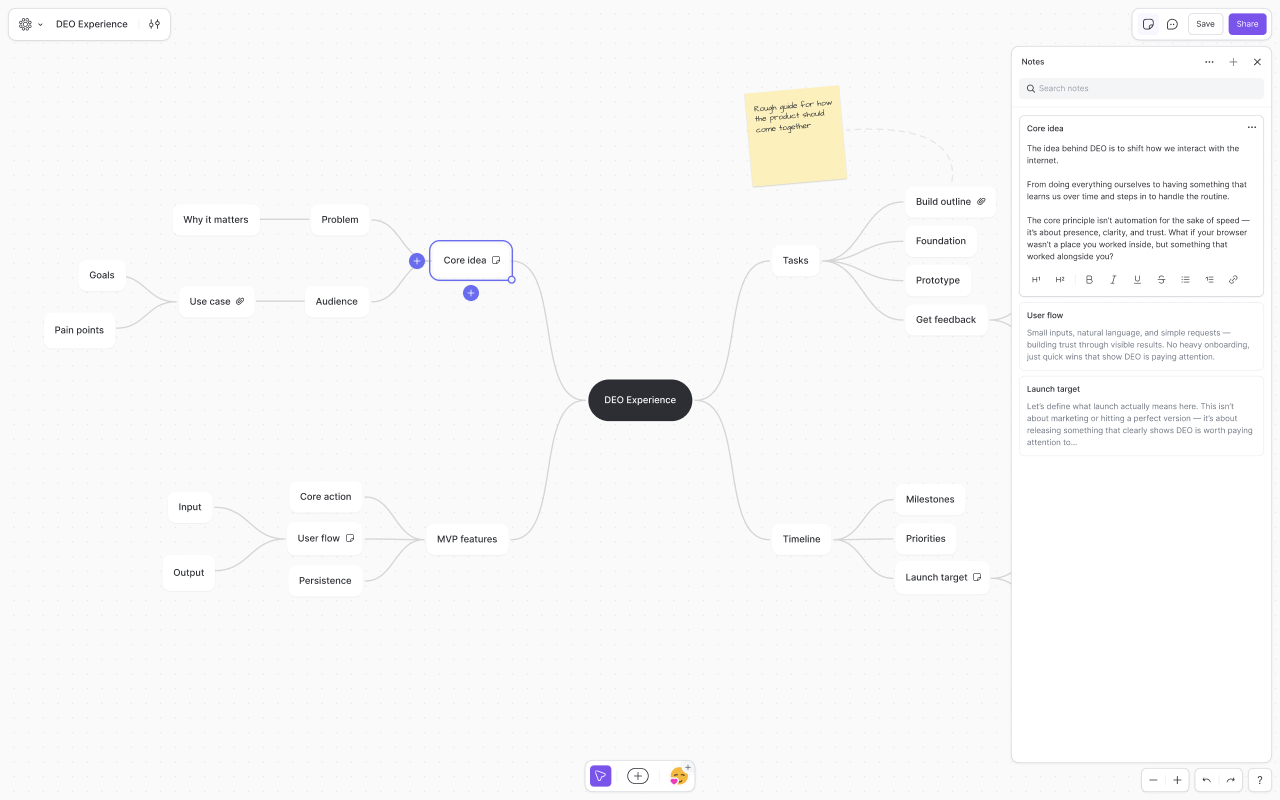
Mindmup is a fast, collaborative, zero-friction mind mapping app built for brainstorming, planning, and organizing ideas visually.

Mindmup for Google Drive™ requires an active Mindmup Starter, Team, or Organization subscription. Monthly and annual plans are available. Learn more at mindmup.com/pricing.

The new generation of Mindmup brings a redesigned experience with deeper Google Drive™ integration, and a cleaner, more intuitive interface designed to stay out of your way.

Highlights:

- Seamless Google Drive™ integration with support for familiar Drive workflows
- Lightweight, distraction-free interface focused on speed and simplicity
- Support for multiple Google™ accounts at the same time
- Drive previews for easier sharing and discovery
- Attach Google Drive™ files and images directly to map nodes
- Flexible layouts, themes, styling, and productivity features
- Easy publishing, exporting, and embedding
- Works instantly in the browser with no software installation required

“If you are looking to create a mind-map online, Mindmup is the app I would recommend the most. Mindmup is the sort of app everyone dreams of finding online.” – MakeUseOf

“Mindmup is super-simple, lightweight, and generally a joy to use.” – PC World

“What I like about Mindmup is that it is clean and simple. It allows for frictionless capture of ideas and projects. The UI stays out of your way and lets you get your ideas out.” – Time Management Ninja

“If you like to plan and brainstorm by creating mind maps to link together ideas, Mindmup is a great browser-based program that helps you get organized.” – LifeHacker

Google Drive™ and Google™ are trademarks of Google LLC.
Additional information
PricingPaid
Developer
Privacy policy
Terms of service
Mindmup will ask for the permissions shown below. Learn more
Mindmup will need access to your Google account
This will allow Mindmup to :
See, edit, create, and delete only the specific Google Drive files you use with this app
Connect itself to your Google Drive
See your primary Google Account email address
See your personal info, including any personal info you've made publicly available
Reviews
Language:
Sort by:
Google doesn't verify reviews or ratings. Learn more about reviews
Profile Picture
Tom S
June 2, 2026
I have loved and used this app for years. Then, suddenly, I lost access to all my old mindup files and have to subscribe to an 'upgrade' that I never wanted. Why wasn't I warned of this sudden change to come? (A simple message on the maps I use daily would have worked!!). To suddenly remove access, without giving users an option to migrate, export etc is frankly terrible behavior. This company has destroyed all the praise and brand value I had for it overnight. Apparently they announced changes on their website in their news section - do they really think that every user is going to check regularly their news section? It's up to them to push the messaging to users (such as a message as users read their maps!). Anything else is appalling. Shame on you!!
Is this review helpful?
Yes
No
Profile Picture
Kate Kim
February 4, 2025
Lost all my work. Maps are blank. Seems to be a common issue.
Is this review helpful?
Yes
No
Profile Picture
Rex Koontz
April 24, 2024
I have been using MindMup on Google Drive for years. Has only gotten better and is still free. For people in academia, check out the Argument Visualization feature, which I only found recently and have found helpful for mapping argument elements.
Is this review helpful?
Yes
No
Profile Picture
Yayat Suswandar
January 6, 2025
ok
Is this review helpful?
Yes
No
Profile Picture
A User of Mindmup
June 30, 2020
It is quite user friendly for starters, and can be used to quickly make some mindmaps. However, the "share" option is often broken, and collaboration is quite hard. It has quite poor customizability though, and the layout of the nodes becomes annoying and gets in the way of some bigger projects, which decreases its readability as well.
Is this review helpful?
Yes
No
Profile Picture
Samreen Tariq/SH/BGTL
March 10, 2021
It is really user friendly and a great tool in my drive. Being a manager I need to collaborate and have quick catch up meetings at times .It easy to take notes and save them as a mind map to get back to.
Is this review helpful?
Yes
No
Profile Picture
A User of Mindmup
February 20, 2017
I've been using this tool for about 2 years now. Over the last two days it has failed to save literally HOURS of work I've done. Twice it completely reverted back to an earlier version of the file I'd saved, totally wiping out MASSIVE amounts of effort. I have absolutely no choice to completely relinquish any sense of reliability with this tool. Sad, sad situation for me. I'm incredibly disappointed.
Is this review helpful?
Yes
No
Profile Picture
A User of Mindmup
April 28, 2020
I'm a paying customer. I am happy with the basic functionality. However it allows saving to google drive, and when it does so, it does NOT do this with autosave on. Nor does it provide a highly visible user warning. The devs said they do this to enable collaboration due to some technical issue on google drive. Bottom line is it lets you create large docs which are not saved, and you will not notice. I have just lost a significant amount of work once again due to this. I can't afford to use a tool which doesn't prioritize saving of user-entered data. I can not recommend this app due to this one showstopper behavior.
Is this review helpful?
Yes
No
Profile Picture
A User of Mindmup
May 6, 2020
I have been using this product for 2 years at school and work. I find it very easy to use and intuitive, especially when you learn the shortcut keys. I suggest making shortcuts more prominent. Especially for one of the most useful functions - copying an entire branch and pasting it into a doc so that it appears as a bulleted list. This isn't listed at all. I use this to store notes, articles (embedded links work really well), screenshots and free form ideas. If you don't like clutter, you can contract a branch to make it cleaner. I find the autosave features works really well and use that for all my mindmaps. I have recommended it to many people, but it seems to work best for people who are visual learners. Suggested Improvements: 1) make connecting nodes from other branches nicer/cleaner - it's currently clunky 2) fix the requirement to authenticate your account repeatedly
Is this review helpful?
Yes
No
Profile Picture
A User of Mindmup
November 26, 2016
We are starting to use it for teaching / learning at our university med school program. MindMup has many features we like such as fast, affordable for large groups with generous annual publishing license that lets you share read only ver. of maps with anyone anywhere in world. We also like cooperative real time editing, colored nodes, themes, and way it works so well with Google docs. The export options are many, and powerful. Generally, fast, easy to use, easy to learn, easy to share with professional responsible developers. Very well done! This is a definite best choice for K-12 and college/universities on tight budgets. Some things we'd love to see added in upcoming versions that our staff / students really need: 1. Ability to add text notes to Lines connecting nodes 2. Ability to easily add "cross-link lines" (also with text explanations) between nodes
Is this review helpful?
Yes
No
1-10 of 175
Search
Clear search
Close search
Google apps
Main menu