
Google Workspace Marketplace


MoneyPatrol
Fetch transactions and balances data from your MoneyPatrol account directly into a Google Sheet™.
बनाने वाली कंपनी:
लिस्टिंग को पिछली बार अपडेट किया गया:16 सितंबर 2025
इनके साथ काम करता है:
114
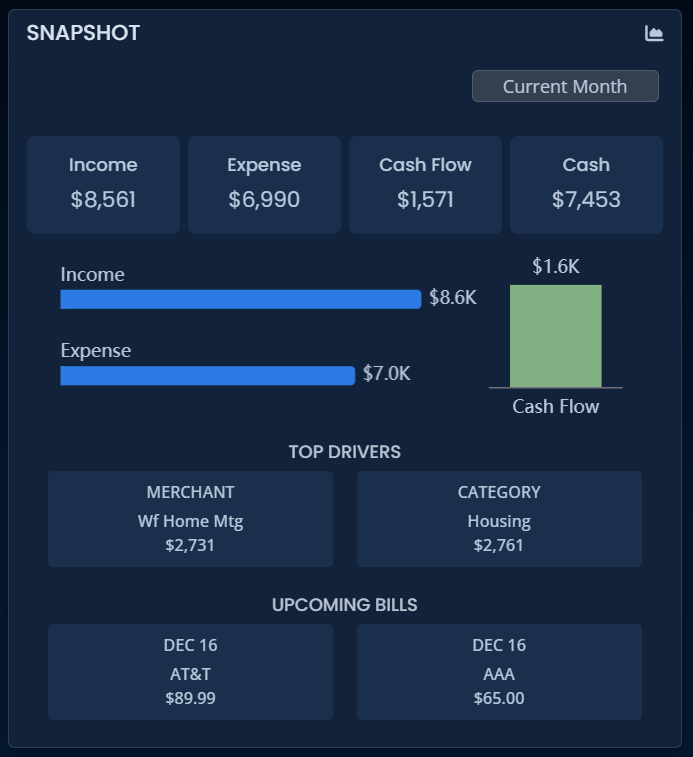
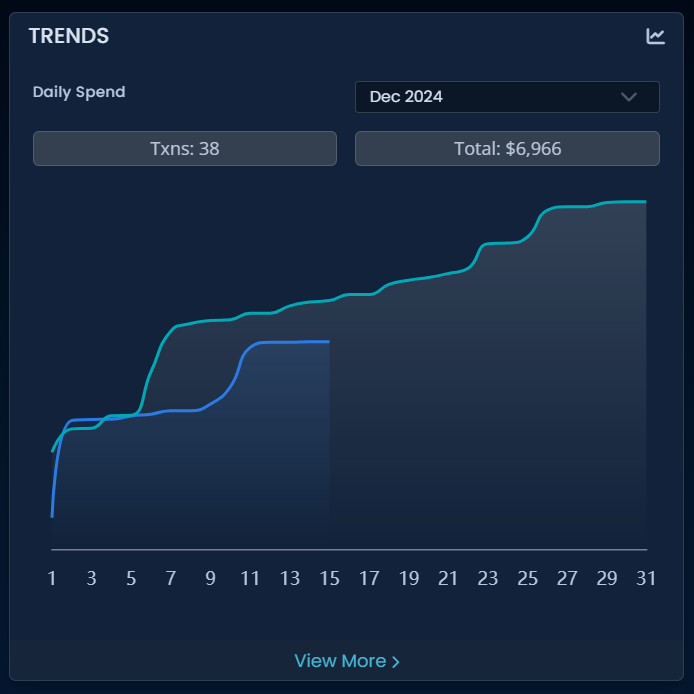


अवलोकन
MoneyPatrol – Smart Expense & Budget Tracking for Google Sheets™

Manage your finances effortlessly with MoneyPatrol, a powerful Google Sheets™ add-on designed to help you track expenses, manage budgets, and gain valuable financial insights—all within your spreadsheets. Whether you're an individual looking to monitor personal finances or a business managing expenses, MoneyPatrol makes financial tracking simple, automated, and insightful.

🔹 Why Choose MoneyPatrol?
MoneyPatrol enhances your Google Sheets™ experience by seamlessly integrating with your financial data, automating expense tracking, and providing in-depth reports. No more manual data entry—just clear, real-time insights into your spending and savings.

🚀 Key Features & Benefits

✅ Automated Expense Tracking
- Import transactions from multiple bank accounts, credit cards, and financial institutions.
- Automatically categorize expenses to see where your money is going.
- Save time by reducing manual data entry and improving accuracy.

✅ Customizable Budgeting
- Set up personalized budgets for different spending categories.
- Monitor your progress and adjust budgets as needed.
- Get real-time alerts when approaching or exceeding your budget limits.

✅ Detailed Financial Reports & Insights
- Generate interactive reports with charts and graphs for clear financial visualization.
- Analyze income vs. expenses to identify spending patterns.
- Gain insights into saving opportunities and track financial goals.

✅ Bank & Financial Account Integration
- Sync your bank and credit card transactions securely.
- Stay updated with real-time financial data without switching apps.
- Easily reconcile transactions and avoid financial discrepancies.

✅ Smart Alerts & Notifications
- Get alerts for unusual transactions, bill payments, and budget thresholds.
- Stay informed about upcoming expenses and financial changes.
- Never miss a payment or exceed your budget again.

✅ Seamless Google Sheets™ Integration
- Easily manage your financial data within Google Sheets™.
- Customize spreadsheets with formulas, filters, and sorting options.
- Collaborate with team members or family members in real time.

🎯 Who Can Use MoneyPatrol?

Individuals & Families – Keep track of personal finances, household budgets, and savings.
Freelancers & Entrepreneurs – Monitor business expenses and manage cash flow.
Small Businesses – Simplify financial tracking and reporting for better financial planning.

📌 Get Started Today!
1️⃣ Install the MoneyPatrol add-on in Google Sheets™.
2️⃣ Connect your financial accounts.
3️⃣ Start tracking, budgeting, and analyzing your finances effortlessly!

💡 Take control of your financial future with MoneyPatrol—your personal finance assistant in Google Sheets™! 🚀
अतिरिक्त जानकारी
sell
कीमतबिना किसी शुल्क के
code
डेवलपर
व्यापारी नहीं है
email
सहायता
lock
निजता नीति
description
सेवा की शर्तें
flag
शिकायत करेंआपत्तिजनक ऐप्लिकेशन की शिकायत करें




खोजें
खोज हटाएं
खोज बंद करें
Google ऐप
मुख्य मेन्यू