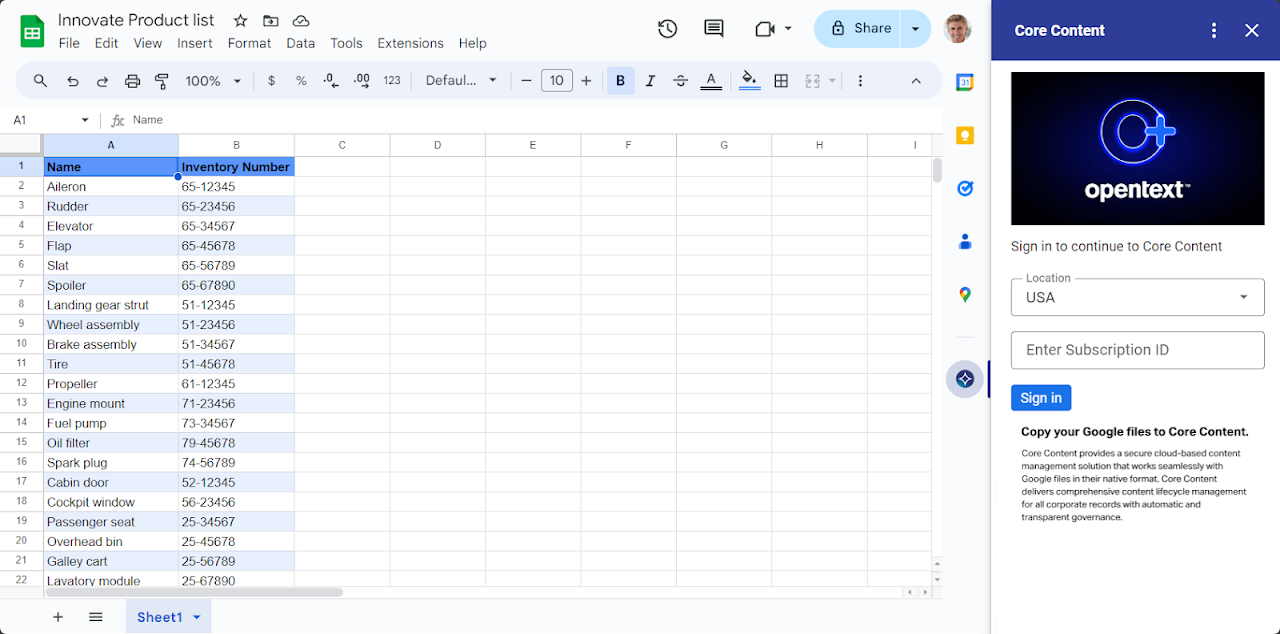
This add-on lets you copy your Google files directly into Core Content.
ืžืืช:
ื“ืฃ ื”ืืคืœื™ืงืฆื™ื” ืขื•ื“ื›ืŸ ื‘ืชืืจื™ืš:10 ื‘ืคื‘ืจื•ืืจ 2025
ื”ืืคืœื™ืงืฆื™ื” ืคื•ืขืœืช ืขื:
ืื™ืŸ ื‘ื™ืงื•ืจื•ืช
496
ืกืงื™ืจื” ื›ืœืœื™ืช
OpenTextโ„ข Core Content is a fast-deploying SaaS content management solution that delivers simple, agile and secure cloud-based content management. It integrates into crucial business process applications, including SAPยฎ S/4HANA Public Cloud, Salesforceยฎ, Google Workspaceโ„ข, and Microsoftยฎ 365 to maximize employee productivity, accelerate business processes and enhance governance.

OpenText together with Google, help organizations accelerate their journey to the cloud, reduce operational costs, and increase compliance, security and scalability, with Core Content on Google Cloudโ„ข, under a single service-level-agreement (SLA). 

With the Core Content add-on, files you have opened in Google Docsโ„ข, Google Sheetsโ„ข or Google Slidesโ„ข can be copied into Core Content.

Useful links:

Core Content product overview: https://www.opentext.com/assets/documents/en-US/pdf/opentext-so-core-en.pdf
Core Content introduction video: https://opentext.hubs.vidyard.com/watch/KiTNDYmQGt5NFShskQ9dcC
ืžื™ื“ืข ื ื•ืกืฃ
ืชืžื—ื•ืจื‘ื—ื™ื ื
ืžืคืชื—
ืžื“ื™ื ื™ื•ืช ื”ืคืจื˜ื™ื•ืช
ืชื ืื™ื ื•ื”ื’ื‘ืœื•ืช
ื”ืืคืœื™ืงืฆื™ื” OpenText Core Content Management ืชื‘ืงืฉ ืœืงื‘ืœ ืืช ื”ื”ืจืฉืื•ืช ืฉืžืคื•ืจื˜ื•ืช ืœืžื˜ื”. ืžื™ื“ืข ื ื•ืกืฃ
ื”ืืคืœื™ืงืฆื™ื” OpenText Core Content Management ืชืฆื˜ืจืš ื’ื™ืฉื” ืœื—ืฉื‘ื•ืŸ Google ืฉืœืš
ืคืขื•ืœื” ื–ื• ืชืืคืฉืจ ืœืืคืœื™ืงืฆื™ื” OpenText Core Content Management ืœื‘ืฆืข ืืช ื”ืคืขื•ืœื•ืช ื”ื‘ืื•ืช:
ื”ืฆื’ื”, ืขืจื™ื›ื”, ื™ืฆื™ืจื” ื•ืžื—ื™ืงื” ืฉืœ ื›ืœ ื”ืžืกืžื›ื™ื ืฉืœืš ื‘-Google Docs
ื”ืฆื’ื” ื•ื ื™ื”ื•ืœ ืฉืœ ืžืกืžื›ื™ื ืฉื‘ื”ื ื”ื™ื™ืฉื•ื ื”ื–ื” ืžื•ืชืงืŸ
ื”ืฆื’ืช ื ืชื•ื ื™ื ื‘ืกื™ืกื™ื™ื ืœื’ื‘ื™ ืงื‘ืฆื™ื ืื• ืชื™ืงื™ื•ืช ืฉื™ื™ื‘ื—ืจื• ืขืœ ื™ื“ืš ื‘-Google Drive
ื”ืฆื’ื”, ืขืจื™ื›ื”, ื™ืฆื™ืจื” ื•ืžื—ื™ืงื” ืฉืœ ื›ืœ ื”ืžืฆื’ื•ืช ืฉืœืš ื‘-Google Slides
ื”ืฆื’ื” ื•ื ื™ื”ื•ืœ ืฉืœ ื”ืžืฆื’ื•ืช ื‘-Google Slides ืฉื”ื™ื™ืฉื•ื ื”ื–ื” ืžื•ืชืงืŸ ื‘ื”ืŸ
ื”ืฆื’ื”, ืขืจื™ื›ื”, ื™ืฆื™ืจื” ื•ืžื—ื™ืงื” ืฉืœ ื›ืœ ื”ื’ื™ืœื™ื•ื ื•ืช ื”ืืœืงื˜ืจื•ื ื™ื™ื ืฉืœืš ื‘-Google Sheets
ื”ืฆื’ื” ื•ื ื™ื”ื•ืœ ืฉืœ ื’ื™ืœื™ื•ื ื•ืช ืืœืงื˜ืจื•ื ื™ื™ื ืฉื‘ื”ื ื”ื™ื™ืฉื•ื ื”ื–ื” ืžื•ืชืงืŸ
ื”ืจืฆื” ื‘ืชื•ืจ ืชื•ืกืฃ ืœ-Gmail
ื”ืฆื’ื” ื•ื”ืจืฆื” ืฉืœ ืชื›ื ื™ ืื™ื ื˜ืจื ื˜ ืฉืœ ืฆื“ ืฉืœื™ืฉื™ ื‘ื”ื•ื“ืขื•ืช ื•ื‘ืกืจื’ืœื™ ืฆื“ ืฉืžื•ืฆื’ื™ื ื‘ืืคืœื™ืงืฆื™ื•ืช ืฉืœ Google
ื”ืชื—ื‘ืจ ืœืฉื™ืจื•ืช ื—ื™ืฆื•ื ื™
ื”ืฆื’ืช ื”ืžื“ื™ื ื”, ื”ืฉืคื” ื•ืื–ื•ืจ ื”ื–ืžืŸ
ื”ืฆื’ืช ื›ืชื•ื‘ืช ื”ืื™ืžื™ื™ืœ ื”ืจืืฉื™ืช ื”ืžืฉื•ื™ื›ืช ืœื—ืฉื‘ื•ืŸ Google ืฉืœืš
ื”ืฆื’ืช ื”ืžื™ื“ืข ื”ืื™ืฉื™ ืฉืœืš, ื›ื•ืœืœ ืžื™ื“ืข ืื™ืฉื™ ืฉื”ื’ื“ืจืช ื›ืš ืฉื™ื”ื™ื” ื’ืœื•ื™ ืœื›ื•ืœื
ื‘ื™ืงื•ืจื•ืช
ืฉืคื”:
ืžื™ื•ืŸ ืœืคื™:
ื‘-Google ืœื ืžืืžืชื™ื ื‘ื™ืงื•ืจื•ืช ืื• ื“ื™ืจื•ื’ื™ื. ืžื™ื“ืข ื ื•ืกืฃ ืขืœ ื‘ื™ืงื•ืจื•ืช
ืื™ืŸ ืชื’ื•ื‘ื•ืช
ื—ื™ืคื•ืฉ
ื ื™ืงื•ื™ ื”ื—ื™ืคื•ืฉ
ืกื’ื™ืจืช ื”ื—ื™ืคื•ืฉ
ืืคืœื™ืงืฆื™ื•ืช Google
ื”ืชืคืจื™ื˜ ื”ืจืืฉื™