
Google Workspace Marketplace


Page Break Tools
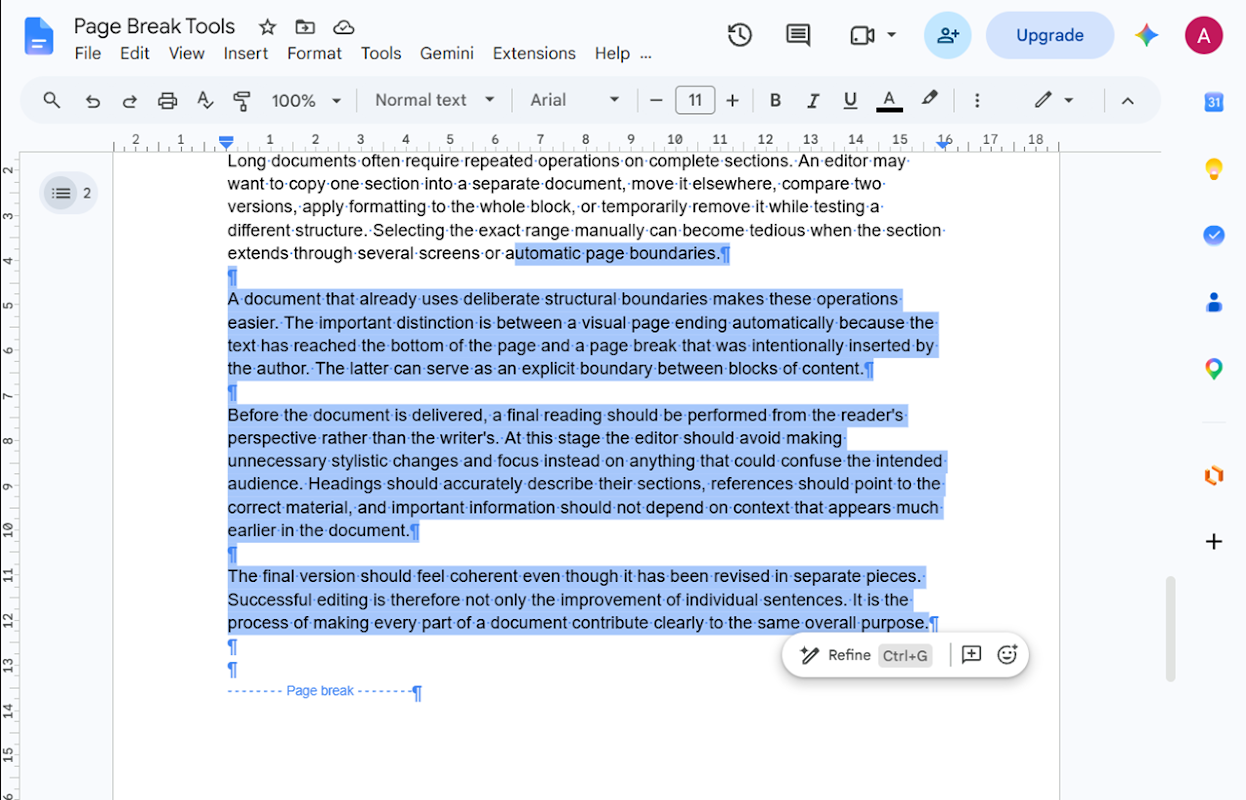
Select content around manual page breaks in Google Docs™: back to the previous break, between breaks, or up to the next break.
Zápis aktualizován:24. září 2026
Podporuje:
Žádné recenze
2


Přehled
Page Break Tools is an add-on for Google Docs™ for selecting content around manually inserted page breaks.

It provides three focused commands:

• Select Content Back to Previous Page Break
• Select Content Between Page Breaks
• Select Content Up to Next Page Break

Place the cursor inside the document and choose the command you need from Extensions → Page Break Tools.

Page Break Tools works with manually inserted page breaks in Google Docs™. It does not treat the normal visual end of a page as a page-break delimiter.

The add-on is designed to work only with the active Google Docs™ document and to request the minimum document access required for its selection features.

No separate Page Break Tools account is required.

Google Docs™ is a trademark of Google LLC.
Další informace
sell
CenyBez dalších poplatků
code
email
Podpora
lock
Zásady ochrany soukromí
description
Smluvní podmínky
flag
NahlásitNahlásit jako nevhodné


Vyhledávání
Vymazat vyhledávání
Zavřít vyhledávání
Aplikace Google
Hlavní nabídka