
Google Workspace Marketplace


Page Break Tools
Select content around manual page breaks in Google Docs™: back to the previous break, between breaks, or up to the next break.
Kehittäjä:
Tiedot päivitetty:24. syyskuuta 2026
Yhteensopiva seuraavien kanssa:
Ei arvosteluja
2


Yleiskatsaus
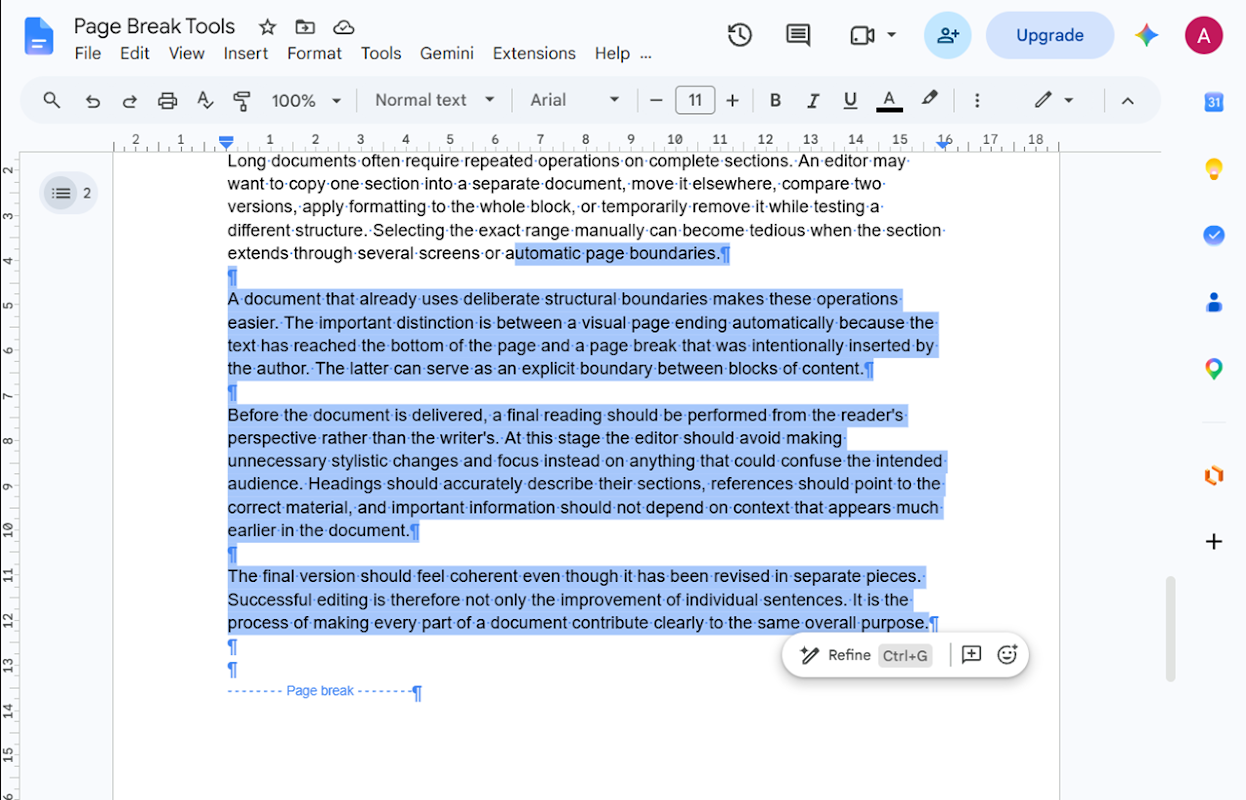
Page Break Tools is an add-on for Google Docs™ for selecting content around manually inserted page breaks.

It provides three focused commands:

• Select Content Back to Previous Page Break
• Select Content Between Page Breaks
• Select Content Up to Next Page Break

Place the cursor inside the document and choose the command you need from Extensions → Page Break Tools.

Page Break Tools works with manually inserted page breaks in Google Docs™. It does not treat the normal visual end of a page as a page-break delimiter.

The add-on is designed to work only with the active Google Docs™ document and to request the minimum document access required for its selection features.

No separate Page Break Tools account is required.

Google Docs™ is a trademark of Google LLC.
Lisätietoja
sell
HinnatMaksuttomat
code
Kehittäjä
email
lock
Tietosuojakäytäntö
description
Käyttöehdot
flag
Tee ilmoitusMerkitse sopimattomaksi


Haku
Tyhjennä haku
Sulje haku
Google-sovellukset
Päävalikko