
Google Workspace Marketplace


Pangram AI Detection
Pangram Labs provides teachers with tools to detect AI-generated text directly within Classroom submissions.
정보 업데이트:2026년 1월 31일
호환 기기:
리뷰 없음
3천+

개요
Pangram Labs provides teachers with tools to detect AI-generated text directly within Classroom submissions.

🦊 How to use:
1. Enable the Pangram Labs AI Detection add-on.
2. Create an assignment and attach an AI usage policy to it.
3.While grading, click on the AI usage policy to access the full AI transparency report.
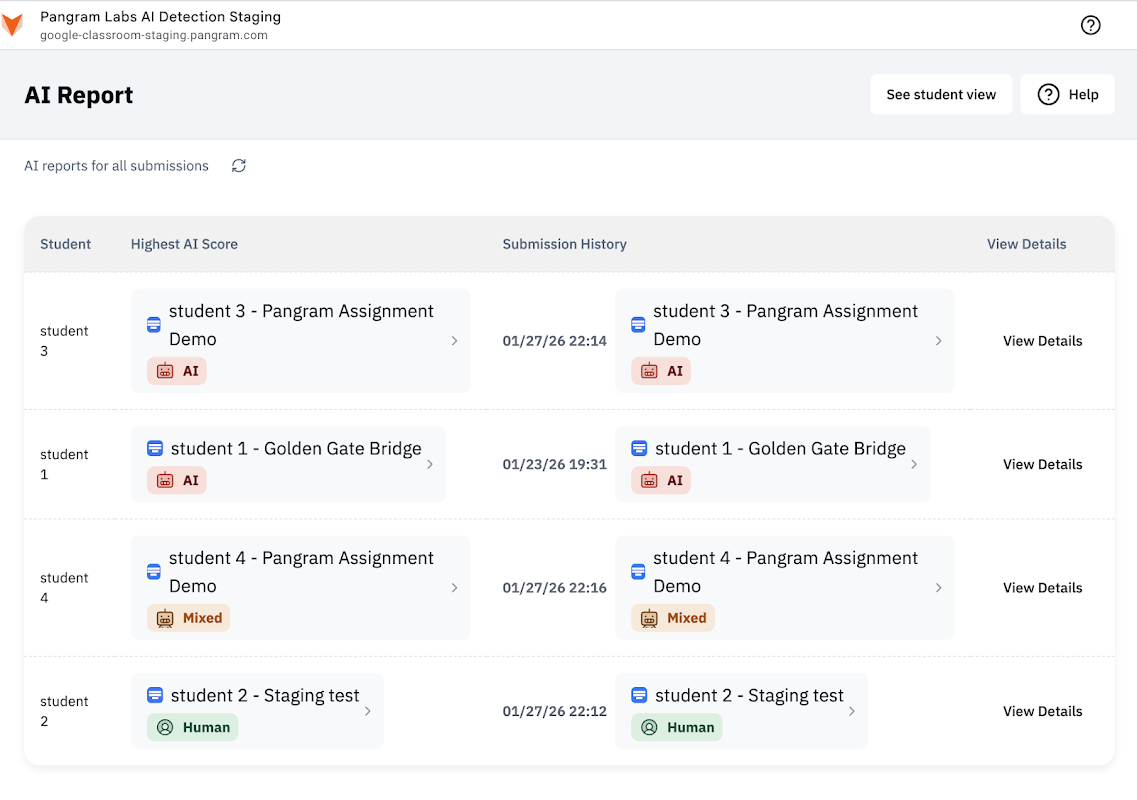
4. Click on the Pangram attachment to see an overview of all AI transparency reports at once.

❓ How it works:
This add-on is brings the power of Pangram's AI text detection directly to Google Classroom.
Pangram's text classifier is trained on millions of AI-generated documents and can identify AI writing from its distinct style.
Information collected from student submissions is used to create AI transparency reports. None of this data is used to train AI models and we will never sell student data to third parties.

📊 Help us improve:
Have any technical issues? Feature requests? Please contact us: https://www.pangramlabs.com/contact-us
추가정보




검색
검색어 지우기
검색 닫기
Google 앱
기본 메뉴