
Google Workspace Marketplace

Pdf to QR Code for Drive™
Top app for sharing Google Drive™ pdf file or folder via dynamic QRCode
דף האפליקציה עודכן בתאריך:9 באוגוסט 2026
האפליקציה פועלת עם:
אין ביקורות
8


סקירה כללית
You can generate the Dynamic QRCode for any pdf file and then send this QR Code to your friends, colleagues. Moreover, you can customize QR Code by adding the branded logo, add label, customize label, etc.
Features of  unlimited scan QR Code:
+ Create dynamic QRCode for any pdf file inside Drive™
+ Resize QRCode on the fly without changing their high quality images
+ Insert logo, image into branded QRCodes
+ Insert label and change position and size of label on the go
You can share your Google Drive™ file or folder via QR Code easily. You can share with readable or writable permission. Moreover, you can unlink sharing anytime. After generating QR Code, you send this QR Code to your friends, colleagues or partner. They can use their mobile devices to scan QR Code and access Google Drive™ file or folder directly. If they installed Google Drive™ application, add on will redirect them to file directly inside Google Drive™ application or web browser
Features:
+ Resize QRCode on the fly without changing their high quality images
+ Insert logo, image into branded QR Code
+ View total number of scans of QR
+ Insert label and change position and size of label on the go
+ Share Drive™ pdf file QR
+ Share with readable or writable permission
+ Modify URL of Dynamic QRCodes dynamically when the file or folder is changed
+ If QR Code label is too long, please set "High" for Error Correct Level so user can scan QR easily.
+ Support more than 15 languages
+ During the trial period, you can generate codes with a limited number of scans (set randomly for each trial). This allows you to experience the features and benefits of our add-on at no cost.
+ To enjoy unlimited scans and unlock the full potential of the add-on, we invite you to upgrade to the premium version
How to generate QR Codes
+ Upload the PDF to Google Drive™ manually
+ Click on a PDF file you want to share
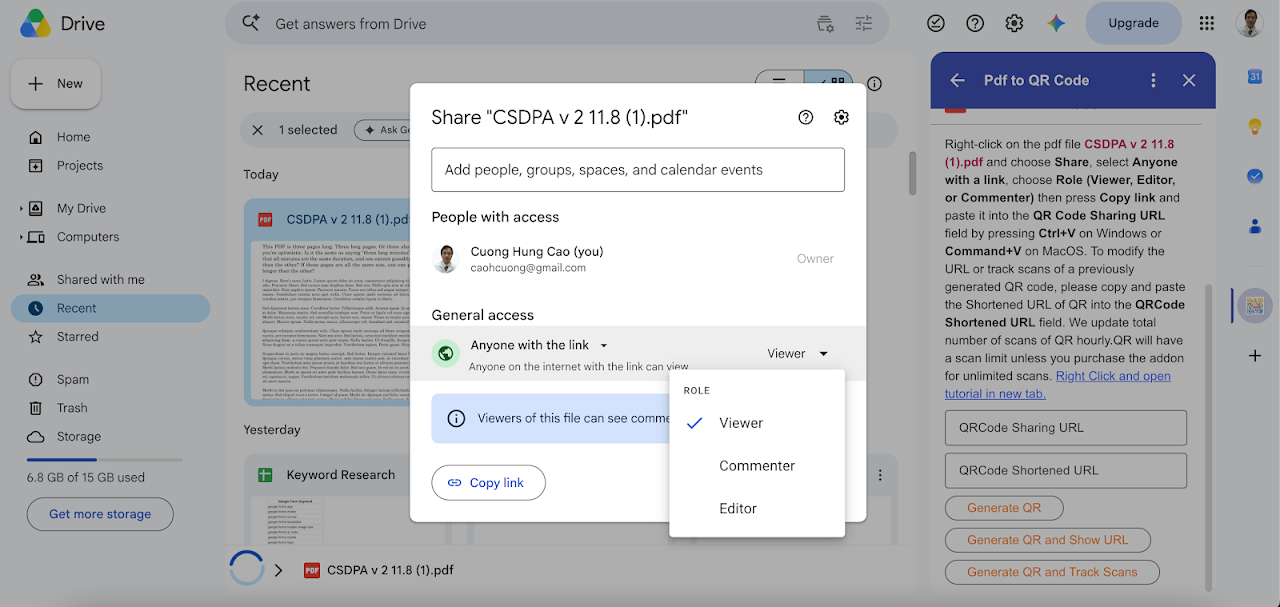
+ Right-click on the file and click on share
+ Choose "Anyone with the link"
+ Choose Role you want to share (Viewer, Editor or Commenter)
+ Click on "Copy Link"
+ Paste to textbox "QRCode Sharing URL" using Ctrl+V on Window or Command+V on MacOS
+ Click on "Generate QRCode" button
+ Customize QRCodes in the popup window
How to modify dynamic QR Code:
+ Copy the previous shortened URL of QR Code
+ Paste to textbox "QRCode Shortened URL" using Ctrl+V on Window or Command+V on MacOS
מידע נוסף
sell
תמחורתקופת ניסיון בחינם
code
email
lock
מדיניות הפרטיות
description
תנאים והגבלות
flag
דיווחסימון כבלתי הולמת





חיפוש
ניקוי החיפוש
סגירת החיפוש
אפליקציות Google
התפריט הראשי