
Google Workspace Marketplace


AI Day Planner
Type your to-dos and let AI schedule your day around your existing events as color-coded blocks in Google Calendar™.
정보 업데이트:2026년 10월 26일
호환 기기:
11


개요
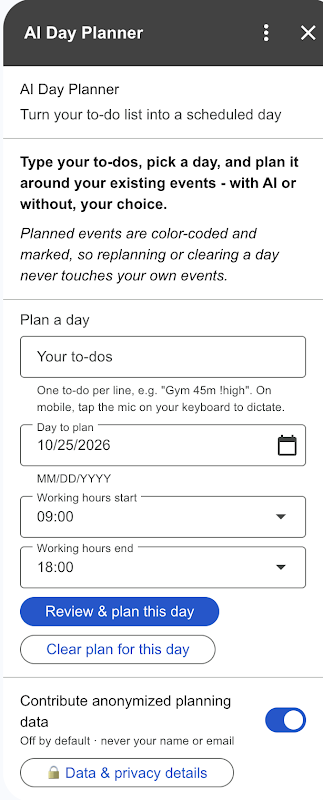
Stop shuffling your to-do list around your meetings by hand. AI Day Planner turns a plain to-do list into a realistic, scheduled day: type your tasks, pick a day and your working hours, and the AI places each task as a timed, color-coded event in your Google Calendar™ - around the events you already have.

The planner reads the busy times of the day you are planning (and only that day), respects them, keeps a 10-minute buffer between tasks, leaves room for lunch, and tells you honestly when something did not fit.

- One to-do per line, with optional hints the planner understands: durations like "45m" or "2h" and priorities like "!high" or "urgent"
- Plans strictly within your chosen working hours, in your timezone
- Never overlaps your existing events; ignores all-day events, events marked "free" and invitations you declined
- Color-codes by category (meetings, deep work, errands, health, personal, breaks) with a fitting emoji per task
- A summary card shows the planned schedule plus notes on the choices made and anything that did not fit
- Replanning a day replaces only the events the planner created; the "Clear plan for this day" button removes them again - your own events are never touched or edited
- Planned events carry no reminders and show as a normal schedule, up to 20 events per plan
- Learns your rhythm: your usual time and duration per kind of task, from your own past plans, kept only with your own add-on settings, never on our servers; to-dos that did not fit last time are offered again
- Planning the current day uses only the hours still ahead of you - it never schedules in the past, and tells you when your working hours are already over
- One tap 👍 / 👎 on every plan helps improve the planner (only the rating and the mode are sent, never the plan)

Fair use: up to 3 AI plans per day, which comfortably covers planning today, tomorrow and one replan.

You stay in control of your data. Before anything is planned, a confirmation card shows the exact day being planned and asks how to plan it: "Plan with AI" sends your to-do text, that day's busy slots (times and event titles) and, once learned, your usual times per kind of task, transiently to our secure server to generate the plan; "Plan without AI" uses built-in, research-based scheduling rules and sends nothing anywhere. No AI keys ship in the add-on, nothing is used for advertising, and the AI provider does not train on your data. A Data & privacy card spells all of this out. The planner also learns your rhythm (your usual time and duration per kind of task) from your own past plans, stored only with your own add-on settings, never on our servers (erase it anytime with one tap), and never uses your data to train AI models. Plans are suggestions - review them before you live by them.

Try it free for 7 days - no card needed, the trial starts the first time you open the add-on.

Price: CHF 19.99 per year, billed as a yearly subscription via Stripe (secure checkout; we never see your card details). If a renewal payment fails, your access continues through a 14-day grace period so you can fix the payment without interruption. Cancel anytime.

Questions or ideas? Email work@louissch.com - from the makers of Weather Calendar, Weather Calendar Pro and Weather Calendar Ultra.

Google Calendar™ is a trademark of Google LLC. AI Day Planner is not affiliated with or endorsed by Google.
추가정보



검색
검색어 지우기
검색 닫기
Google 앱
기본 메뉴