
Google Workspace Marketplace


Plus AI for Google Slides™ and Docs™
Stop creating slides and docs the old way. Make work easier with the best AI tools for Google Slides™ and Google Docs™.
개발자:
정보 업데이트:2025년 12월 11일
호환 기기:

187만+



개요
With Plus AI, you can use the same AI technology that powers tools like ChatGPT, Duet AI, and Copilot to make beautiful presentations and well-written documents for work and school.

Plus AI for Google Slides™ is the best AI presentation maker to create and edit presentations, directly in Google Slides™. And Plus AI for Google Docs™ is the best AI writing tool to write and edit content, directly in Google Docs™.

Stop wasting time creating slides and writing blog posts from scratch, and let our AI tools do the boring work for you!

👉 How to get started with Plus AI for free
• Install Plus AI from the Google Workspace Marketplace by clicking “Install.”
• Open any Google Slides™ presentation or Google Docs document.
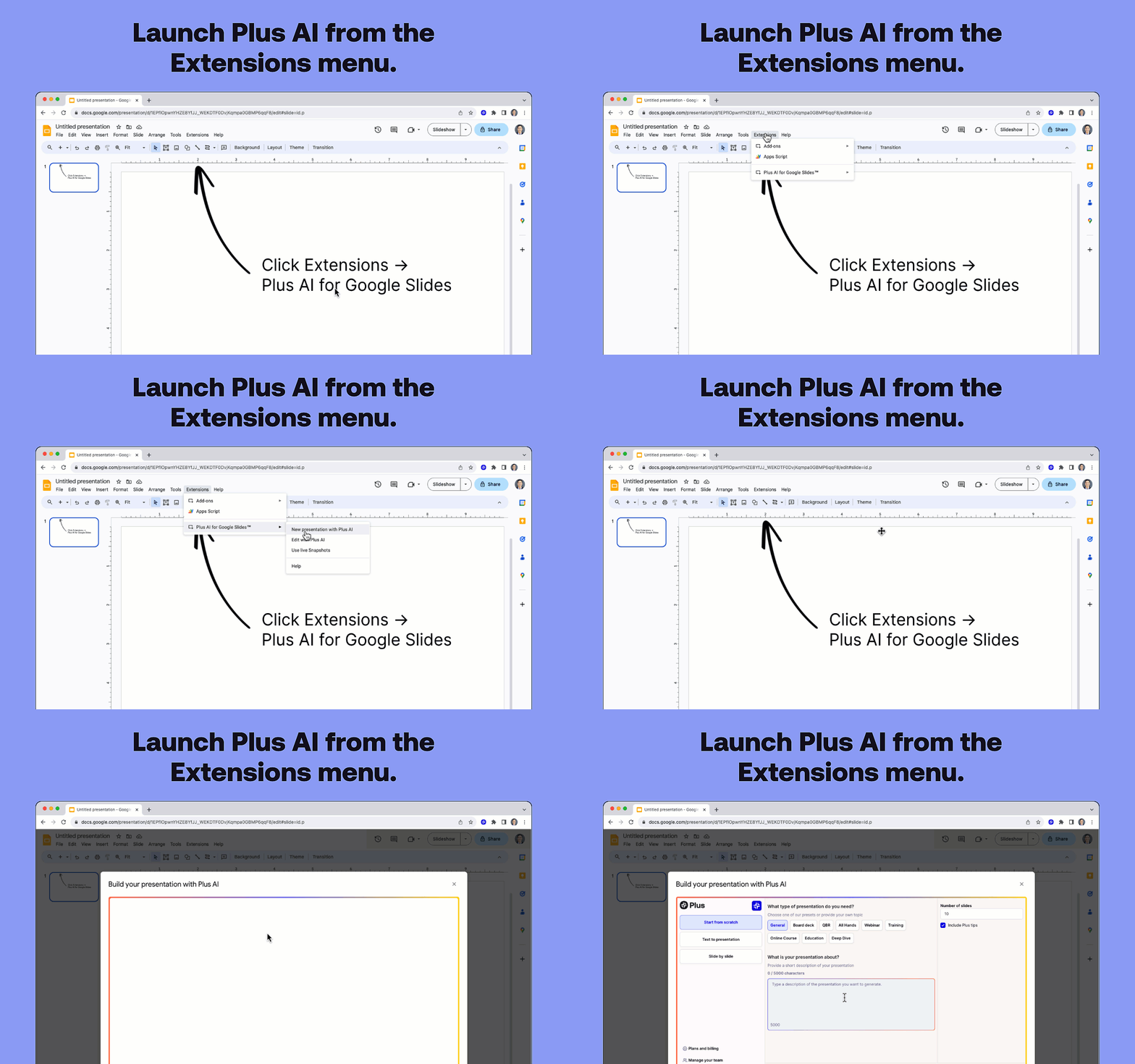
• Click Extensions -> Plus AI for Google Slides™ -> New presentation with Plus AI.
• Enter a prompt or drop in your text to create a new presentation.

👉 Plus AI features
• Use Edit with Plus AI to insert new slides, rewrite existing slides, or remix slide layouts. (Use AI to convert a plain text slide into a well-formatted three column slide)
• Design custom themes with our presentation AI. (Type in the name of your theme, and let our Google Slides™ AI automatically select beautiful fonts and colors for your deck)
• Co-create and co-write with an AI for presentations. (Our Google Slides™ AI provides tips and tricks on how to improve your presentation on each slide)
• Ensure your team’s presentations have consistent designs, styles, and tones. (Create shared themes and custom AI instructions)
• Translate your slides and generate slides in any language. (Use our Rewrite tool and ask Plus AI to "Translate this slide from English to Spanish")
• Format your slides and apply consistent formatting. (Use our Remix tool to change a simple slide into a three column slide, a pro/con slide, or more)
• Write blog posts or marketing copy just by providing a short prompt (Use generate mode in Google Docs™ to have AI write new content for you)
• Edit existing text with AI using our editing tools (Use edit mode in Google Docs™ to rewrite and reformat an existing document)
• Use Plus Snapshots to pull data from all of your analytics tools and apps. (Take Snapshots using our browser extension and automatically refresh the data on your slides)

👉 Start for free
• Start generating and editing presentations with our AI presentation maker for free.
• Upgrade for unlimited AI usage, premium layouts, custom themes, and more.

👉 Popular use cases and personas
• Sales presentations - Need to create dozens of presentations for customers and prospects? Use AI to automatically generate customized slide decks for each of your meetings.
• Educational materials - Create online courses, training materials, and other educational content using the Plus AI presentation maker to save time and focus on teaching, not slides.
• Business assistant - Treat Plus AI as your personal business analyst who can do basic research, transform content from blog posts into slide decks, and create well-formatted slides.
• Marketing collateral - Ask AI to create ad copy, write blog posts, and come up with marketing strategies for you.

👉 Presentation templates, right in Google Slides™
• Use Plus AI to design the perfect presentation templates for your organization.
• There’s no need to use separate template galleries like SlidesGo and SlidesCarnival or learn new apps like Canva, Beautiful.ai, Tome, Gemini, or Copilot.
• Plus offers an extensive set of slide layouts compared to other add-ons like SlidesAI, MagicSlides, and GPT Workspace.
• After creating new presentation themes, share your designs, supporting content, visual styles, and writing styles with your team.

👉 How Plus AI works
• Open the Plus AI add-on and write a short description of the presentation you want.
• You can talk to Plus AI just like ChatGPT, Bard, Claude, or your favorite chatbot
• Plus AI generates a presentation outline. Review and adjust the outline as needed.
• Plus AI writes your slides. Review, make final edits, and you’re ready to present!

👉 Plus Snapshots
• Capture Snapshots of any website, app, or dashboard with Plus. Embed Snapshots in your Google Docs™ and Google Slides™. Refreshing all of your Snapshots with one click.
• Plus works with all your favorite collaboration tools. Embed live Snapshots in tools like Notion, Tome, Confluence, Canva, and more. Set up automated Slack subscriptions to keep your team up-to-date.
• Go back in time and view every historical version of your Snapshots. Search the content of your screenshots using OCR, and set up automatic notifications when something changes.

👉 About Plus
At Plus, we are building AI productivity tools to help people make their day-to-day work easier. We focus on the parts of work where AI can do the best job: brainstorming, creating outlines, first drafts, and editing and revising.


👉 Try out all of the Plus AI products
• Plus AI for Google Slides™
• Plus AI for Google Docs™
• Plus Snapshots
추가정보






검색
검색어 지우기
검색 닫기
Google 앱
기본 메뉴