
Google Workspace Marketplace


Plus AI for Google Slides™ and Docs™
Stop creating slides and docs the old way. Make work easier with the best AI tools for Google Slides™ and Google Docs™.
Listing updated:১১ ডিসেম্বর, ২০২৫
Works with:

১৮ লা+



এক নজরে
With Plus AI, you can use the same AI technology that powers tools like ChatGPT, Duet AI, and Copilot to make beautiful presentations and well-written documents for work and school.

Plus AI for Google Slides™ is the best AI presentation maker to create and edit presentations, directly in Google Slides™. And Plus AI for Google Docs™ is the best AI writing tool to write and edit content, directly in Google Docs™.

Stop wasting time creating slides and writing blog posts from scratch, and let our AI tools do the boring work for you!

👉 How to get started with Plus AI for free
• Install Plus AI from the Google Workspace Marketplace by clicking “Install.”
• Open any Google Slides™ presentation or Google Docs document.
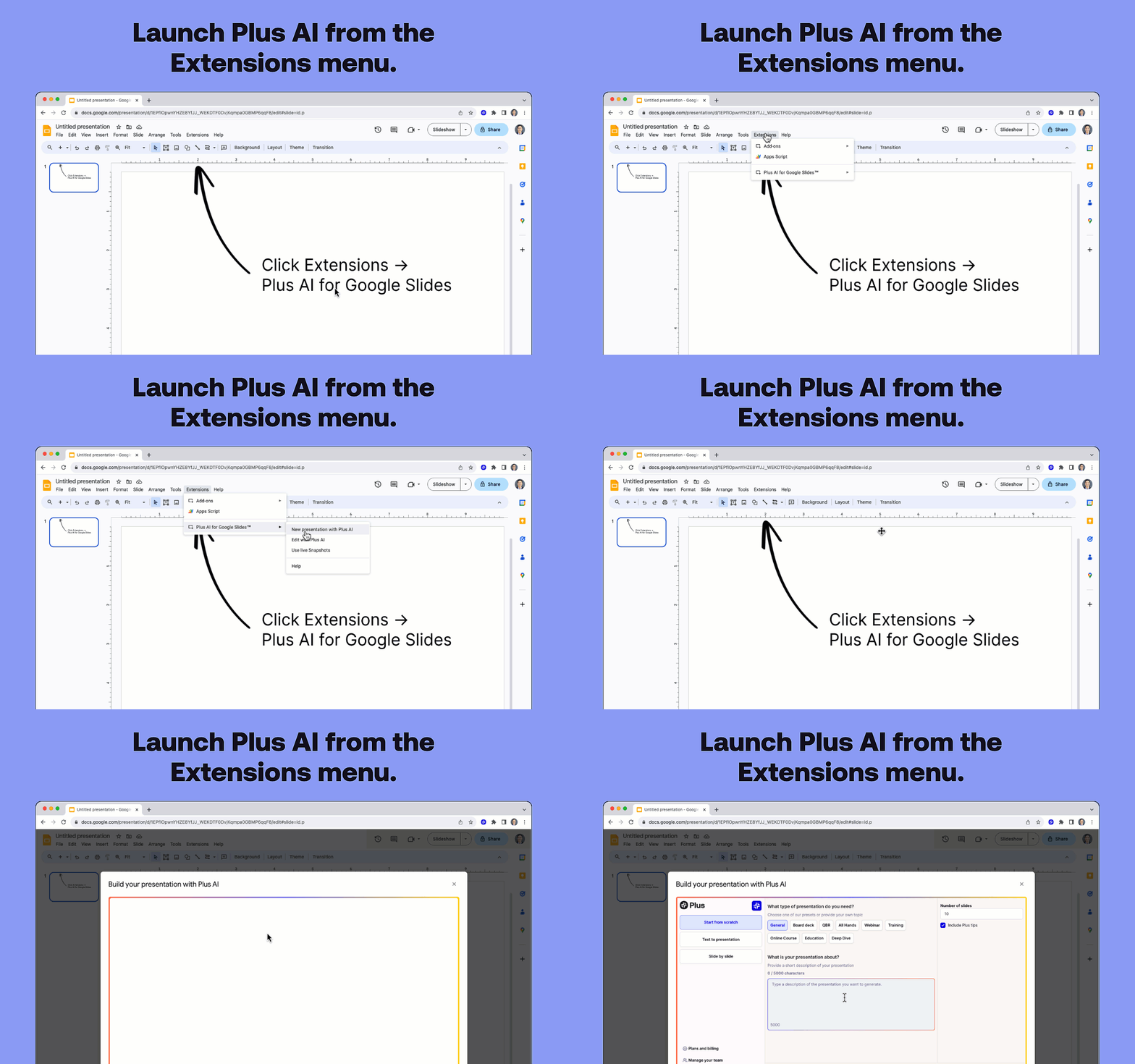
• Click Extensions -> Plus AI for Google Slides™ -> New presentation with Plus AI.
• Enter a prompt or drop in your text to create a new presentation.

👉 Plus AI features
• Use Edit with Plus AI to insert new slides, rewrite existing slides, or remix slide layouts. (Use AI to convert a plain text slide into a well-formatted three column slide)
• Design custom themes with our presentation AI. (Type in the name of your theme, and let our Google Slides™ AI automatically select beautiful fonts and colors for your deck)
• Co-create and co-write with an AI for presentations. (Our Google Slides™ AI provides tips and tricks on how to improve your presentation on each slide)
• Ensure your team’s presentations have consistent designs, styles, and tones. (Create shared themes and custom AI instructions)
• Translate your slides and generate slides in any language. (Use our Rewrite tool and ask Plus AI to "Translate this slide from English to Spanish")
• Format your slides and apply consistent formatting. (Use our Remix tool to change a simple slide into a three column slide, a pro/con slide, or more)
• Write blog posts or marketing copy just by providing a short prompt (Use generate mode in Google Docs™ to have AI write new content for you)
• Edit existing text with AI using our editing tools (Use edit mode in Google Docs™ to rewrite and reformat an existing document)
• Use Plus Snapshots to pull data from all of your analytics tools and apps. (Take Snapshots using our browser extension and automatically refresh the data on your slides)

👉 Start for free
• Start generating and editing presentations with our AI presentation maker for free.
• Upgrade for unlimited AI usage, premium layouts, custom themes, and more.

👉 Popular use cases and personas
• Sales presentations - Need to create dozens of presentations for customers and prospects? Use AI to automatically generate customized slide decks for each of your meetings.
• Educational materials - Create online courses, training materials, and other educational content using the Plus AI presentation maker to save time and focus on teaching, not slides.
• Business assistant - Treat Plus AI as your personal business analyst who can do basic research, transform content from blog posts into slide decks, and create well-formatted slides.
• Marketing collateral - Ask AI to create ad copy, write blog posts, and come up with marketing strategies for you.

👉 Presentation templates, right in Google Slides™
• Use Plus AI to design the perfect presentation templates for your organization.
• There’s no need to use separate template galleries like SlidesGo and SlidesCarnival or learn new apps like Canva, Beautiful.ai, Tome, Gemini, or Copilot.
• Plus offers an extensive set of slide layouts compared to other add-ons like SlidesAI, MagicSlides, and GPT Workspace.
• After creating new presentation themes, share your designs, supporting content, visual styles, and writing styles with your team.

👉 How Plus AI works
• Open the Plus AI add-on and write a short description of the presentation you want.
• You can talk to Plus AI just like ChatGPT, Bard, Claude, or your favorite chatbot
• Plus AI generates a presentation outline. Review and adjust the outline as needed.
• Plus AI writes your slides. Review, make final edits, and you’re ready to present!

👉 Plus Snapshots
• Capture Snapshots of any website, app, or dashboard with Plus. Embed Snapshots in your Google Docs™ and Google Slides™. Refreshing all of your Snapshots with one click.
• Plus works with all your favorite collaboration tools. Embed live Snapshots in tools like Notion, Tome, Confluence, Canva, and more. Set up automated Slack subscriptions to keep your team up-to-date.
• Go back in time and view every historical version of your Snapshots. Search the content of your screenshots using OCR, and set up automatic notifications when something changes.

👉 About Plus
At Plus, we are building AI productivity tools to help people make their day-to-day work easier. We focus on the parts of work where AI can do the best job: brainstorming, creating outlines, first drafts, and editing and revising.


👉 Try out all of the Plus AI products
• Plus AI for Google Slides™
• Plus AI for Google Docs™
• Plus Snapshots
Additional information
sell
PricingFree of charge trial
code
Developer
email
সমর্থন
lock
গোপনীয়তা নীতি
description
পরিষেবার শর্তাদি
flag
রিপোর্ট করুনFlag as inappropriate






সার্চ করুন
সার্চ মুছুন
সার্চ বন্ধ করুন
Google অ্যাপ্লিকেশানগুলি
প্রধান মেনু