
Google Workspace Marketplace


PresEngage
AI-powered Q&A for Google Meet™ presentations. Audience members ask questions and get instant, slide-referenced answers from an AI trained on your presentation content.
정보 업데이트:2026년 3월 12일
호환 기기:
169



개요
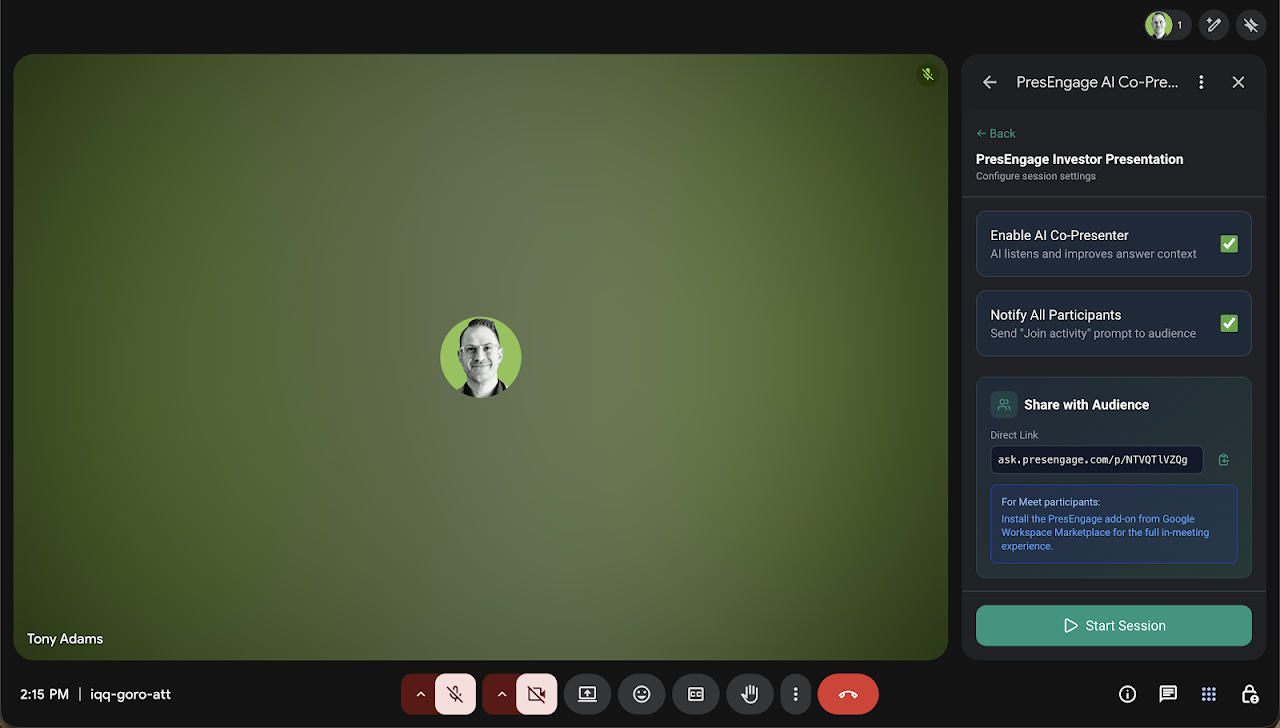
PresEngage™ adds an AI Co-Presenter to your Google Meet™ sessions that answers audience questions in real time using your presentation slides as context.

How it works: Upload your presentation to PresEngage™, start a live session in Google Meet™, and your audience can ask questions directly from the Meet™ side panel. The AI Co-Presenter responds instantly with accurate answers grounded in your slide content, including references to specific slides.

 Presenter features:
 - Start and manage live Q&A sessions from within Google Meet™
 - Moderate questions: star, approve, or hide submissions in real time
 - Star a question to display it on the main stage for all participants
 - Monitor live question and participant counts
 - Toggle the AI Co-Presenter on or off at any time
 - Share a direct link so people outside the meeting can also ask questions

 Audience features:
 - Ask questions and receive AI-generated answers with slide references
 - See featured questions highlighted by the presenter on the main stage
 - Join with Google Sign-In™ or just an email — no account required
 - Continue the conversation after the meeting ends via a follow-up link

PresEngage™ is built for teachers, trainers, conference speakers, and anyone who presents in Google Meet™ and wants to make Q&A easier and more engaging. Visit https://presengage.com to get started.
추가정보


검색
검색어 지우기
검색 닫기
Google 앱
기본 메뉴