
Google Workspace Marketplace


Price to Text
Instantly convert numerical amounts to text (words) in UAH, USD, and RUB directly in Google Sheets™. Perfect for invoices, contracts, and reports. Save time and avoid errors!
Listing updated:2025 m. balandžio 23 d.
Works with:
No reviews
175



Apžvalga
Tired of manually writing out amounts in words on financial documents? The "Price to Text" add-on for Google Sheets™ automates this process!

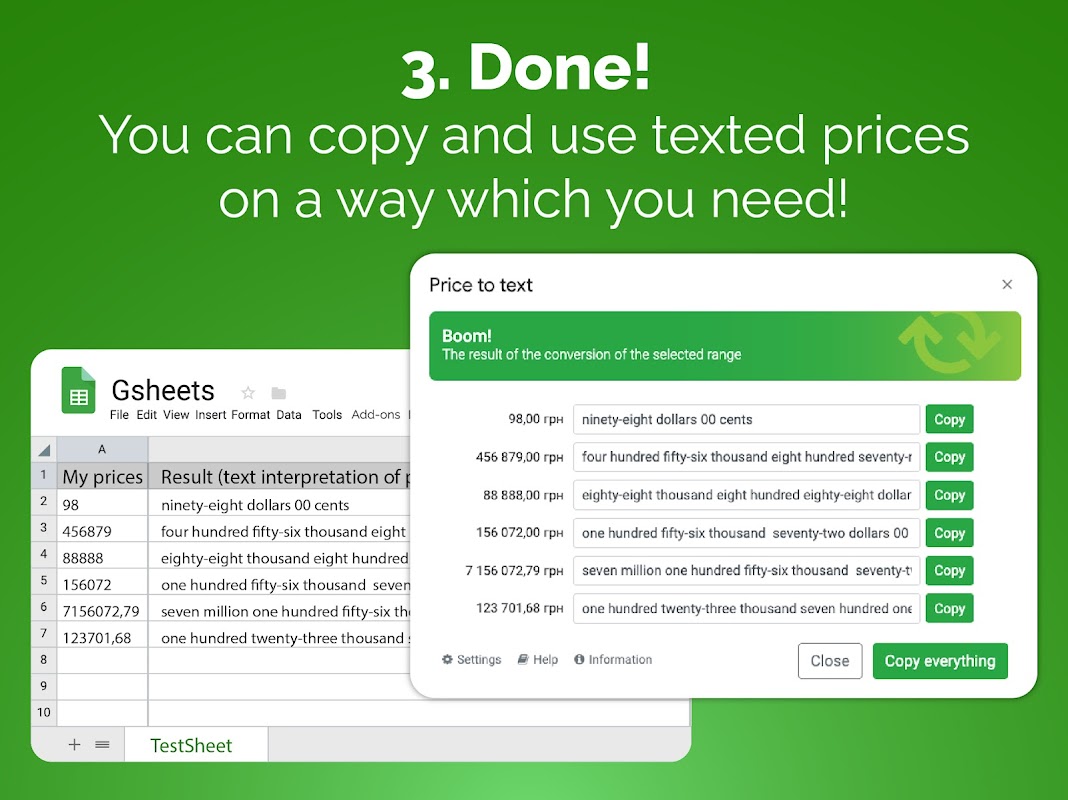
This powerful and free tool allows you to easily convert any numerical values into their text equivalents (amounts in words) directly within your Google Sheets™.

How it works?

Simple Function: Just enter =PRICETOTEXT(number_or_cell) or =PRICETOTEXT(range) into the desired cell.

Convenient Interface: Use the built-in converter with settings, accessible via the "Extensions" -> "Price to text" menu.

Key Features:

Automatic Conversion: Accurately converts numbers, including cents/kopecks, into words.

Currency Support: Works with Ukrainian Hryvnia (UAH), US Dollars (USD), and Russian Rubles (RUB).

Flexible Settings: Easily choose the desired currency and interface language via the add-on menu.

Proper Grammar: Correctly handles grammatical rules for number declension in supported languages (Ukrainian and Russian included).

Google Sheets™ Integration: Works like a standard spreadsheet function, automatically updating results when source data changes.

Array Processing: Can convert entire cell ranges at once.

Benefits of using "Price to Text":

Time Saving: Forget about the routine manual entry of amounts in words.

Accuracy: Avoid accidental errors that are easy to make manually.

Professionalism: Give your financial documents (invoices, contracts, reports) a flawless look.

Security: Your data is processed locally within your Google Sheets™ and is not transmitted anywhere.

Convenience: A cloud-based solution that requires no additional software installation.

Free: All core features are available absolutely free of charge.

Ideal for accountants, finance professionals, managers, and anyone working with financial documents in Google Sheets™.

Install "Price to Text" from the Google Workspace Marketplace™ today and simplify your work!

Developed by bvstud.io

Google Sheets™ and Google Workspace Marketplace™ are trademarks of Google LLC.
Additional information
sell
PricingNeužsiėmęs (-usi)
code
Developer
email
Palaikymas
lock
Privatumo politika
description
Paslaugos teikimo sąlygos
flag
PraneštiFlag as inappropriate




Paieška
Išvalyti paiešką
Uždaryti paiešką
Google Apps
Pagrindinis meniu