
Google Workspace Marketplace


Routing24
Route planner for deliveries and field service. Import stops from Google Calendar™, Excel, or a pasted list, and get optimized routes with time windows, capacities, and driver-ready ETAs.
Ficha actualizada:4 de septiembre de 2026
Sin reseñas
2




Información general
Routing24 plans delivery and field-service routes. Give it your stops, vehicles, and rules, and it builds optimized routes with arrival times you can share with drivers.

GOOGLE CALENDAR IMPORT

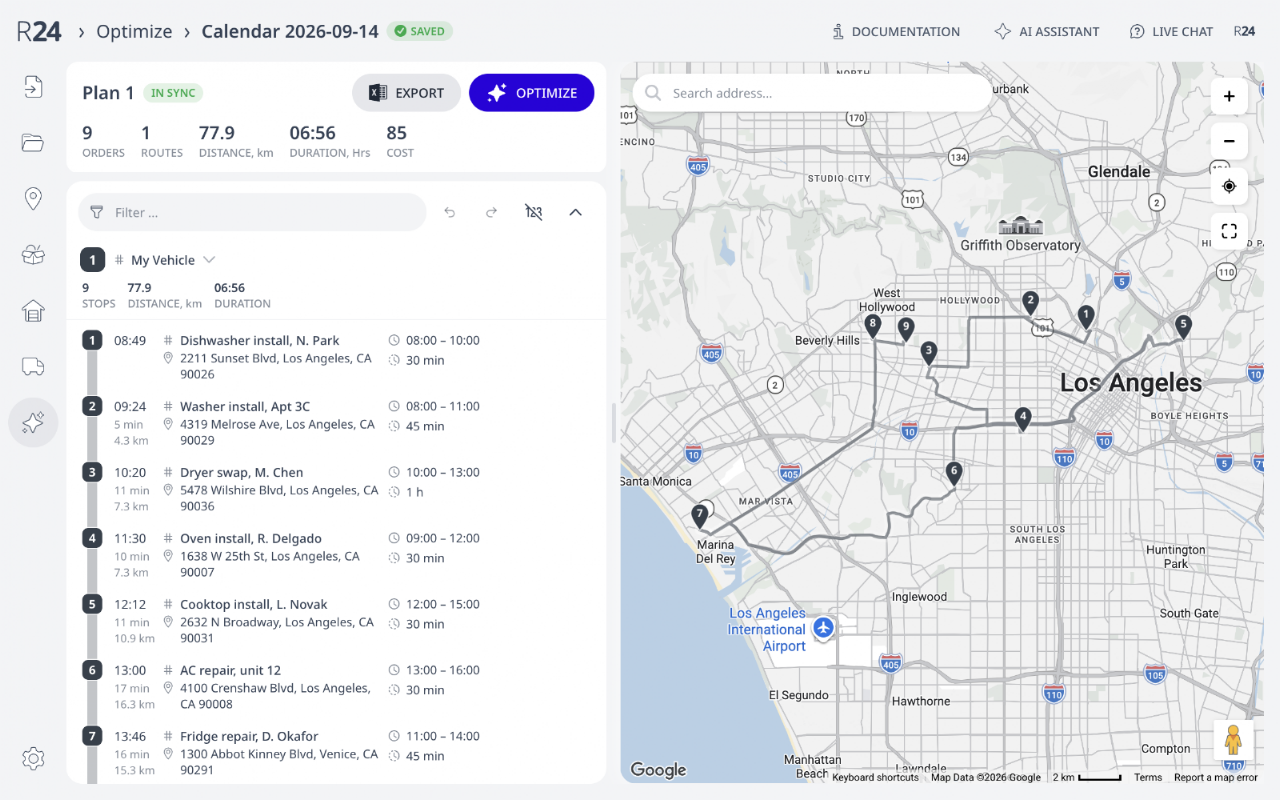
Routing24 can create orders from Google Calendar™ events with addresses. If you manage or collect appointments in Google Calendar™, Routing24 can create optimized routes for them. Pick one or more calendars and a date range: every event with a location becomes an order. The event start and end time become the arrival window. Service time and opening hours can be specified in the event description with lines like "Job: 30 minutes" and "Open: 8am - 6pm". You can append several imports (different calendars or date ranges) into one plan and optimize them together. Access is read-only: Routing24 never changes your calendar.

WHAT YOU GET

Route optimization with time windows, vehicle capacities, driver shifts and breaks, skills, priorities, and multiple depots
Import from Google Calendar™, Excel or CSV, a pasted address list, or another plan
Automatic geocoding with a review step for unrecognized addresses
Optimized routes on the map with per-stop ETAs, editable by drag and drop
Excel export of routes; a mobile view for drivers
An AI assistant that builds and edits plans in plain language; Claude and ChatGPT connect through the Routing24 MCP server

GETTING STARTED

Open the app, press Import calendar on the home page, and approve read-only calendar access. Free to start, with no credit card; paid plans cover commercial use.
Información adicional
sell
PrecioPrueba sin coste adicional con funciones de pago
code
Desarrollador
email
Asistencia
lock
Política de privacidad
description
Términos del Servicio
flag
DenunciarMarcar como inapropiada



Búsqueda
Borrar búsqueda
Cerrar búsqueda
Aplicaciones de Google
Menú principal