
Google Workspace Marketplace


Sailing Jury Decision
A Google Docs add-on for sailing race juries. Co-scribe protest decisions in one template, then file via sailti, m2s, or RRS — whichever your event uses.
Vermelding geüpdatet:19 juni 2026
Werkt met:
40


Overzicht
Sailing Jury Decision lets international race juries draft and co-scribe protest decisions in one consistent Google Docs template, then file them into whichever system the event uses — sailti, manage2sail, or racingrulesofsailing.org.

WHAT IT DOES

Today, jury panels typically either draft the decision directly in the filing system (limited tooling, no real collaboration, sometimes data loss) or in their own file (rarely Google Docs), then copy each field into the system one by one.

This add-on offers a better path:

1. It makes Google Docs a viable drafting environment for protest decisions. Your panel works in one consistent template — Procedural Matters, Facts Found, Rules applicable, Conclusions, Decision, decision date and time, jury members — and gets Google Docs' collaboration: co-scribe simultaneously, comment, and quality-check together in real time. The decision becomes a panel artifact, not a single-scribe bottleneck.

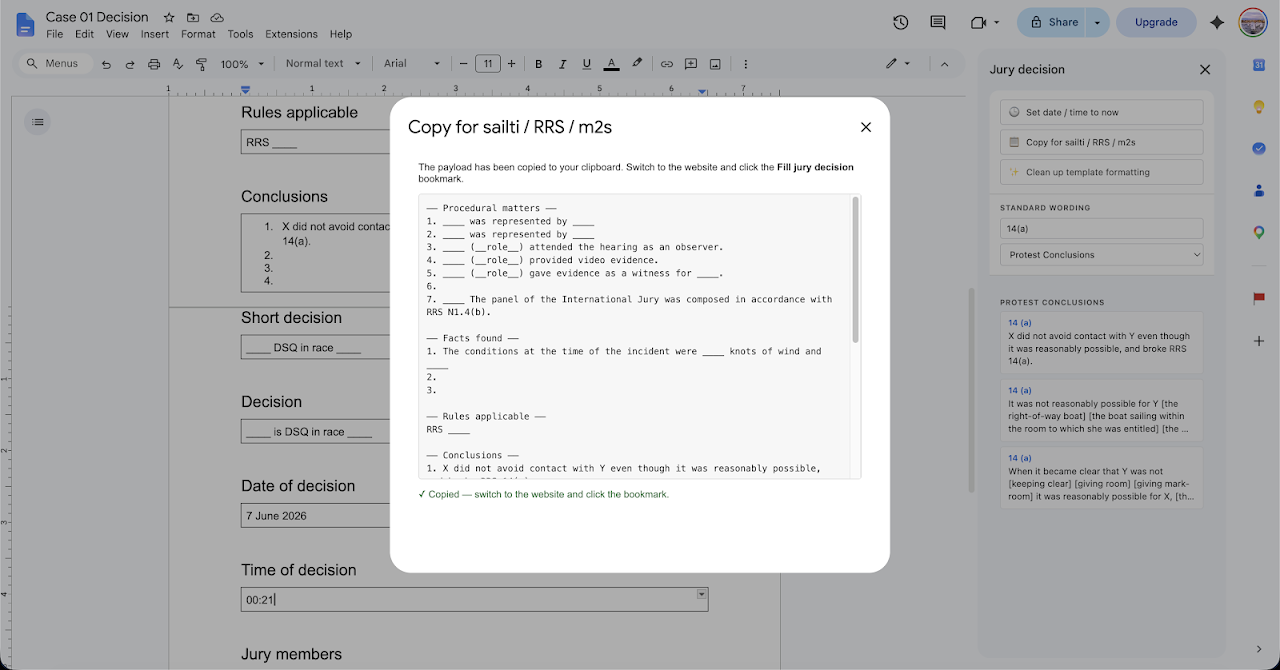
2. It replaces field-by-field copy/paste with a single Copy action. One click serializes every field and the companion bookmarklet fills the form for whichever system your event uses.

THE FLOW

1. Open your jury decision Google Doc.
2. Click the red flag icon in the right panel — the add-on opens.
3. Draft and co-scribe. Multiple panel members can scribe simultaneously in the same Google Doc, comment on each other's work, and quality-check together in real time. The add-on sidebar provides:
   - One-click insertion of standard wording snippets (organized by category — Procedural Matters, Validity, Protest Conclusions, Redress Decisions, and others).
   - One-click "Set decision date and time to now".
   - Format cleanup for content pasted from email or other documents.
4. When the panel is ready, click "Copy for sailti / RRS / m2s". The add-on reads the decision document — including the smart-chip dropdowns for jury members — and copies a structured payload to your clipboard.
5. Open your event's filing system (sailti, RRS, or m2s) in another browser tab.
6. Click the "Fill jury decision" bookmarklet (installed beforehand from https://jury.peronneau.net/install.html). It pastes every field into the right form input, including chairman, scribe, and panel member selections.
7. Review and submit.

The add-on works with the standard jury decision template used by international jury panels. If your federation uses a slightly different structure, the template can be adapted.

WHO IT'S FOR

International sailing judges and national-class jury panels who file decisions in sailti, manage2sail, or racingrulesofsailing.org. The tool is most useful for events where the same jury panel issues multiple decisions across the regatta. It's also useful for any panel that wants to co-scribe decisions — multiple judges drafting simultaneously — rather than rely on a single scribe.

PERMISSIONS

The add-on requests the minimum permissions necessary to function:

- Access to the document you actively open with it (drive.file) — needed to read the structure and the jury member chip values.
- Permission to display a sidebar and dialog inside Google Docs.
- Permission to fetch the shared wording snippets from a public Google Sheet maintained by the developer.

The add-on does not read any other documents in your Drive. It does not transmit your decisions to the developer or any third party. Your data flows: Google Doc → add-on → your clipboard → your browser tab → filing system. The developer never sees your decisions.

See the privacy policy for full details.

ABOUT

This add-on is a personal-effort tool maintained by Yoann Peronneau, an international sailing judge. It is not affiliated with World Sailing, manage2sail, sailti, racingrulesofsailing.org, or any sailing federation. It is provided free of charge as a contribution to the international judging community.

For support, feature requests, or to report issues: see the project page at https://jury.peronneau.net/.
Meer informatie
sell
KostenKosteloos
code
Ontwikkelaar
Geen handelaar
email
Support
lock
Privacybeleid
description
Servicevoorwaarden
flag
RapportMarkeren als ongepast




Zoeken
Zoekopdracht wissen
Zoekfunctie sluiten
Google-apps
Hoofdmenu