
Google Workspace Marketplace

Self-Checking Quiz Maker
Allow educators to create self-checking quizzes/tests in minutes.
Ficha actualizada:3 de septiembre de 2024
Compatible con:
51




Información general
Transform Your Quiz Creation with the Self-Checking Quiz Maker Add-On for Google Sheets™

Are you an educator or trainer looking for a way to simplify quiz creation and grading? Introducing the Self-Checking Quiz Maker, a new Google Sheets™ add-on designed to revolutionize the way you create, distribute, and grade quizzes. This powerful tool allows you to enter up to 100 questions and answers and generates a self-checking, self-scoring quiz sheet in just seconds. Save time and enhance your teaching with this innovative solution!

Key Features of the Self-Checking Quiz Maker
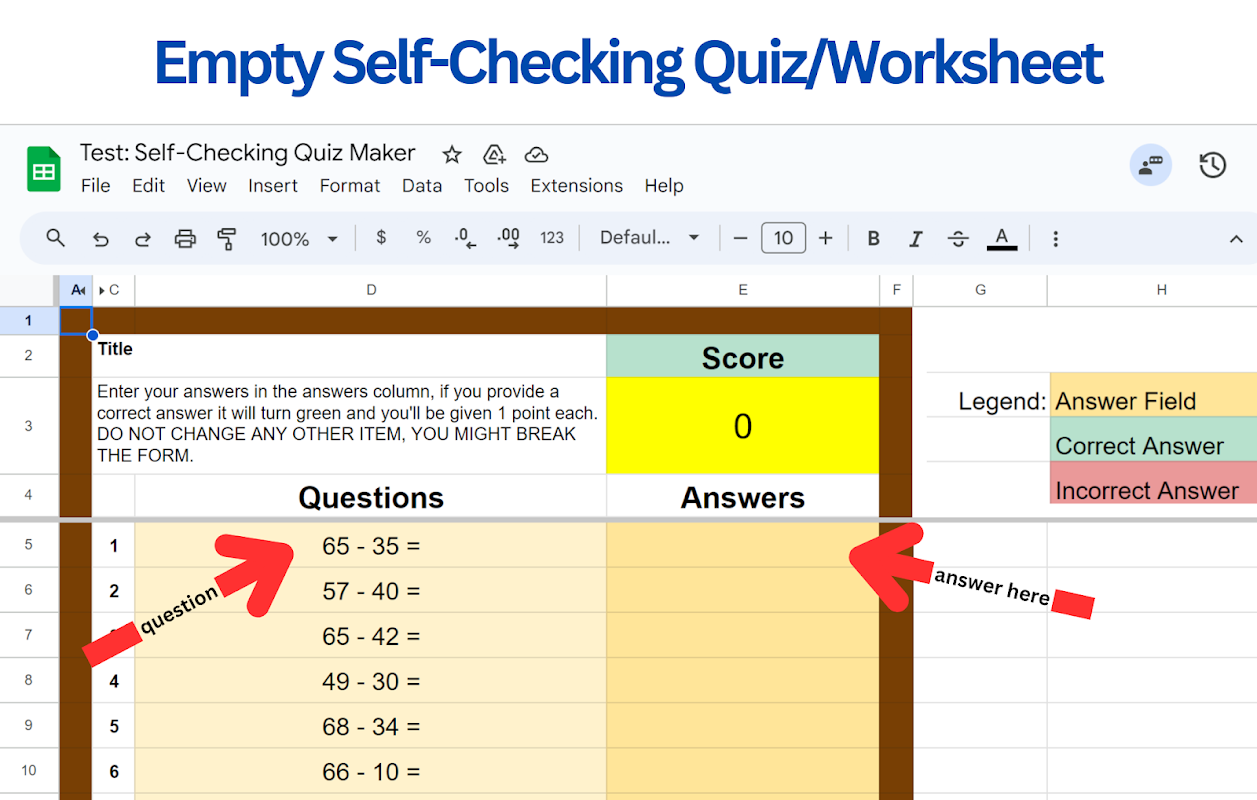
Quick and Easy Quiz Creation: With the Self-Checking Quiz Maker, creating quizzes is as easy as entering your questions and answers. The add-on automatically generates a Google Sheets™ file formatted as a quiz, complete with all the necessary features for self-checking and scoring.

Self-Checking Functionality: The add-on automatically checks students' answers as they complete the quiz, providing immediate feedback. This feature not only saves you time but also supports student learning by allowing them to see which questions they got right and which they need to review.

Automatic Scoring: Say goodbye to manual grading! The Self-Checking Quiz Maker calculates scores automatically, providing instant results for each student. This automated scoring system helps maintain accuracy and consistency while significantly reducing your workload.

Customizable Quiz Options: The Self-Checking Quiz Maker offers a range of customization options to suit any educational setting. Whether you're teaching elementary school students or conducting professional training, you can adjust the quiz format, difficulty, and even add hints or explanations to questions.

Seamless Integration with Google Sheets™: As a Google Sheets™ add-on, the Self-Checking Quiz Maker integrates perfectly with your existing Google Workspace™ tools. You can easily share quizzes through Google Classroom™, email, or any platform that supports Google Sheets™, making it a versatile tool for various learning environments.

Why Choose the Self-Checking Quiz Maker?
Save Time and Effort: Automate the tedious tasks of creating, distributing, and grading quizzes, freeing up your time for more interactive teaching and personalized student engagement.
Enhance the Learning Experience: Immediate feedback helps students learn more effectively by quickly understanding their mistakes and reinforcing correct answers.
Boost Student Engagement: Interactive quizzes keep students engaged and motivated, whether they are in the classroom or learning remotely.
Maintain Organized Workflow: Keep everything streamlined within the Google Sheets™ environment, avoiding the hassle of additional software or tools.
How to Start Using the Self-Checking Quiz Maker
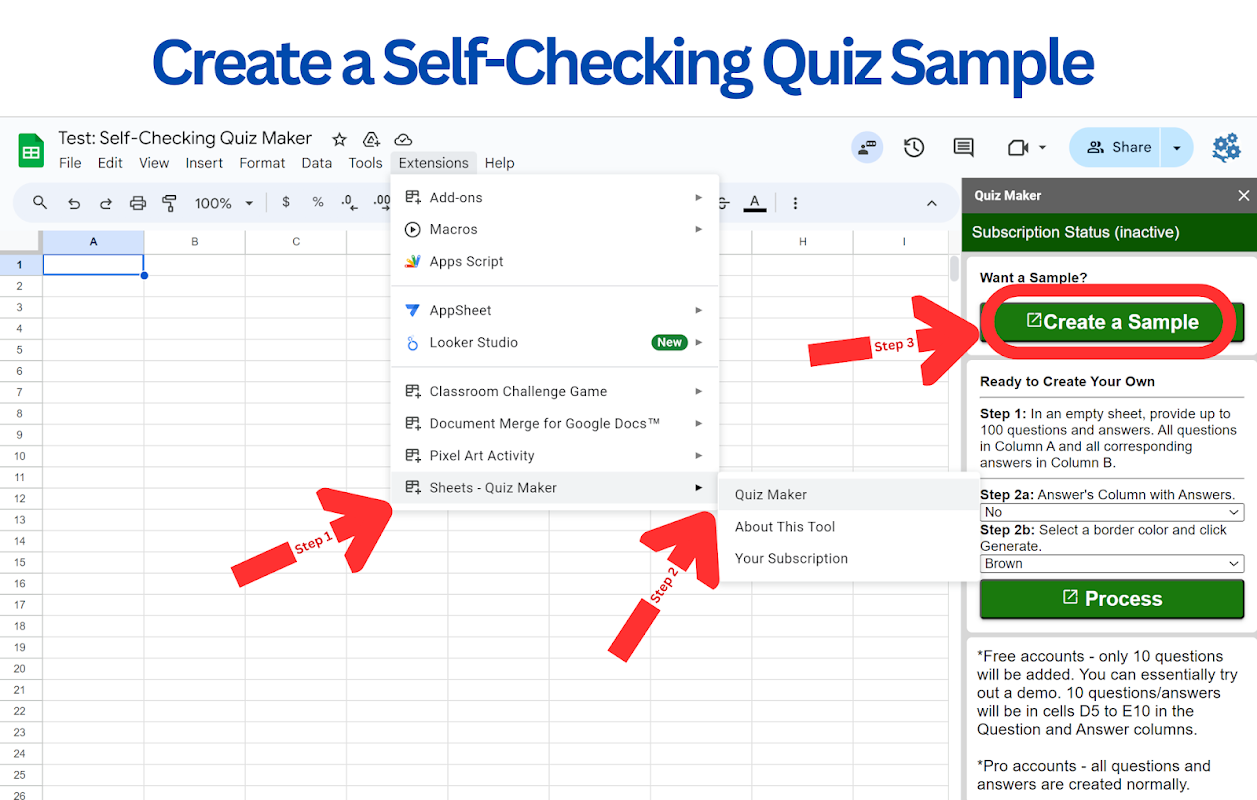
Getting started is simple. Install the Self-Checking Quiz Maker add-on from the Google Workspace Marketplace™ and open it in Google Sheets™. From there, enter your questions and answers, and within moments, you'll have a fully-functional, self-checking quiz ready to use.

Try the Self-Checking Quiz Maker Today!
Simplify your quiz-making process with the Self-Checking Quiz Maker. Designed to save you time and enhance the educational experience, this add-on is a must-have for any educator or trainer using Google Sheets™. Try it today and see how much easier your teaching can be!
Información adicional
sell
PrecioPrueba sin coste adicional con funciones de pago
code
Desarrollador
email
Asistencia
lock
Política de privacidad
description
Términos del Servicio
flag
DenunciarMarcar como inapropiada




Búsqueda
Borrar búsqueda
Cerrar búsqueda
Aplicaciones de Google
Menú principal