
Google Workspace Marketplace

Sheet Automation Flow - Automate Workflow
Multi-step workflows triggered by sheet edits. Route, track, and manage approvals, notification and reminders without leaving your spreadsheet.
Ändrades senast:15 maj 2026
Fungerar med:
98 tn+

Översikt
Sheet Automation Flow brings long-running, multi-step approval workflows to Google Sheets™.

Define your approval process right where your data lives, and let Flow handle the routing, notifications, and tracking automatically.
Unlike approval tools that require you to start with Google Forms, Sheet Automation Flow works with your existing spreadsheet data. Add a row, edit a cell, or change a status column — Flow picks it up, routes the request to the right approvers, and updates your sheet with every decision in real time.

✅ Key Features
► Long-running automation
Send delayed email or multiple emails with interval of hours or days. Pause and resume the flow at a later time. Runs Automatically in the Background
► Conditional Routing
Set rules to determine who approves based on your data. Orders over $5,000 go to the VP. Leave requests route to the team lead listed in column D. Flow reads your sheet and routes accordingly.
► Approval Workflows
Route rows for review with a single click. Send approval request emails containing full row details, and let reviewers respond to approve or decline — directly from their inbox, no spreadsheet access needed.
► Sheet Change Monitor
Get instant alerts when spreadsheet content is updated. Ideal for monitoring form submissions, inventory changes, status updates, or any critical data in your sheet.
► Date-Based Reminders
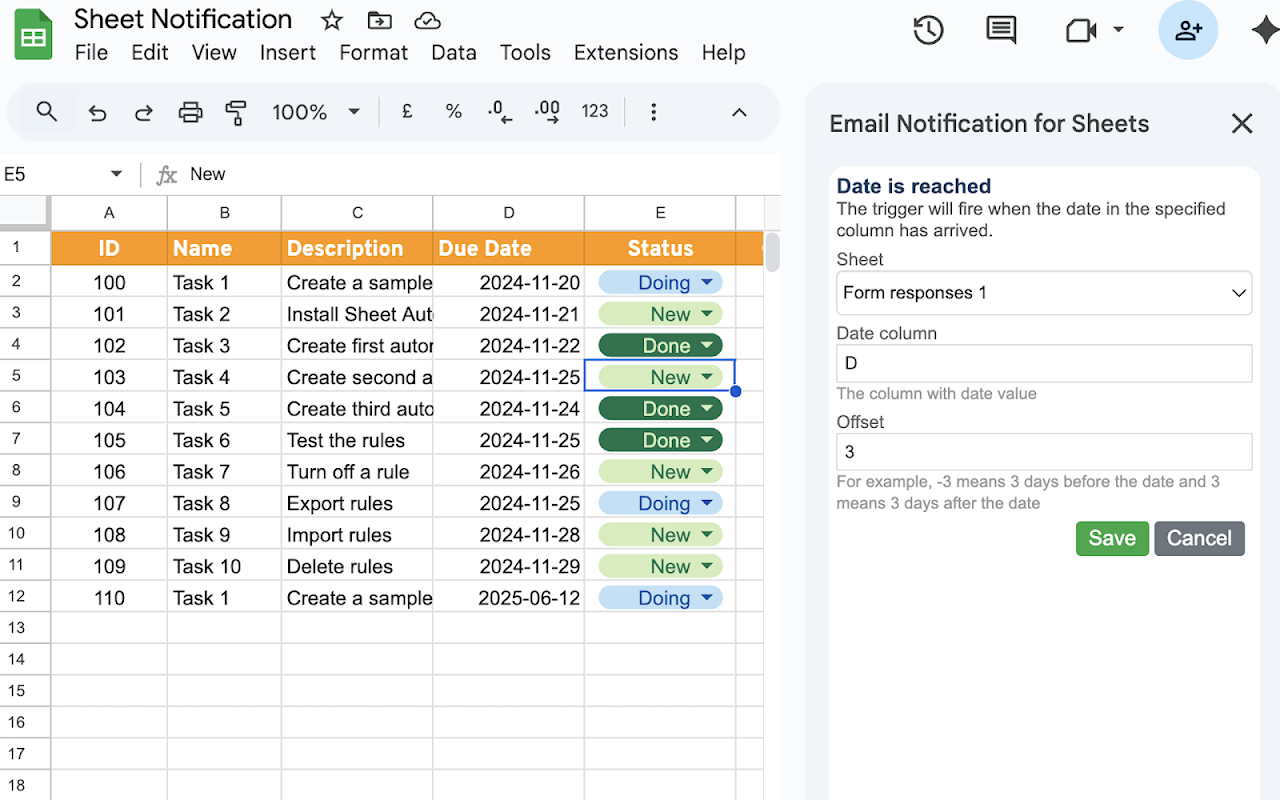
Set reminder triggers based on dates in your sheet. Automatically notify your team before a task deadline, alert customers ahead of a subscription renewal, or send follow-ups on key milestones.
► One-Click Approve or Reject from Email
Approvers receive a clear email with the request details and one-click buttons to approve or reject — no spreadsheet access required. They can act from their inbox on any device.
► Flexible Conditions & Triggers
Choose exactly which rows, columns, and data conditions trigger an email. Monitor the whole sheet or lock it down to a specific range — you're in control.

✅USE CASES
► Purchase Order Approvals
Paste vendor quotes into your sheet. Flow routes each line item for approval based on amount, department, or vendor, and updates the status when approved.
► Time Off and Leave Requests
Employees add a row with their dates and reason. Their manager is notified automatically. Once approved, the status updates and a confirmation email goes to the requester.
► Expense Claims
Submit expenses by adding rows. Flow routes to the appropriate manager based on amount thresholds, then to finance for final sign-off.
►IT Access Requests
Employees request software or system access via a shared sheet. Flow routes to the IT manager and security team for approval, with full audit trail.

✅WHO IT'S FOR
Sheet Automation Flow is built for teams that already manage their work in Google Sheets™ and need a simple, reliable way to add approval workflows without adopting a new platform.
Operations managers, office administrators, HR teams, finance departments, project leads, procurement teams, school administrators, and small business owners.

✅WORKS WITH SHEET AUTOMATION
Already using Sheet Automation? Flow is designed to complement it. Use Sheet Automation for instant triggers and actions (send an email, update a cell, call a webhook). Use Flow when you need processes that span multiple steps, multiple people, and multiple days.

You can also use Flow as a standalone add-on — no prior Sheet Automation installation required.

From the team behind Sheet Automation — trusted by thousands of Google Sheets™ users for reliable spreadsheet automation.

Support: sheetautomation.com/contact.html

 Google Sheets™ is a trademark of Google LLC
Ytterligare information
sell
PriserKostnadsfritt med betalfunktioner
code
Utvecklare
Inte säljare
email
Support
lock
Integritetspolicy
description
Användarvillkor
flag
RapportFlagga som olämplig




Sök
Rensa sökning
Stäng sökrutan
Googles appar
Huvudmeny