
Google Workspace Marketplace

Sheetminer
Invoice Data Extractor: Manual snipping & template-based audit tool for Sheets.
बनाने वाली कंपनी:
लिस्टिंग को पिछली बार अपडेट किया गया:3 मार्च 2026
इनके साथ काम करता है:
9



अवलोकन
Stop Manual Data Entry. Extract Invoices Directly to Sheets.
Tired of toggling between PDFs and spreadsheets? Sheetminer helps finance teams, accountants, and business owners move invoice data into Google Sheets with accuracy and a built-in audit trail.
Stop relying on "black box" automation that makes mistakes. With Sheetminer, you stay in control while the tool does the heavy lifting.
How it works:

✂️ Point-and-Click Extraction: Just draw a box around the value you need totals, dates, or vendor names. What you select is exactly what gets entered.

📊 Smart Field Detection: Automatically map common fields like Invoice Number, Subtotal, and Tax directly into your columns. No complex templates or "training" required.

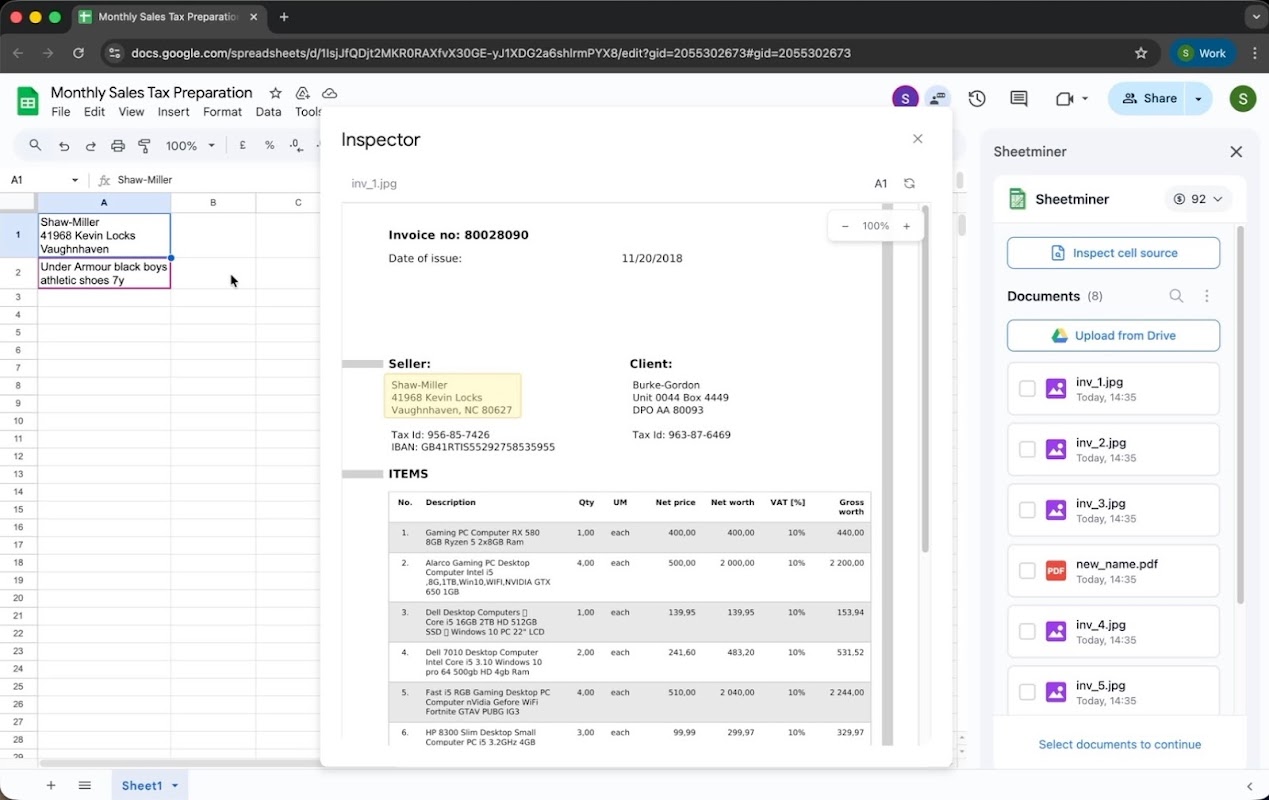
🔍 The Built-in Inspector: Every cell is linked to its source. Click any value to see the original document with the exact number highlighted. No more second-guessing.

🤝 Audit-Ready Collaboration: Share your sheet with the team. Anyone can verify data using the Inspector, making month-end and year-end reviews a breeze.

📂 Secure Google Drive Integration: Your data stays in your ecosystem. Sheetminer only processes the files you select within your Google Drive.

Why users choose Sheetminer:
Speed: Process a stack of invoices in minutes, not hours.
Accuracy: Eliminate typos
Transparency: Always know where a number came from.
Pricing
Free to start. New users get 20 free credits to test the workflow. No credit card required.
अतिरिक्त जानकारी
sell
कीमतबिना किसी शुल्क के
code
email
सहायता
lock
निजता नीति
description
सेवा की शर्तें
flag
शिकायत करेंआपत्तिजनक ऐप्लिकेशन की शिकायत करें




खोजें
खोज हटाएं
खोज बंद करें
Google ऐप
मुख्य मेन्यू