
Google Workspace Marketplace


SheetNova AI
AI-powered Google Sheets™ add-on to automate tasks, clean data, & AI content creation.
Kehittäjä:
Tiedot päivitetty:26. syyskuuta 2026
Yhteensopiva seuraavien kanssa:
58


Yleiskatsaus
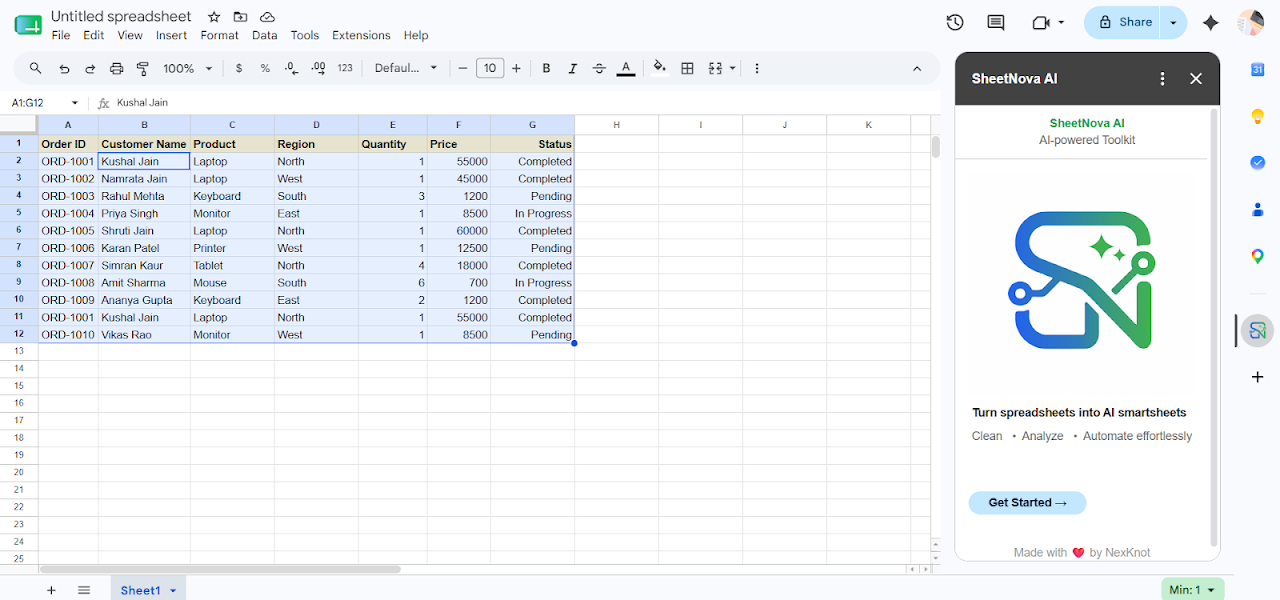
SheetNova AI is an all-in-one AI-powered productivity toolkit for Google Sheets™ that helps professionals, analysts, marketers, and teams automate spreadsheet workflows, clean data, and generate AI content directly inside Google Sheets™.

With SheetNova AI, you can manage bulk data, perform deep cleaning, analyze numbers, build formulas, and execute 1-click AI tasks seamlessly via a simple sidebar interface.

━━━━━━━━━━━━━━━━━━━━━
⚡ WHAT'S NEW IN VERSION 2.0
━━━━━━━━━━━━━━━━━━━━━
• 14 AI-Powered Productivity Tools.
• E-Commerce & SEO Content Generators (Product Descriptions, Titles, Meta Tags, Keywords).
• Smart Text Processing (Summarize, Extract, Classify, Sentiment Analysis, Fact Finder).
• 30-Day Full Premium Free Trial 🎁 with automated license management.

━━━━━━━━━━━━━━━━━━━━━
KEY FEATURES
━━━━━━━━━━━━━━━━━━━━━

🤖 1. AI Content & Text Tools:
• Product Description Generator: Create compelling e-commerce descriptions.
• Product Title & Ad Content Generator: High-converting copy for campaigns.
• SEO Suite: Meta Description Generator, Keywords & Misspellings Generator.
• Text Extractor & Classifier: Categorize and parse unstructured text in bulk.
• Text Summarizer & Rewriter: Condense long text and polish tone.
• Sentiment Analysis & Fact Finder: Analyze sentiment and verify data points.
• Q&A Generator & Task Executor: Automate custom prompt workflows.

📊 2. Data Management:
• Merge & Consolidate Sheets
• Compare Sheets & Ranges
• 1-Click Duplicate Removal

🧼 3. Data Cleaning & Formatting:
• Advanced Find & Replace
• Color-Based Sorting & Functions
• Text Trimming, Case Formatting, & Custom Filtering

📈 4. Data Analysis & Formulas:
• Statistical Analysis (Sum, Avg, Median, StdDev, Variance, Min/Max, Frequency)
• Instant Formula Generation for complex calculations
• Pivot & Summary Helpers

━━━━━━━━━━━━━━━━━━━━━
HOW TO GET STARTED
━━━━━━━━━━━━━━━━━━━━━
1. Click "Install" to add SheetNova AI to your Google Workspace™.
2. Open any Google Sheets™ spreadsheet.
3. Go to Right Side Panel (companion bar) → SheetNova AI → Launch Sidebar.
4. Select your data range and run any tool with a single click.

🔒 PRIVACY & SECURITY
• SheetNova AI strictly adheres to the Google API Services User Data Policy, including Limited Use requirements.
• We do NOT store your raw spreadsheet cell contents or personal files on external databases.
• All spreadsheet modifications run locally inside your active sheet container.

━━━━━━━━━━━━━━━━━━━━━
TRADEMARK ATTRIBUTION
━━━━━━━━━━━━━━━━━━━━━
Google Workspace™ and Google Sheets™ are trademarks of Google LLC.
Lisätietoja
sell
HinnatMaksuttomia ja maksullisia ominaisuuksia
code
Kehittäjä
email
lock
Tietosuojakäytäntö
description
Käyttöehdot
flag
Tee ilmoitusMerkitse sopimattomaksi





Haku
Tyhjennä haku
Sulje haku
Google-sovellukset
Päävalikko