
Google Workspace Marketplace


Sheets Manager
Handle multiple sheets with ease: copy, move, reorder, (un)lock, (un)hide, color, delete.
बनाने वाली कंपनी:
लिस्टिंग को पिछली बार अपडेट किया गया:24 फ़रवरी 2026
इनके साथ काम करता है:
4 लाख+



अवलोकन
This add-on takes your Google Sheets™ management to a next level. It lets you select multiple sheets and handle them all at once. Hide, protect, copy & move, change color, reorder, delete – everything can be done with sheets in bulk.

KEY FEATURES YOU WON'T FIND IN GOOGLE SHEETS™

1. Handy list of all sheets

See and navigate all sheets from the user-friendly add-on tree view. You'll instantly recognize all protected sheets, colored, hidden ones (which you can hide from the list), your currently active sheet and all tabs selected to be managed.

2. Manage several sheets

Everything you're used to doing with sheets one by one is now possible with all of them at once. Select multiple sheets by ticking off their checkboxes straight in Sheets Manager and process them all in one go.

3. Copy & move sheets to multiple separate spreadsheets

Have the add-on create a new folder in your Drive™ and copy or move each selected sheet from the file to its own new spreadsheet in that folder.

4. Quick sheet search

Find the required sheet swiftly by typing its name in the search field.

5. Sheet count

See how many sheets there are in your spreadsheet and how many you select to process.

BASIC OPERATIONS MADE EASIER

Whether you deal with 1 or several sheets, it's a lot easier when you have them all listed in one place with controls right above them (or in the context menu):

 • Hide/unhide
 • Show hidden sheets in the list
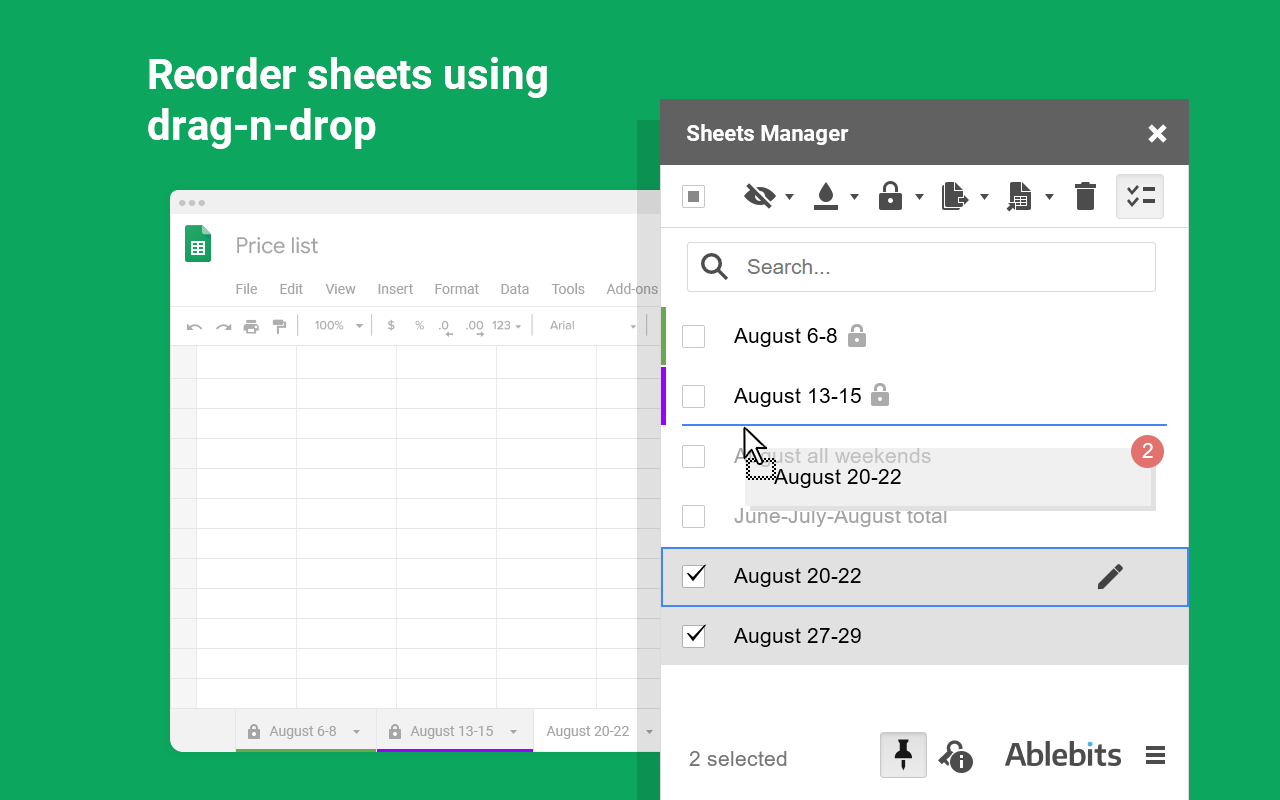
 • Reorder with drag-n-drop
 • Find sheets by names using quick search
 • Change tab color / reset color
 • Lock/unlock sheets:
    1. Show warning
    2. Restrict editing
 • Copy sheets to:
    1. Current spreadsheet (duplicate)
    2. New spreadsheet
    3. Existing spreadsheet
    4. Multiple new spreadsheets
    5. Multiple existing spreadsheets
 • Move sheets to:
    1. New spreadsheet
    2. Existing spreadsheet
    3. Multiple new spreadsheets
    4. Multiple existing spreadsheets
 • Rename
 • Delete

30 DAYS OF FREE USE

Fully functional 30-day trial period. All payments are secure and include an unconditional 30-day money-back guarantee.

If you have any questions please post them here: https://www.ablebits.com/docs/handle-multiple-google-sheets/
We'll be happy to assist!

Sheets Manager is a proud member of the Ablebits product family. We build add-ons that help you make the most of Google Workspace™. Visit our official website to learn more:
https://www.ablebits.com/google-sheets-addons.php
–––––––––––––––––––––––––––––––––––––
WHAT'S NEW:
***** V1.3 (20 Feb 2026) *****
★ New features: ★
- V8 Upgrade: the add-on is rebuilt for Google's mandatory V8 standard. While optimized, this more demanding architecture may slightly affect your experience. Feel free to contact us if you have any questions or suggestions.

Improved:
- The add-on now identifies font and tab colors more accurately.
- You can now explore more Ablebits add-ons from the corresponding Extensions menu.
- A direct link to recover your license key is added on the activation screen.
- Folder navigation now requires a double-click to prevent accidental selections.
- UX and UI improvements.

Fixed:
- The support email link in error messages was unclickable.
- Didn't display all protected sheets in the error handler when multiple users collaborated.
- Triggered an "is not defined" error in the console during certain operations.

***** V1.2 (10 May 2023) *****
★ New features: ★
- Copy or move the same sheet(s) to multiple existing spreadsheets at once.

Improved:
- It's now possible to look for the files in the folder with Starred items of your Drive.
- The limit for total cells in a spreadsheet is expanded to 10 million cells.
- Minor UX and UI improvements.

Fixed:
- Stopped processing multiple sheets if at least one of them couldn't be processed.
- Didn't delete sheets found in the add-on quick search.
- Couldn't locate spreadsheets in Drive™ if your search name started with an apostrophe.
- Moved the protected data to other spreadsheets.
- Inserted the Chart-sheet first after copying and moving it along with other multiple sheets.
- Displayed sheet names incorrectly if they had leading spaces.

***** V1.1 (1 Mar 2022) *****
★ New features ★
- Quick sheet search. You can find the required sheet swiftly by typing its name in the search field.

Improved:
- The add-on now copies and moves multiple sheets in the same order they appear in the source file.
- Minor UX and UI improvements.अतिरिक्त जानकारी
sell
कीमतइस ऐप्लिकेशन को बिना किसी शुल्क के आज़माने की सुविधा उपलब्ध है
code
डेवलपर
email
सहायता
lock
निजता नीति
description
सेवा की शर्तें
flag
शिकायत करेंआपत्तिजनक ऐप्लिकेशन की शिकायत करें





खोजें
खोज हटाएं
खोज बंद करें
Google ऐप
मुख्य मेन्यू