
Google Workspace Marketplace

SheetsWatch: Change Tracker & Edit Notifications
Monitor Google Sheets™ with email notification. Track any cell changes and get notified to an email address whenever there's a change. Only $9 for lifetime use. Customer support & refund available.
Gawa ng:
Na-update ang listing noong:Disyembre 11, 2025
Gumagana sa:
53



Pangkalahatang-ideya
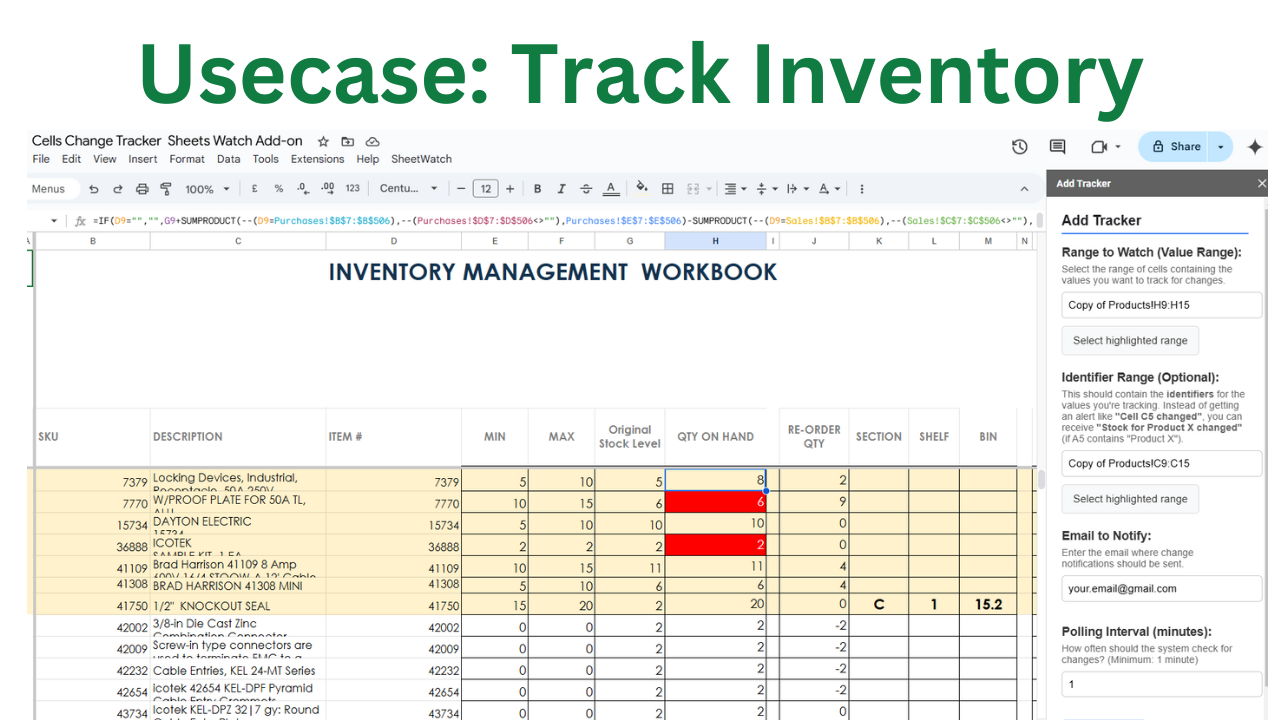
SheetWatch is a Google Sheets™ add-on that tracks changes in a specified range of cells and sends email notifications when any changes occur. It is designed for internal ERP use cases, such as monitoring product inventory, order status updates, and warehouse stock levels, ensuring that teams stay informed of critical changes without manual checks.

Features:
- Track value changes in a selected cell range.
- Receive automatic email notifications when updates occur.
- Set a custom polling period to check for changes at regular intervals.
- Sets optional minimum threshold value for email notification
- Easy-to-use configuration via a sidebar interface.
- Runs in the background based on the specified polling period.

How it works:
1. Install the add-on and open it from the Extensions menu in Google Sheets™.
2. Select the range of cells representing product inventory or other operational data.
3. Set the polling interval (e.g., every 5 minutes, every hour).
4. Enter the email address where you want to receive notifications.
5. SheetWatch will automatically check for updates and send an email alert when any value changes.

Use cases:
- Monitor product inventory levels and get notified of updates.
- Track changes in warehouse stock or supply chain data.
- Keep teams informed about order status updates in real-time.
- Automate internal ERP workflows by detecting key changes in data.

Only $9 for lifetime use, customer support & refund is always available.
Customer support is always available at sheetswatch@terrydjony.com (reply in under 1 business day)
Karagdagang impormasyon
sell
PagpepresyoMay bayad
code
Developer
Hindi trader
email
Suporta
lock
Patakaran sa privacy
description
Mga tuntunin ng serbisyo
flag




Search
I-clear ang paghahanap
Isara ang paghahanap
Mga app ng Google
Pangunahing menu