SlidesPro offers a set of tools and libraries to create more professional Google™ Slides. Our Wizards also empowers you to add images, YouTube™ videos, icons, GIFs and stickers.
Listing updated:December 22, 2025
Works with:

875K+
Overview
By turbo-charging your Google™ Slides with SlidesPro, you will be able to:
Position and order elements across the slides and amongst themselves
Resize elements easily so that they have the same size
Modify text characteristics, merge or split text boxes easily
Change colours of any element or text with a single click
Insert beautiful and meaningful images and photos

Wizards
We currently offer four wizards: Icons, Images, Charts and Maps but many more are under construction at the moment and will be made available to you as soon as ready. For now though, you will be able to create the following:

Icons:
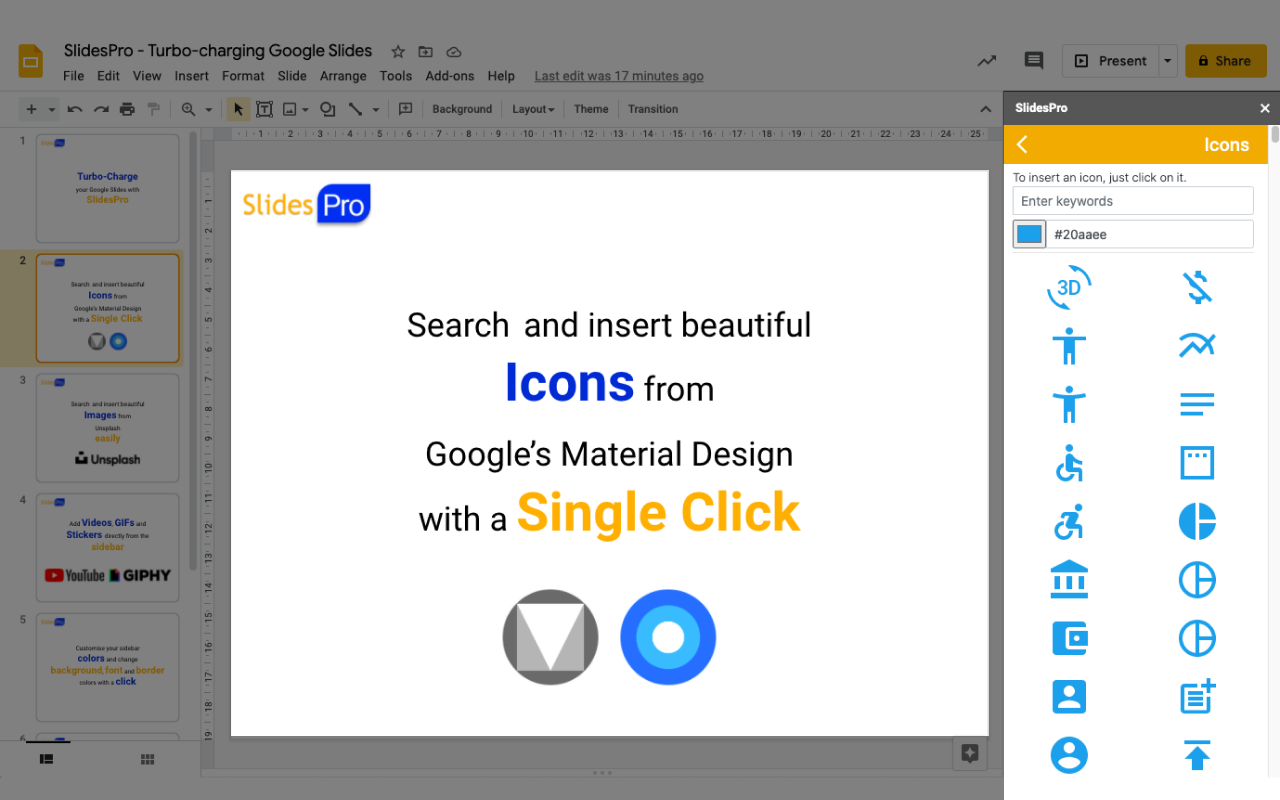
Search icons within a set of libraries that include Google™'s Material design, change the colour of the icons and insert them into your presentation seamlessly with a single click of a button.

YouTube Videos:
Insert videos from YouTube into presentations with a single click.

GIFs:
Search GIFs from GIPHY easily and insert them with a click.

Stickers:
Search Stickers from GIPHY easily and insert them with a click.

Images:
Search the great image and photo library from Unsplash, find beautiful photos and images and insert them directly into your slides.

Position & Order
This section of the tools has been designed to give you access to more features to align elements amongst themselves and relative to the overall slide. We have also added shortcuts for you to order elements very easily and also swap objects so that you can easily modify your slides without wasting a minute of your time.

Size
The Size section allows you to resize elements easily relative to other ones. You can for example stretch an element to the down most edge of the Master element or expand the height of an object to the Master. Rather than describing it though, you might wanna have a go and play with it, we believe these features are very useful :)

Text
We have added this section as a way for you to access the standard text features easily since they tend to be highly used. And to complement it, we have two very cool additions: merge and split text boxes. As its name suggests, merge text boxes will merge multiple text boxes into one and split text boxes will… well, you know :)

Theme Colors
In this section, we have created a list of colors for you to change the background, border and font colors of your elements very fast. And the best thing is that now you can also edit them and customise them!

We hope you enjoy SlidesPro and that you find it very useful.

Feel free to reach out should you have any feedback by email at contact@slidespro.io

For any questions or issues, please also email us at contact@slidespro.io.
For more information, please visit: www.slidespro.io
Additional information
PricingFree of charge
Developer
Privacy policy
Terms of service
SlidesPro will ask for the permissions shown below. Learn more
SlidesPro will need access to your Google account
This will allow SlidesPro to :
See, edit, create, and delete all your Google Slides presentations
Display and run third-party web content in prompts and sidebars inside Google applications
Connect to an external service
See your primary Google Account email address
See your personal info, including any personal info you've made publicly available
Reviews
Language:
Sort by:
Google doesn't verify reviews or ratings. Learn more about reviews
Profile Picture
Bern Bilazon
February 7, 2026
I honestly didn’t expect to like this extension as much as I do, but SlidesPro has become one of those tools I now use all the time. It just makes working in Google Slides way less annoying. The alignment and resizing tools alone save me so much time. Instead of fiddling around trying to line things up perfectly, it just… works. I also really like how easy it is to add icons, images, GIFs, and even YouTube videos directly into my slides without leaving Google Slides. Everything feels smooth and well-integrated, not clunky or overwhelming. It doesn’t change how you use Slides — it just makes it faster and better. My presentations look more polished, and I spend way less time fixing tiny layout issues. If you use Google Slides regularly (for work, school, or teaching), this is 100% worth installing. Simple, helpful, and does exactly what it promises. 👍 Highly recommend!
Is this review helpful?
Yes
No
Profile Picture
Jenny Solis
November 20, 2025
I appreciate how Slidespro assists us in developing engaging and conveniently selectable themes for our presentations. Enhanced support for Slidespro!
Is this review helpful?
Yes
No
Profile Picture
Jagadeeswari S
December 19, 2025
Finally, an add-on that actually simplifies the workflow! Being able to pull high-quality Unsplash images and Material Design icons directly from the sidebar without switching tabs is a massive time-saver. The interface is clean and doesn't lag. If you build decks daily, this is a game-changer. ⭐⭐⭐⭐⭐
Is this review helpful?
Yes
No
Profile Picture
Dan Amber Gasapo
August 31, 2025
Super handy add-on for building presentations faster. I was able to turn a bunch of screenshots into a clean, professional deck in minutes. The tools are simple but save a lot of time compared to doing everything manually.
Is this review helpful?
Yes
No
Profile Picture
Christine Maheu
September 2, 2025
Definitely feel that we can do so much more with google slides than PP. Hence can't wait to be the winner to have this additional feature.
Is this review helpful?
Yes
No
Profile Picture
Davide Campagna
February 12, 2026
Great tool!
Is this review helpful?
Yes
No
Profile Picture
A User of SlidesPro
May 1, 2025
This service is AMAZING! I would recommend it for all users who want better features on google slides. The free features are amazing, but the pro features are 100% worth. I really love this app and would say that everyone should buy pro, because it is cheap for what it offers!
Is this review helpful?
Yes
No
Profile Picture
Jacquin Benson
November 15, 2025
This has been a really great add on that makes presentations speak louder.
Is this review helpful?
Yes
No
Profile Picture
Abel Treece
January 31, 2026
This was a great extention.
Is this review helpful?
Yes
No
Profile Picture
Practax
April 13, 2025
I recently used SlidesPro to create professional-looking slides for my business presentation, and I was blown away by the results! The templates are modern, clean, and easy to customize. The support team was also super helpful and responsive. Highly recommend SlidesPro for anyone looking to elevate their presentation game!
Is this review helpful?
Yes
No
1-10 of 52
Search
Clear search
Close search
Google apps
Main menu