
Google Workspace Marketplace


Simple CRM For Gmail™
The CRM for small businesses that don't want a CRM. No setup. Manage customers, follow-ups, notes, and tasks using Gmail™ and Google™ tools.
Listing updated:August 25, 2026
Works with:
60


Overview
🚀 THE CRM FOR SMALL BUSINESSES THAT DON'T WANT A CRM

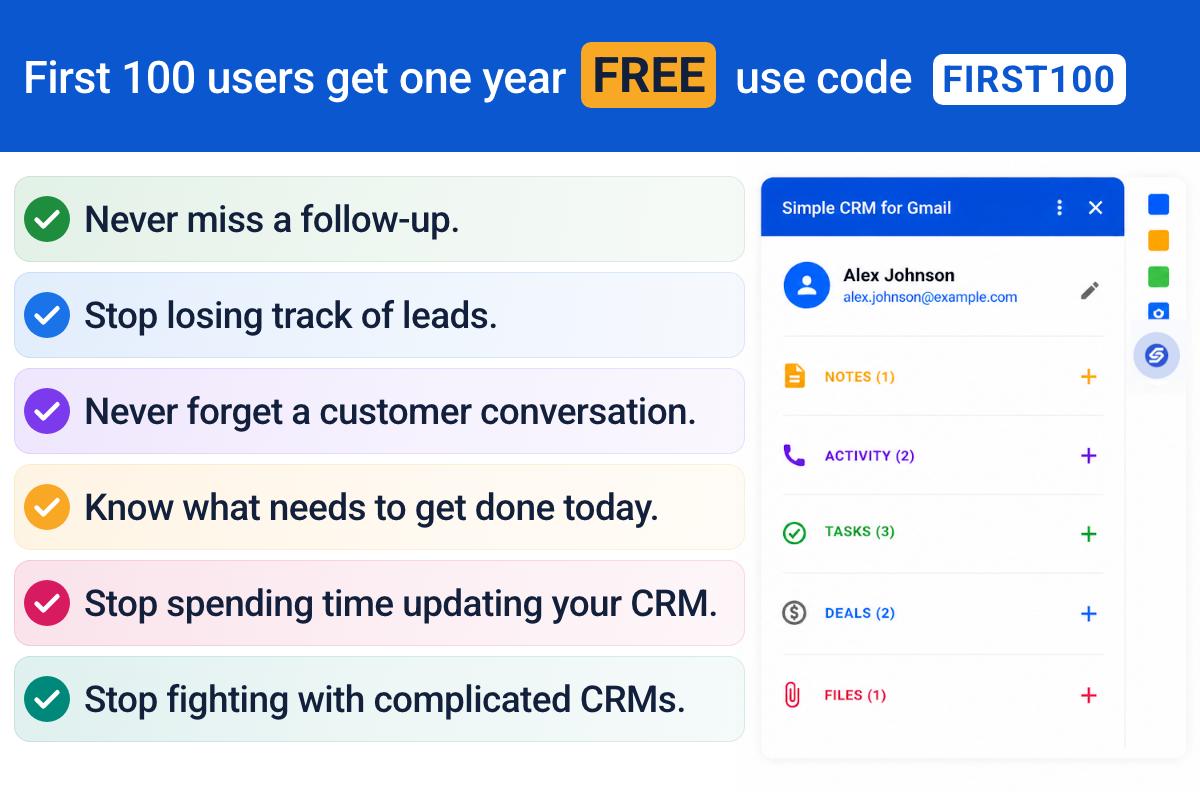
Simple CRM for Gmail™ gives you everything you need to manage customers, leads, deals, follow-ups, and relationships — without the complexity of a traditional CRM.

✨ NO SETUP. NO DATA MIGRATION. NO NEW ECOSYSTEM TO LEARN.

It works directly inside Gmail™ and uses the Google™ tools you already know.

⚡ START MANAGING CUSTOMERS IN MINUTES

There's no complicated implementation or empty database to build.

Simple CRM for Gmail™ opens with your existing Google Contacts™, so you can start managing the people you're already communicating with.

Open an email. See the contact. Add notes. Create a follow-up. Schedule a meeting. Keep the relationship organized.

You don't need to become a CRM expert to use it.

📧 YOUR CRM, INSIDE GMAIL™

Keep your customer information where you're already doing business.

• 👥 Contacts & Companies — Manage customers, prospects, and businesses, with deals rolled up by company.

• 💰 Deals & Sales — Track opportunities through your own pipeline. Rename "Deal" to Opportunity, Project, Bid, or whatever fits your business.

• ✅ Tasks & Follow-Ups — Create and manage follow-ups using Google Tasks™.

• 📝 Notes & Activity — Log calls, emails, meetings, and notes so you always know what happened.

• 📅 Meetings — Schedule meetings directly from a customer record using Google Calendar™.

• 📁 Files — Attach files from the email you're viewing or select them from Google Drive™. Your files stay in your Drive; the CRM simply keeps the link.

• 🔎 Search — Find contacts, companies, deals, notes, or tasks from one search box.

🤖 LET AUTOMATIONS DO THE ADMIN

Stop manually keeping your CRM up to date.

Turn on simple automations that handle repetitive work for you:

• New deal → create a first-contact task
• Deal stage changes → log the change
• Deal stage changes → create a follow-up task
• Deal won or lost → log the result and value
• Deal without a close date → create a task to set one

Each automation is a simple switch. For deadline-based automations, choose how many days you want.

Less CRM administration. More time running your business.

🎯 MAKE IT FIT YOUR BUSINESS

Your business doesn't have to fit someone else's CRM.

• Rename, hide, add, or delete fields
• Create your own deal stages
• Choose your default deal stage
• Reorder or hide sections on your home page
• Customize Notes, Activity, and Tasks
• See what's happening today, your open pipeline value, and your top deals

Use the terminology and workflow that actually make sense for your business.

🔒 YOUR DATA STAYS IN YOUR GOOGLE™ ACCOUNT

Simple CRM for Gmail™ is built around the Google™ tools you already use.

Your CRM data is stored in your own Google Sheets™. Files stay in your own Google Drive™. Contacts use Google Contacts™. Tasks use Google Tasks™. Meetings use Google Calendar™.

• CRM data → Your Google Sheets™
• Files → Your Google Drive™
• Contacts → Google Contacts™
• Tasks → Google Tasks™
• Meetings → Your Google Calendar™

Your business data stays in the Google™ ecosystem you already use instead of being locked into a separate proprietary CRM database.

🪄 NOTHING TO SET UP

Forget the typical CRM implementation.

• No importing contacts
• No building an empty database
• No hours of configuration

Your existing Google Contacts™ are already there.

Install Simple CRM for Gmail™, open Gmail™, and start working.

🧠 NOTHING NEW TO LEARN

You already know Gmail™.

You already know Google Calendar™.

You already know Google Contacts™.

You already know Google Tasks™.

You already know Google Drive™.

You already know Google Sheets™.

Simple CRM for Gmail™ connects these tools into a simple customer management system instead of asking you to learn an entirely new ecosystem.

👤 BUILT FOR SOLO ENTREPRENEURS & SMALL BUSINESSES

You don't need the complexity of a CRM designed for a 50-person sales department.

You need to know:

Who are my customers?
What opportunities do I have?
Who do I need to follow up with?
What happened last time we spoke?
What's happening today?

Simple CRM for Gmail™ focuses on the core things a small business actually needs.

Manage your:

• Contacts
• Companies
• Deals
• Tasks
• Follow-ups
• Notes
• Activity
• Meetings
• Files

Everything you need to stay on top of your customers. Nothing you don't.

💵 TRY IT FREE

$15/month or $149/year

Students: $49 one-time payment covering 6 years with a .edu address.

🎁 14-DAY FREE TRIAL

Try Simple CRM for Gmail™ free for 14 days.

No credit card required.

See how much easier customer management can be when your CRM works with the tools you already use.

Gmail™, Google Contacts™, Google Tasks™, Google Calendar™, Google Drive™, Google Sheets™ and Google Workspace™ are trademarks of Google LLC. Simple CRM for Gmail is not endorsed by or affiliated with Google LLC.
Additional information
sell
PricingFree of charge trial
code
Developer
Non-trader
email
Support
lock
Privacy policy
description
Terms of service
flag
ReportFlag as inappropriate








Search
Clear search
Close search
Google apps
Main menu