
Google Workspace Marketplace


Slides™ to Video GIF - Convert Slide to Video
Lets you convert Google Slides™ into MP4, WEBM, or GIF videos with custom durations — fast, easy, and intuitive.
Listing updated:August 15, 2025
Works with:
768


Overview
------------------------------------------------------------
Slides™ to Video GIF lets you transform your presentations
into beautiful videos or looping GIFs — perfect for social
media, tutorials, announcements, and more.

Whether you're a teacher, marketer, content creator, or
presenter, now you can breathe new life into your
Google Slides™ with just a few clicks.
------------------------------------------------------------

FEATURES
------------------------------------------------------------
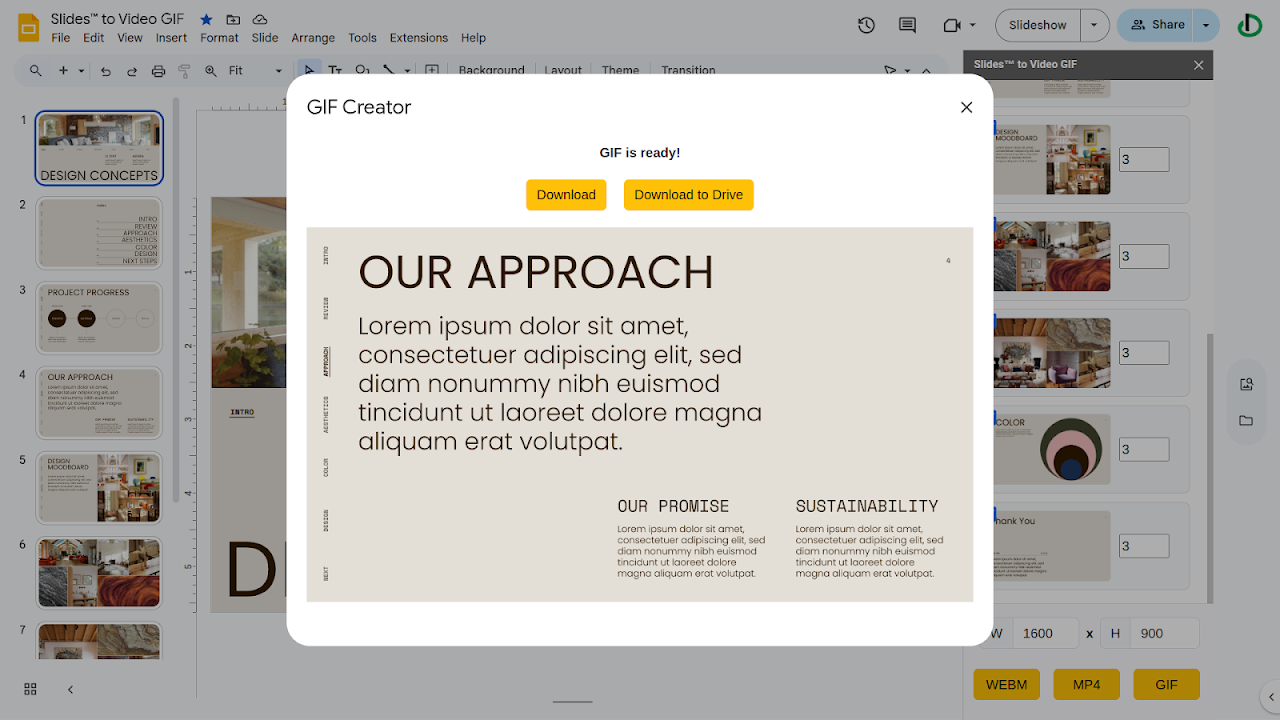
- Convert your slide(s) into MP4, WEBM, or animated GIF formats
- Set custom durations for each slide (e.g., 3s, 5s, etc.)
- Select specific slide(s) to include — skip the rest
- Choose output resolution (e.g., 1600x900, 1280x720)
- Works seamlessly within Google Slides™
- One-click export — no video editing tools needed

------------------------------------------------------------
HOW IT WORKS
------------------------------------------------------------
1. Open your Google Slides™ presentation
2. Launch the add-on via Extensions > Slides™ to Video GIF
3. Select the slide(s) you want to include
4. Set the time each slide appears (in seconds)
5. Click WEBM, MP4, or GIF to export your video

- Your file will be generated and saved to Google Drive
- Option to preview and download

------------------------------------------------------------
FREE VERSION LIMITATIONS
------------------------------------------------------------
- The Free version lets you process the first few slide(s)

------------------------------------------------------------
USE CASES
------------------------------------------------------------
- Create explainer videos or lessons from lecture slide(s)
- Turn presentations into social media videos
- Share pitch decks as animated previews
- Make looping promo GIFs for products or ads
- Automate content repurposing workflows

------------------------------------------------------------
DATA PRIVACY & PERMISSIONS
------------------------------------------------------------
- This add-on uses Google Drive™ and Slides™ APIs only
  with your permission
- Your data is never shared or stored externally
- We respect your privacy 100%

------------------------------------------------------------
SUPPORT & FEEDBACK
------------------------------------------------------------
For help, feature requests, or reporting issues, contact:
support@dawent.com

Watch the demo video:
https://youtu.be/p4NtUEIU2OM

------------------------------------------------------------
Transform your slide(s) into stunning videos — no video
editing skills required.
------------------------------------------------------------
Additional information
sell
PricingFree of charge with paid features
code
Developer
email
Support
lock
Privacy policy
description
Terms of service
flag
ReportFlag as inappropriate






Search
Clear search
Close search
Google apps
Main menu