
Google Workspace Marketplace

Slides Translator - AI Translate
AI-powered Google Slides™ translator. Instantly translate presentation text, charts, and image menus into 40+ languages while keeping perfectly formatted slides.
דף האפליקציה עודכן בתאריך:4 במאי 2026
האפליקציה פועלת עם:
אין ביקורות
+19K



סקירה כללית
Effortlessly Translate Google Slides™ Text and Images with AI Technology

Revolutionize your presentations with this cutting-edge app powered by AI. Break language barriers and connect with a global audience by seamlessly translating your Google Slides™ into any language—now with advanced image translation capabilities!

🌟 Key Features:

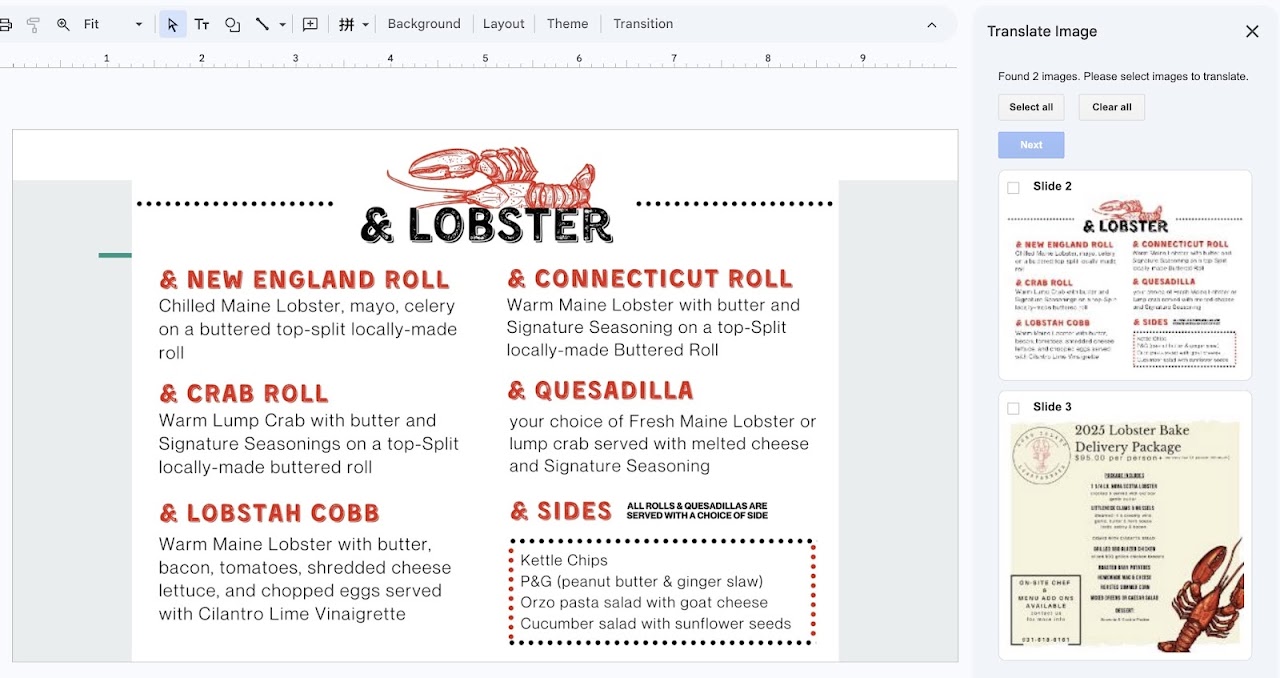
Powerful Image Translation: Go beyond standard text. Our app detects and translates text embedded directly within images (like menus, infographics, or charts) while flawlessly preserving the original visual layout and design.

In-Place Translation: Keep your Google Drive organized. Translations directly modify your current slide deck, meaning no messy duplicate files or new presentations are created.

Preserve Formatting: Maintain your hard work. The AI carefully replaces the original text with the translated language without breaking your slide's layout or design elements.

Extensive Language Support: Translate your content into 40+ different languages with just a few clicks.

Flexible Selection: Choose exactly what you want to translate—whether it's specific slides, selected images within a slide, or the entire presentation.

Free & Premium Plans: Get started for free! The Free plan includes translation for your first 5 slides. Upgrade to Premium to instantly translate entire presentations (up to 50,00 slide translations per month) and unlock 500 image translations.

Enhance communication, broaden your reach, and leave a lasting impression with AI-driven translation.

Google Slides™ is a trademark of Google LLC.
מידע נוסף
sell
תמחורתקופת ניסיון בחינם
code
מפתח
email
lock
מדיניות הפרטיות
description
תנאים והגבלות
flag
דיווחסימון כבלתי הולמת




חיפוש
ניקוי החיפוש
סגירת החיפוש
אפליקציות Google
התפריט הראשי