Easy-to-use tools to compress, convert, e-sign, and merge your documents directly from within your Google Workspace™—for free!
Listing updated:April 16, 2024
Works with:
3M+
Overview
Easy-to-use tools to compress, convert, e-sign, and merge your documents directly from your Google Workspace™—for free! Works with Google Docs™, Google Sheets™, and Google Drive™.

Once you’ve finalized your Google document, pick a tool from the Smallpdf tools side panel to compress, sign, convert to PDF, merge, organize, and more. Smallpdf is the first and only PDF software you’ll love, trusted by over 2.4 billion people since 2013.

How to use Smallpdf in your documents:
1.  Install the Smallpdf Google Workspace App.
2.  Click on the Smallpdf icon and pick a tool. 
3. Process your file on our site.
4. Download your file.

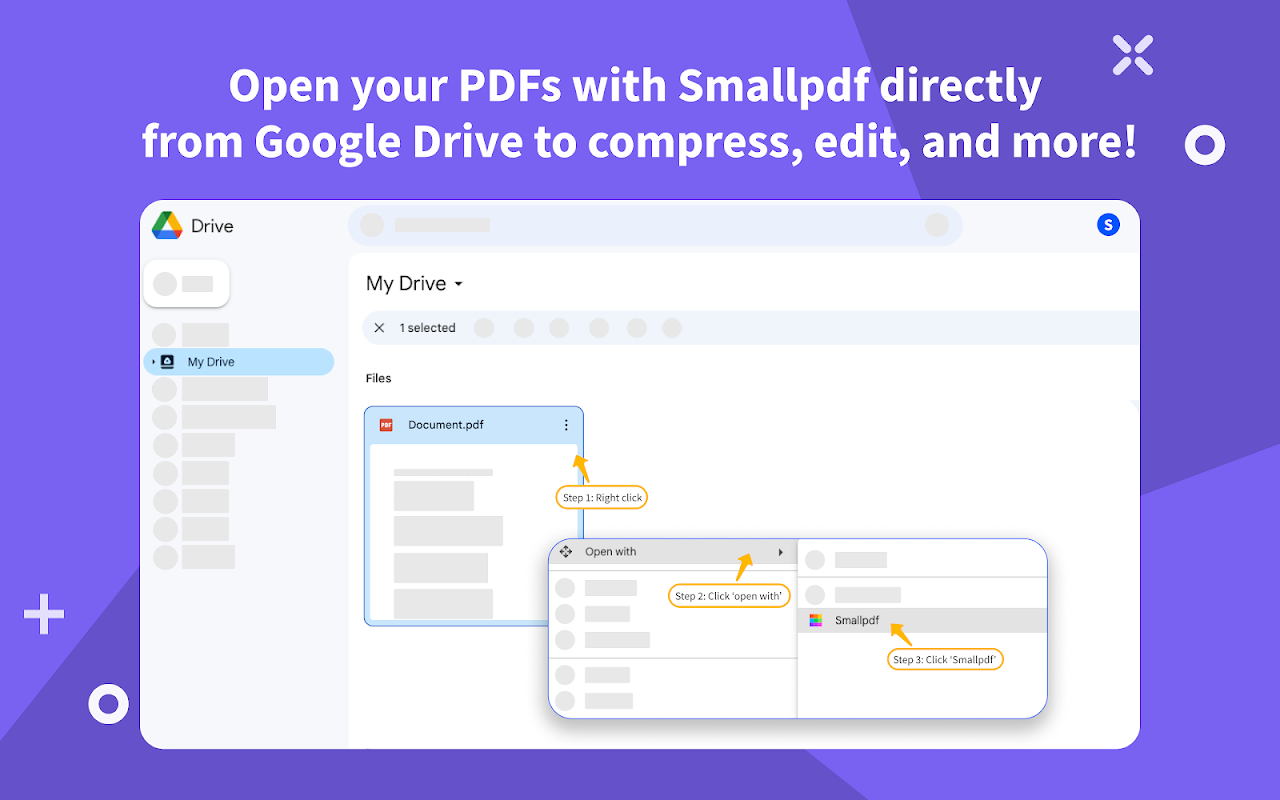
How to use Smallpdf in your Google Drive™:
1. Install the Smallpdf Google Workspace App.
2. Right-click on any PDF in your Google Drive™.
3. Go to “Open with” and then “Smallpdf.”

Use Smallpdf’s free online tools to:

➤ Edit PDF
➤ Compress 
➤ Merge 
➤ Split 
➤ E-sign 
➤ Extract  pages
➤ Convert to PDF
➤ Convert PDF to Word
➤ Convert PDF to Excel
➤ Convert PDF to PPT
➤ Convert PDF to image (JPG)
➤ Protect 
➤ Unlock

Get Smallpdf Pro for premium features:
➤ unlimited usage: Process as many files as you’d like on all tools
➤ compress PDF (70% strong compression)
➤ convert PDF to Office with Optical Character Recognition (OCR)
➤ unlimited access to the Smallpdf Mobile App and offline Smallpdf Windows App
➤ batch processing on our website and the Smallpdf Windows App

Smallpdf Pro is available for a 7-day free trial (www.smallpdf.com/pricing).

By installing the Smallpdf Google Workspace Add-on, you agree to Smallpdf’s Privacy and Terms (www.smallpdf.com/privacy).
Additional information
PricingNot available
Developer
Privacy policy
Terms of service
Smallpdf will ask for the permissions shown below. Learn more
Smallpdf will need access to your Google account
This will allow Smallpdf to :
View and manage documents that this application has been installed in
See, edit, create, and delete only the specific Google Drive files you use with this app
Connect itself to your Google Drive
View and manage spreadsheets that this application has been installed in
See the URL of links within Google Workspace Apps (including Google Documents, Sheets, Slides, Gmail, Calendar, etc)
View your email messages when the add-on is running
Run as a Gmail add-on
Connect to an external service
See your primary Google Account email address
See your personal info, including any personal info you've made publicly available
Reviews
Language:
Sort by:
Google doesn't verify reviews or ratings. Learn more about reviews
Profile Picture
Boris Joffe
April 21, 2024
Why was this installed in my Gmail account without my permission? I've never looked for this extension, but it just appeared in my accoutn about a week ago without any action on my part. This seems like it's malicious software
Is this review helpful?
Yes
No
Profile Picture
Bambang S.
April 2, 2024
Good
Is this review helpful?
Yes
No
Profile Picture
Jordan J
January 24, 2023
best I've found that's actually free to just basically use and get familiar with. not protesting capitalism, but WOW are ALL the other apps either sneaky or also bad.. this one is great and actually free for starters
Is this review helpful?
Yes
No
Profile Picture
Anthony Nguyen
May 3, 2023
Fine if you need to sign only 3 documents. There's a 8 hour wait time if you need to sign more.
Is this review helpful?
Yes
No
Profile Picture
Christopher Fuhrman
December 6, 2022
Free version won't show comments. That is all. Not sure you could even "tag" a user in a comment like in Google Docs. Frustrating that so many "apps" for PDF don't work like Google Docs. It's the cloud, so those features are important.
Is this review helpful?
Yes
No
Profile Picture
Dave Salyer
October 24, 2022
Does not support Shared Drives. Not good for Google Workspace users. It's fine for individual users.
Is this review helpful?
Yes
No
Profile Picture
Veronica Cisneros
December 7, 2022
QUESTION: while in Google drive, I thought I could convert pdf to images, and the image version of the original pdf file would be saved in the drive. This is not the workflow I am experiencing. Do I have the wrong expectations?
Is this review helpful?
Yes
No
Profile Picture
Luca Gentile (Cyclorbit)
February 22, 2023
After installing it, I don't see any icon coming up in the menu on Gdrive.
Is this review helpful?
Yes
No
Profile Picture
Carlos Maglutac,
January 4, 2023
very easy to use specially for signing documents
Is this review helpful?
Yes
No
Profile Picture
Aminah
September 21, 2022
Every tool is just as expected. Smallpdf is the easiest pdf editor I've used.
Is this review helpful?
Yes
No
1-10 of 1224
Search
Clear search
Close search
Google apps
Main menu