
Google Workspace Marketplace


Social Media Officer
Google Sheet™ add-on to prepare and publish Social Media Content
정보 업데이트:2023년 8월 31일
호환 기기:
리뷰 없음
516



개요
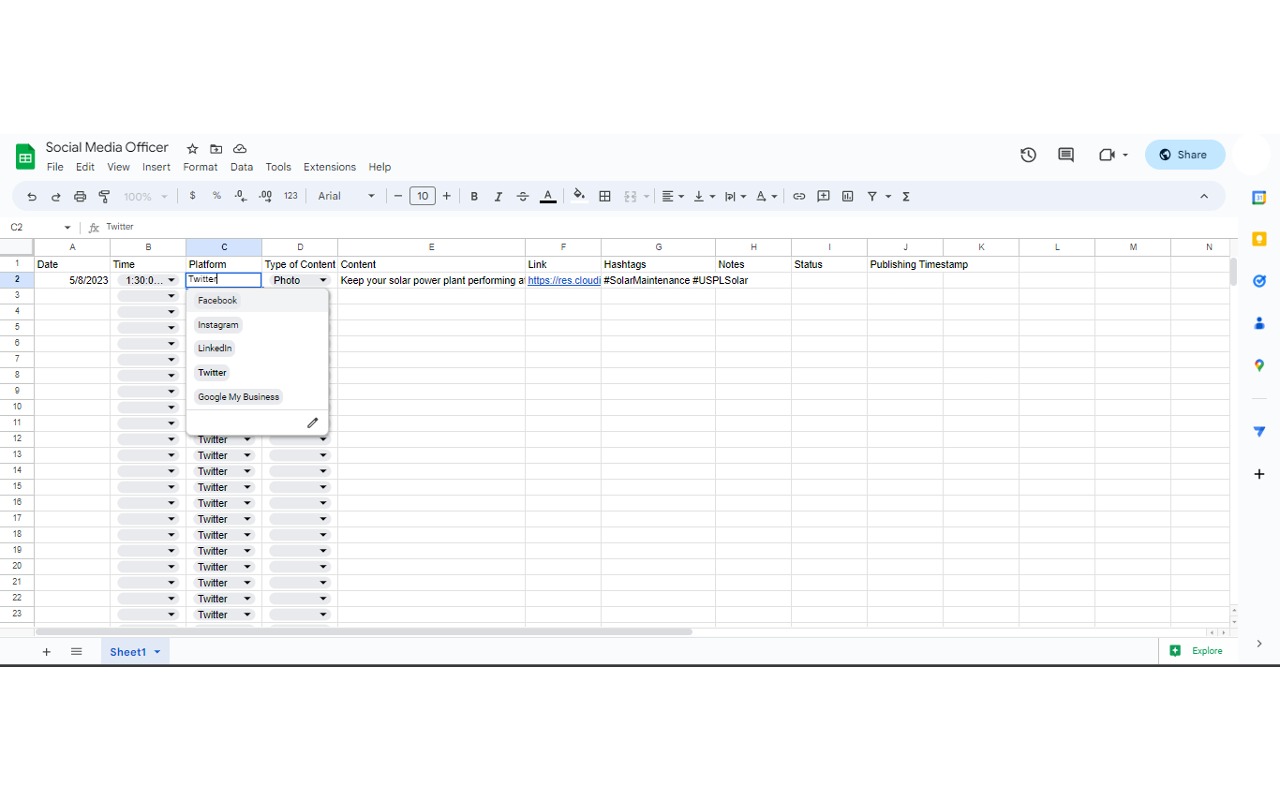
Social Media Officer is a Google Workspace™ Add-on designed to simplify and streamline your social media management. Built to integrate seamlessly with Google Sheets™, this add-on enables you to schedule posts for multiple social media platforms including Facebook™, Instagram™, LinkedIn™, Google My Business™, and Twitter™ all from one place.

Key Features:

Unified Dashboard: Schedule and manage all your social media posts across different platforms from a single Google Sheet™. No need to switch between different tools or tabs.

Batch Schedule: Plan your content calendar ahead of time and schedule multiple posts at once.

Manage Multiple Accounts: Manage and schedule posts to multiple accounts across different platforms seamlessly.

Rich Media Support: Our add-on supports text, image, and video posts, providing versatility in the content you can share.

Secure and Easy to Use: The add-on securely connects with your social media accounts via OAuth. No advanced technical knowledge needed, simple setup.

Efficient Content Management: The user-friendly interface of a Google Sheet™ allows you to effectively manage and overview your content, captions, and posting times.

Google Sheets™ Integration: Utilize the power of Google Sheets™ to manage your post data. Enjoy benefits like collaboration, revision history, easy data input, and much more.

Save time and improve your social media productivity with the Social Media Officer add-on. Whether you're a social media manager, a small business owner, or just trying to keep up with multiple social platforms, the Social Media Officer is a must-have tool in your digital arsenal.

Try it out today and revolutionize your social media management process!
추가정보




검색
검색어 지우기
검색 닫기
Google 앱
기본 메뉴