
Google Workspace Marketplace


Staff Rota Manager
Automate staff scheduling with shift patterns, hours tracking, and absence management.
Разработчик:
Данные обновлены:11 мая 2026 г.
Совместимо с:
81


Общие сведения
Staff Rota Manager is a comprehensive Google Sheets™ add-on that automates employee shift scheduling and workforce management. Transform hours of manual scheduling work into minutes with intelligent rota generation, automatic hours tracking, and integrated absence management—all within your familiar Google Sheets™ environment.

WHAT DOES STAFF ROTA MANAGER DO?

Staff Rota Manager creates and manages employee work schedules directly in Google Sheets™. The add-on generates complete monthly rotas, tracks employee availability and absences, calculates working hours automatically, and provides visual color-coded schedules that make shift planning intuitive and error-free.

CORE FEATURES EXPLAINED:

Automated Monthly Rota Generation
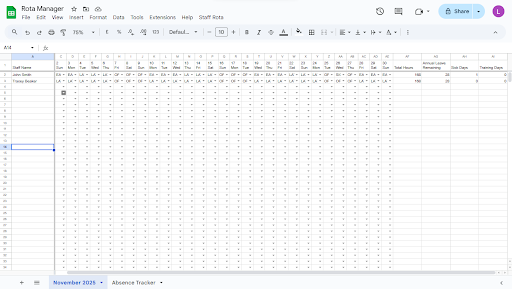
Click one button to generate a complete monthly schedule for your entire team. The add-on creates a professionally formatted rota sheet with dates, staff names, and shift assignments. You can specify the month and year, and the system automatically accounts for the correct number of days, including weekends. Each generated rota includes automatic date formatting, staff member rows, and pre-configured shift columns ready for your assignments.

Comprehensive Shift Pattern System
Staff Rota Manager supports eight different shift types: Early (E), Late (L), Night (N), Day (D), Annual Leave (AL), Sick Leave (S), Training (T), and Rest Days (blank). Each shift type is assigned a distinct pastel color for instant visual recognition. You can customize shift durations to match your business requirements (e.g., Early = 8 hours, Late = 10 hours, Night = 12 hours). Apply shifts individually or use bulk assignment to schedule entire weeks or months in seconds.

Intelligent Hours Calculation
The add-on automatically calculates total hours worked for each staff member throughout the month. As you assign shifts, the hours column updates in real-time using advanced spreadsheet formulas. The system multiplies shift occurrences by their configured durations and displays totals at the end of each staff row. This eliminates manual counting and ensures accurate payroll data and compliance with working time regulations.

Advanced Absence Management System
Log and track employee absences with a dedicated absence management interface. Record annual leave, sick days, and training sessions with start dates, end dates, and reasons. The system automatically calculates absence duration and maintains a searchable absence history. View comprehensive absence reports showing total days taken by type, individual employee absence records, and remaining annual leave balances. All absence data integrates seamlessly with your rota schedules.

Staff Configuration & Management
Easily add, edit, or remove staff members through the intuitive settings dialog. Manage your entire workforce database within the add-on, including staff names and shift preferences. The system automatically updates all existing rotas when you modify staff information, ensuring consistency across all your schedules. Settings are saved to your Google Sheets™, so your configuration persists across sessions.

Visual Color-Coded Interface
Every shift type displays with its own distinctive color: Early shifts in soft blue, Late shifts in coral, Night shifts in purple, Day shifts in green, Annual Leave in golden yellow, Sick Leave in pink, and Training in light blue. This visual system allows managers and staff to understand schedules at a glance without reading every cell. Color coding reduces scheduling errors and improves communication.

Professional Rota Formatting
Generated rotas include professional formatting with bordered cells, centered text, bold headers, and clear date labels. The first column shows all staff names, while subsequent columns represent each day of the month with the date and day name (e.g., "1 Mon", "2 Tue"). The layout is print-friendly and can be shared directly with your team or exported to PDF.

Data Validation & Error Prevention
The add-on includes built-in safeguards to prevent common scheduling mistakes. You can only assign valid shift codes, ensuring data consistency. The hours calculation formulas are protected from accidental editing. The system validates date ranges for absence logging and prevents invalid entries.

HOW STAFF ROTA MANAGER WORKS:

1. Install the add-on from the Google Workspace™ Marketplace
2. Open any Google Sheets™ spreadsheet
3. Access Staff Rota Manager from the Extensions menu
4. Add your staff members in Settings
5. Generate your first monthly rota
6. Assign shifts by typing shift codes (E, L, N, D, AL, S, T) into cells
7. Watch hours calculate automatically as you schedule
8. Log absences through the Absence Logger
9. View reports to monitor team coverage and leave balances
10. Share the spreadsheet with your team for visibility

IDEAL FOR THESE INDUSTRIES:

Healthcare & Medical Facilities: Manage nursing rotas, doctor shifts, and medical staff schedules with support for night shifts and on-call rotations.

Retail & Hospitality: Schedule shop floor staff, restaurant teams, and hotel employees across early, late, and weekend shifts.

Call Centers & Customer Service: Organize agent schedules, track availability, and ensure adequate coverage during peak hours.

Security & Emergency Services: Coordinate guard rotas, patrol schedules, and 24/7 shift coverage with night shift support.

Manufacturing & Warehousing: Plan production line shifts, manage shift handovers, and track employee hours for payroll.

Any Shift-Based Business: If your organization operates with rotating shifts, multiple shift patterns, or requires precise hours tracking, Staff Rota Manager streamlines your scheduling process.

BENEFITS OF USING STAFF ROTA MANAGER:

Save Time: Generate complete monthly schedules in under 2 minutes instead of spending hours on manual scheduling. Bulk shift assignment allows you to schedule entire weeks with a few clicks.

Reduce Errors: Automated hours calculation eliminates counting mistakes. Color coding prevents shift confusion. Built-in validation stops invalid entries before they cause problems.

Improve Communication: Share schedules instantly with your team through Google Sheets™. Staff can view their shifts from any device without requesting information from management.

Maintain Compliance: Automatic hours tracking helps you monitor working time regulations. Absence records provide audit trails for leave management and HR compliance.

Enhance Visibility: Color-coded visual schedules make it easy to spot gaps in coverage, identify patterns, and balance workloads across your team.

Centralize Information: Keep rotas, absence records, and staff data in one location. No more scattered spreadsheets or paper-based systems.

GETTING STARTED:

Staff Rota Manager requires no technical expertise. If you can use Google Sheets™, you can use this add-on. The intuitive menu system guides you through each function with clear labels and helpful prompts. Built-in help documentation explains every feature in detail.

Your data remains secure in your own Google Sheets™ spreadsheet. Staff Rota Manager operates entirely within your Google™ account and doesn't send your scheduling information to external servers. You maintain complete control over who can view and edit your rotas.

Transform your staff scheduling process today with Staff Rota Manager—the complete workforce management solution for Google Sheets™.

Google Sheets™ and Google Workspace™ are trademarks of Google LLC.
Дополнительная информация
sell
ЦеныПлатное
code
Разработчик
email
Поддержка
lock
Политика конфиденциальности
description
Условия использования
flag
ЖалобаПожаловаться




Поиск
Очистить поле поиска
Закрыть поиск
Приложения Google
Главное меню