
Google Workspace Marketplace


Tailquill: Footnotes to Endnotes & Footnote Fonts
Turn Google Docs™ footnotes into endnotes, restart them per chapter and match fonts.
Deweloper:
Pozycja zaktualizowana:13 listopada 2026
Współpracuje z:
Brak opinii
62



Omówienie
Tailquill gives Google Docs™ the note tools that theses, Chicago-style papers and book manuscripts need: endnotes, footnotes that match your text, numbering that restarts in each chapter, and notes you can cite twice. Converting, matching styles and reviewing are free for up to 25 notes. Pro is one payment with no subscription.

FOOTNOTES TO ENDNOTES (FREE UP TO 25 NOTES)
Choose Extensions > Tailquill > Convert footnotes to endnotes. Every footnote becomes a numbered marker in your text and a note in a Notes section at the end, on its own page if you like. Markers can be superscript (¹ ² ³) or brackets ([1]). Each marker links to its note and each note links back, so readers can jump both ways.
Keep writing afterwards: add new footnotes the normal way (Insert > Footnote) and run Convert again. They slot into the right place and every number after them updates. Your edits to existing notes are kept.
Changed your mind? Edit > Undo or File > Version history brings back the footnoted version.

RESTART NUMBERS IN EACH CHAPTER (PRO)
Every chapter that starts with a Heading 1 gets its own Notes section and numbering that starts again at 1. Notes before the first chapter get their own section too.

MAKE FOOTNOTES MATCH YOUR BODY TEXT (FREE)
Google Docs™ gives every footnote its default font, whatever your document uses. One click sets every footnote to your body text's font, size and line spacing, or to a size 1 or 2 points smaller, as print books do. Tailquill reads your body text's style for you.

CITE A NOTE AGAIN (PRO)
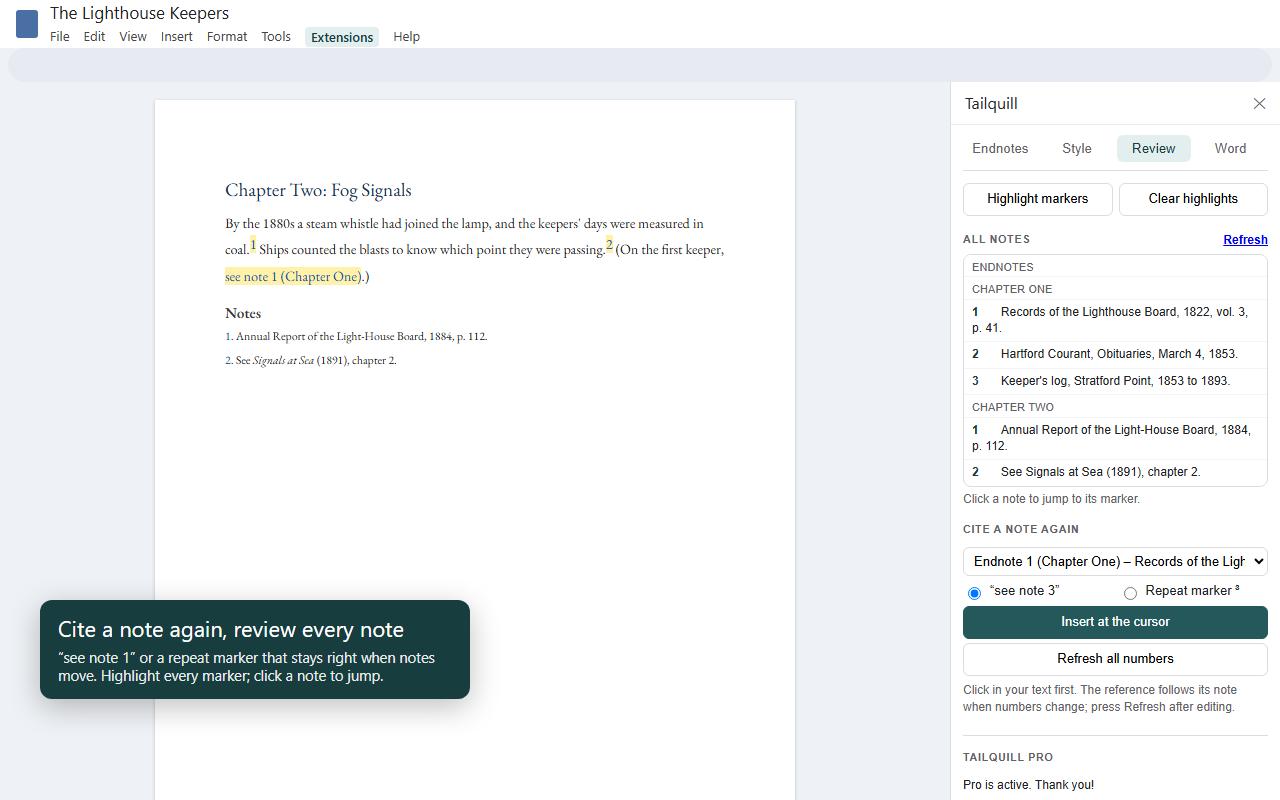
Need the same source twice? Pick a note and insert "see note 3" or a repeat marker at the cursor. When notes are added, moved or deleted, Refresh numbers puts every repeat reference right, for endnotes and for ordinary footnotes alike.

REVIEW EVERY NOTE (FREE)
The Review tab lists every footnote and endnote with its first words. Click one to jump to it. Highlight markers colors every note marker in the document so you can check them, and Clear highlights removes only Tailquill's highlighting.

REAL MICROSOFT WORD ENDNOTES (PRO)
Publishers often want a Word file with true endnotes, and Google Docs™ downloads footnotes as Word footnotes. Download your document as .docx, open Tailquill's .docx fixer, and every footnote becomes a real Word endnote, numbered 1, 2, 3 or i, ii, iii, at the end of the document or of each section. The file is read and rewritten in your browser; it is never uploaded.

PRIVATE BY DESIGN
Tailquill never needs your document shared, and never asks you to set it to "anyone with the link can edit". It works on the document you have open, under your own account. There's no Tailquill server, no tracking and no ads. The only outside request is checking a Pro license key with Gumroad. Tailquill can only see the document you have open, never the rest of your Drive.

GOOD TO KNOW
• Google Docs™ numbers its own footnotes straight through the document, so chapter restarts apply to Tailquill endnotes, not to footnotes.
• Google Docs™ doesn't tell add-ons where pages break, so endnotes are numbered and linked rather than given page numbers.
• Edit > Undo and File > Version history reverse any change.

PLANS
Free: convert up to 25 notes per document, make footnotes match the body text, and review and highlight notes.
Tailquill Pro: $9.99, paid once. Any number of notes, numbering that restarts in each chapter, cite a note again, and real Word endnotes from a .docx.

Made by Front Porch Puzzle Press. Support: hello@frontporchpuzzlepress.com

Google Docs™ and Google Drive™ are trademarks of Google LLC. Microsoft Word is a trademark of the Microsoft group of companies. EndNote® is a registered trademark of Clarivate; Tailquill is not affiliated with Clarivate. Tailquill is not affiliated with or endorsed by Google or Microsoft.
Dodatkowe informacje
sell
CenyBezpłatnie z płatnymi funkcjami
code
Deweloper
email
lock
Polityka prywatności
description
Warunki korzystania z usługi
flag



Szukaj
Wyczyść wyszukiwanie
Zamknij wyszukiwanie
Aplikacje Google
Menu główne