
Google Workspace Marketplace


Tasneef AI
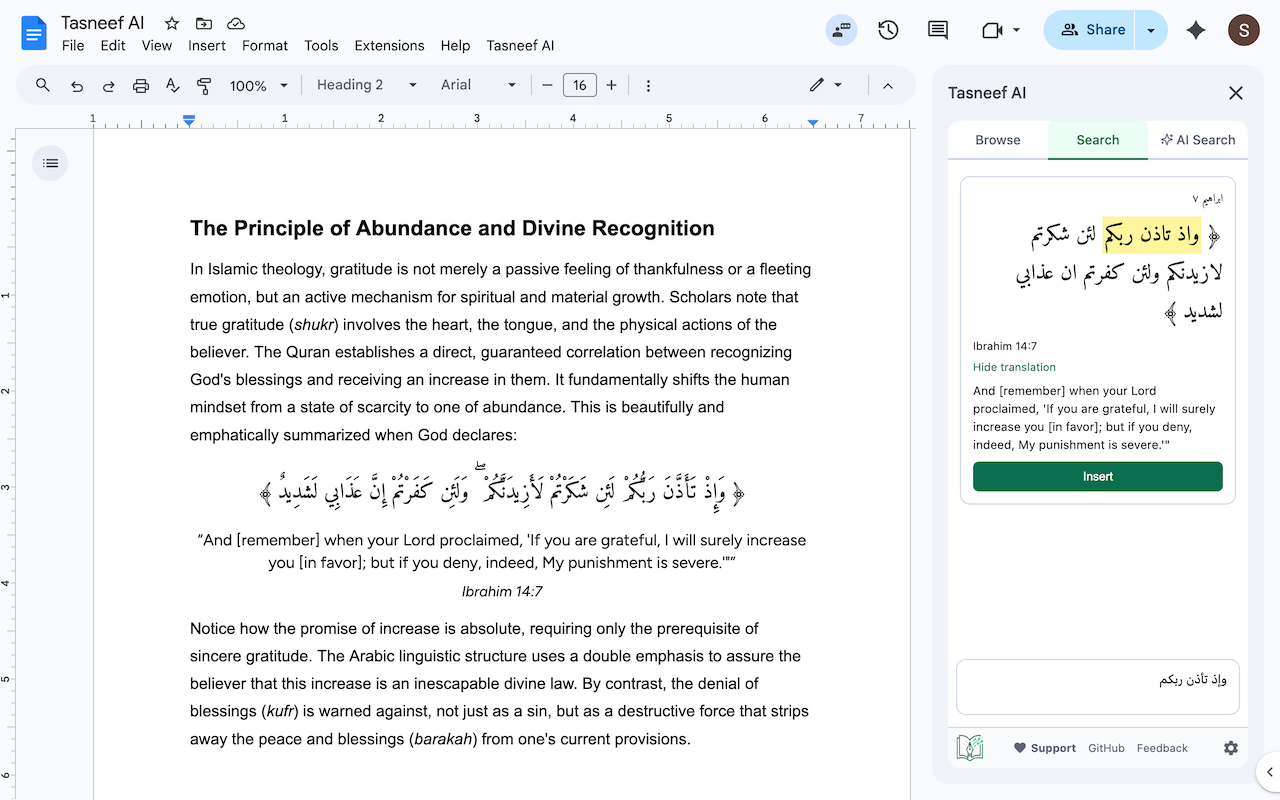
Search and insert Quran verses into Google Docs™ by meaning, reference, or Arabic text.
Autor:
Ficha actualizada:3 de mayo de 2026
Compatible con:
160



Información general
Tasneef AI: Quran Search for Google Docs™

Insert Quran verses into your Google Docs without leaving the page. Search by meaning, by exact Arabic, or browse by Surah and Ayah — then insert with one click, properly formatted with right-to-left alignment.


🔍 Key Features

AI Semantic Search — Don't remember the exact wording? Ask in plain English ("verses about gratitude," "ayahs on patience during hardship") and get relevant ayahs ranked by meaning.

Exact Arabic Search — Search by Arabic keywords with full diacritics handling.

Browse by Surah & Ayah — Navigate the Quran directly when you know what you're looking for.

One-click insertion — Choose between bilingual (Arabic + English translation) or Arabic-only output. RTL alignment is handled automatically.

Multiple insertion styles — Plain text or quote blocks for visual emphasis.


✅ Designed for Accuracy

Tasneef AI uses Retrieval-Augmented Generation (RAG) to understand your search intent — but it never uses AI to generate Quranic text. AI is only used as a search engine. Every retrieved verse is validated against a verified Quran dataset before it appears, and any invalid references are silently dropped. The Arabic text inserted into your document is always the authentic, unaltered text from the source dataset.


👥 Built For

> Islamic scholars, researchers, and graduate students.

> Educators preparing course materials and syllabi.

> Authors, writers, and content creators.

> Anyone who regularly references the Quran in their writing.

------------

Google Docs is a trademark of Google LLC. Tasneef AI is an independent product and is not affiliated with or endorsed by Google.Información adicional
sell
PrecioSin coste
code
Desarrollador
No operador
email
Asistencia
lock
Política de privacidad
description
Términos del Servicio
flag
DenunciarMarcar como inapropiada



Búsqueda
Borrar búsqueda
Cerrar búsqueda
Aplicaciones de Google
Menú principal