
Google Workspace Marketplace


Taverity Outreach
Queue personalized texts from Google Sheets™, sent from your own number.
Fiche mise à jour le :3 août 2026
Compatible avec :
Aucun avis
3
Présentation
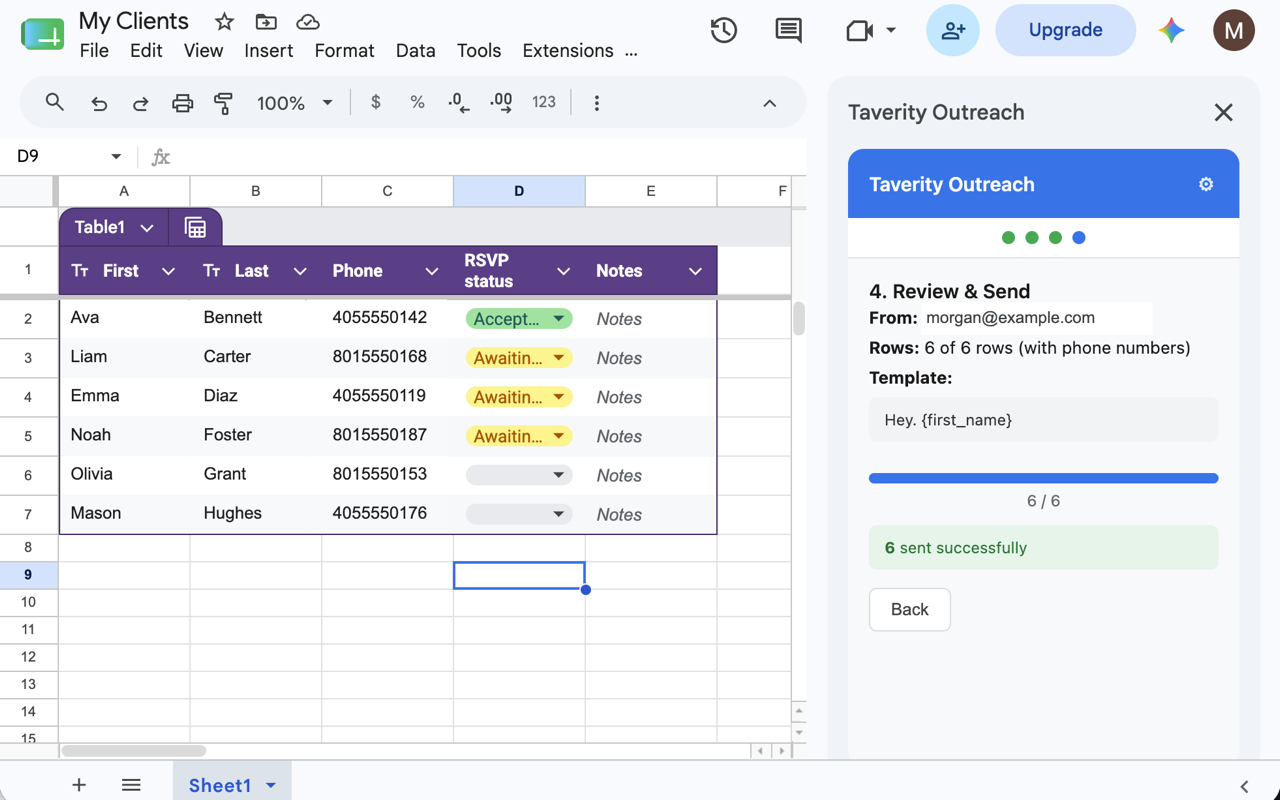
Taverity Outreach turns any Google Sheet™ into personal text outreach — sent from your own phone number, not a marketing shortcode. Keep your contacts where they already live — a spreadsheet — and prepare a personalized text for each one in just a few clicks. Think mail merge, but for real texts from you.

A simple 4-step wizard walks you through every batch:

1. Connect Sheet — pick the tab that holds your contacts.
2. Map Columns — point the add-on at your phone number and name columns (it auto-detects common headers for you).
3. Compose — write your message and drop in personalization tokens like {first_name} so every text feels one-to-one.
4. Review & Send — preview each message, then send the batch to Taverity.

You stay in control of what goes out. The add-on doesn't blast messages from a server — it queues each text to your Taverity account, and the Taverity iPhone app sends them from your own number after you approve. Your contacts see a personal text from you, not an ad from an unknown sender.

Write faster with optional AI drafting: connect your own Google Gemini™ API key and generate a first draft in the tone that fits — cheerful, professional, casual, grateful, urgent, or funny. Your contact data is never sent to the AI; drafts use a {first_name} placeholder that's filled in only at send time.

Why you'll like it:

- Personalized at scale — merge names and other fields into every message.
- Sent from your own number — real personal texts, not a shortcode blast.
- You approve before anything goes out, right in the Taverity app.
- No copy-paste — your contacts stay in the sheet you already use.
- Optional AI drafting with six tones, using your own Gemini™ key.
- Your API keys are stored privately in your own Google Account™ and used server-side — they never travel through the page.
- Reads only the spreadsheet you have open. It cannot see your other files.

You'll need a Taverity account and API key, plus the Taverity iPhone app to send the queued texts. Paste your key once in Settings and you're ready to go. AI drafting is optional and needs a Google Gemini™ (AI Studio) API key.

Open any spreadsheet and go to Extensions → Taverity Outreach → Open Taverity Outreach to get started. Your queued texts appear in the Taverity app, ready for you to review and send.

Google Sheets™, Google Account™, and Google Gemini™ are trademarks of Google LLC. Taverity Outreach is an independent product and is not created by, affiliated with, or endorsed by Google LLC.
Informations supplémentaires
sell
TarifsSans frais
code
Développeur
email
Assistance
lock
Règles de confidentialité
description
Conditions d'utilisation
flag
SignalerSignaler comme inappropriée




Recherche
Effacer la recherche
Fermer le champ de recherche
Applications Google
Menu principal