
Google Workspace Marketplace


Texthelp Study Skills
Texthelp Highlighting Tools: Select, Highlight, and Group Content Together for Review and Learning.
By:Texthelp
Works with:
1 млн.+


Общ преглед
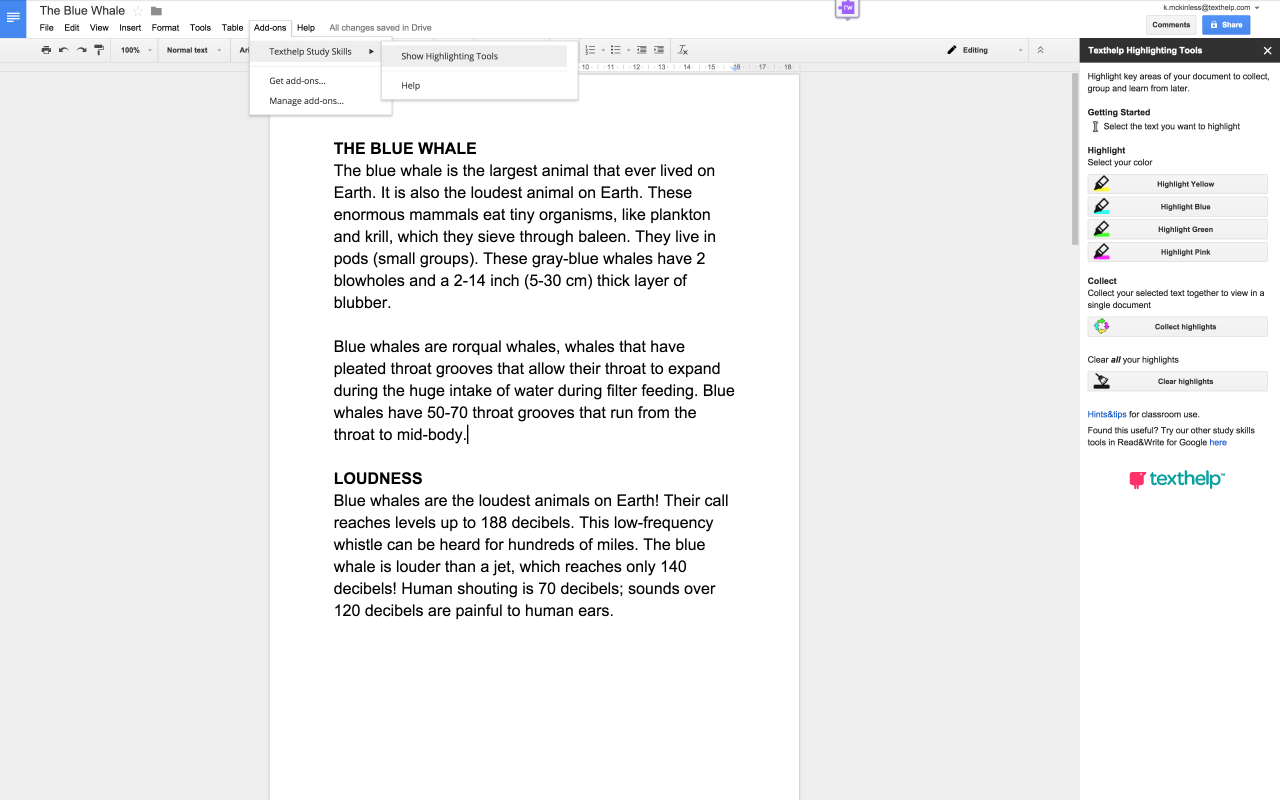
Use Texthelp’s Highlighting Tools to highlight key areas of your document to collect, group, and learn from later. Simply select and highlight the desired  text and click “Collect Highlights” to extract it and place it in a new document (by color or location) for students or educators to review.

Used by educators in the classroom to help students identify and group key facts together, indicate new words to learn, or collect research to assist with studying. Texthelp’s Highlighting Tools are great for all content and grade levels.

Never used Highlighting Tools before? Give them all a try for free for 30 days. After 30 Days, you can continue to use one color highlighter and can collect and clear highlights. To keep using all four color highlighters, you can purchase a subscription to Read&Write for Google, a  comprehensive set of reading, writing, and studying support tools for Google Docs, Web, PDFs, and ePubs. Read&Write for Google is available in the chrome store.
Additional information
sell
PricingНе е налице
code
Developer
TexthelpTrader status unspecified
email
Поддръжка
lock
Декларация за поверителност
description
Общи условия
flag
Подаване на сигналFlag as inappropriate



Търсене
Изчистване на търсенето
Затваряне на търсенето
Приложения на Google
Главно меню