
Google Workspace Marketplace

TextScan
Instant writing analysis for KS1 & KS2 -- Highlighting key features directly in Google Docs™
Listing updated:August 4, 2026
Works with:
8


Overview
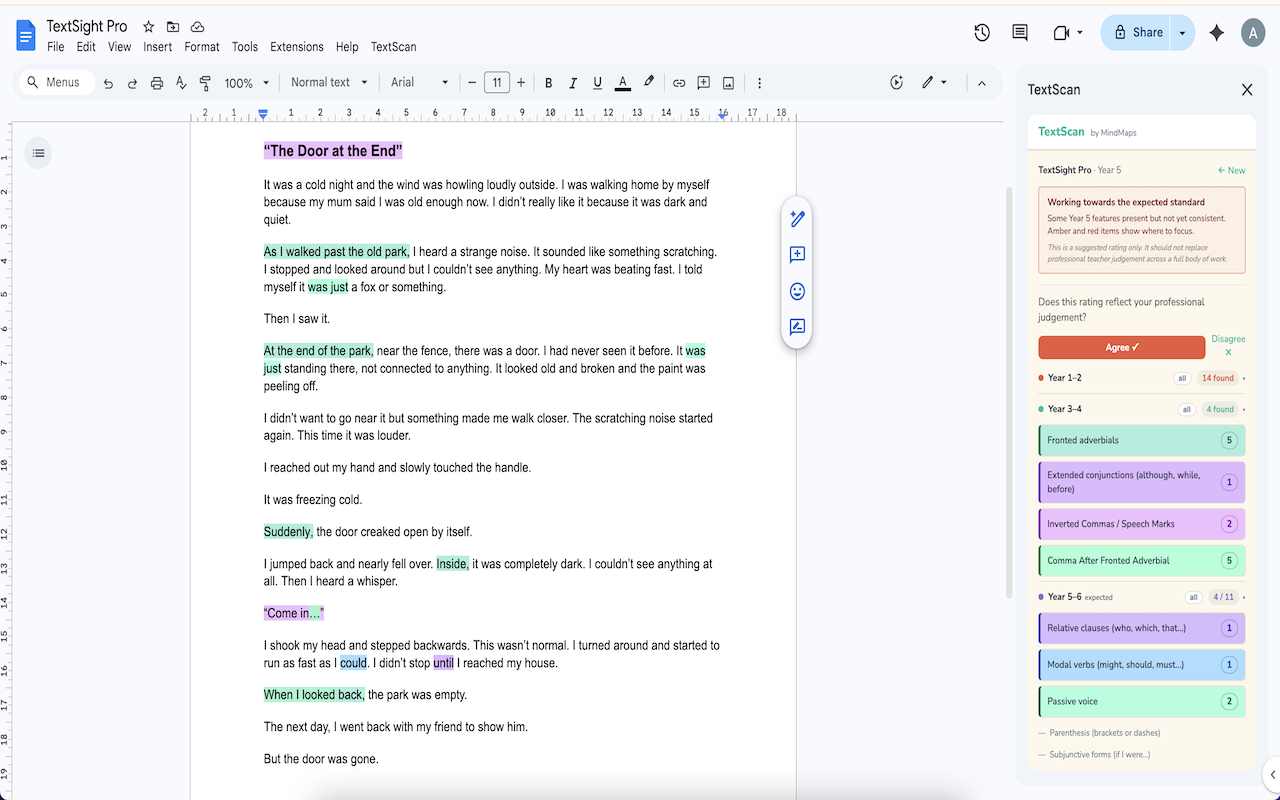
TextScan analyses pupil writing directly inside Google Docs™ and gives teachers an instant suggested TAF rating — no copy-pasting, no separate tools, no marking time wasted.

Open a pupil's Google Doc™, enter their year group, and TextScan identifies the writing features present across all KS1 and KS2 bands: nouns, verbs, adjectives, adverbs, conjunctions, fronted adverbials, subordinating conjunctions, inverted commas, relative clauses, modal verbs, passive voice, parenthesis, and more — 30 features in total across Years 1 to 6.

WHAT TEXTSCAN DOES
• Detects 30+ writing features across Year 1–6 curriculum bands
• Generates a suggested TAF rating: Working Towards, Expected Standard, or Greater Depth
• Highlights detected features in the Google Doc™ with individual colours per feature
• Shows which features are present and which are missing at a glance
• Saves a history of every piece you analyse
• Generates a printable teacher or pupil report

IMPORTANT
TextScan provides a suggested rating to support your professional judgement — it is not a replacement for teacher assessment across a full body of work. We recommend using initials or a pupil code rather than full names when analysing work.

FOR SCHOOL LEADS
School licences include an admin dashboard showing analysis activity across your staff — year group breakdowns, RAG rating trends, and submission history over the last 90 days.

GETTING STARTED
A 14-day free trial is included — no card required. Individual and school licences are available at mindmapscoaching.com.

Google Docs™ is a trademark of Google LLC.
Additional information
sell
PricingFree of charge with paid features
code
Developer
Non-trader
email
Support
lock
Privacy policy
description
Terms of service
flag
ReportFlag as inappropriate





Search
Clear search
Close search
Google apps
Main menu