
Google Workspace Marketplace

TextScan
Instant writing analysis for KS1 & KS2 -- Highlighting key features directly in Google Docs™
Gawa ng:
Na-update ang listing noong:Agosto 4, 2026
Gumagana sa:
5


Pangkalahatang-ideya
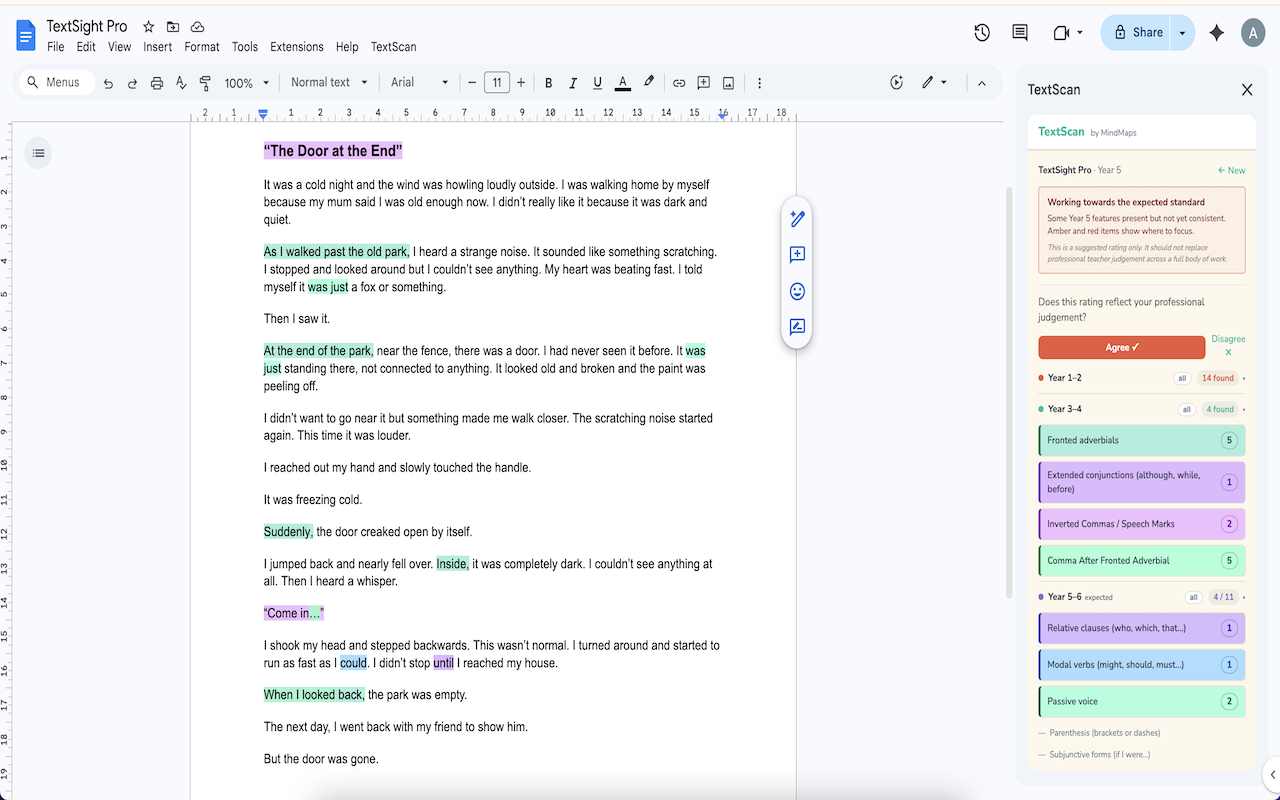
TextScan analyses pupil writing directly inside Google Docs™ and gives teachers an instant suggested TAF rating — no copy-pasting, no separate tools, no marking time wasted.

Open a pupil's Google Doc™, enter their year group, and TextScan identifies the writing features present across all KS1 and KS2 bands: nouns, verbs, adjectives, adverbs, conjunctions, fronted adverbials, subordinating conjunctions, inverted commas, relative clauses, modal verbs, passive voice, parenthesis, and more — 30 features in total across Years 1 to 6.

WHAT TEXTSCAN DOES
• Detects 30+ writing features across Year 1–6 curriculum bands
• Generates a suggested TAF rating: Working Towards, Expected Standard, or Greater Depth
• Highlights detected features in the Google Doc™ with individual colours per feature
• Shows which features are present and which are missing at a glance
• Saves a history of every piece you analyse
• Generates a printable teacher or pupil report

IMPORTANT
TextScan provides a suggested rating to support your professional judgement — it is not a replacement for teacher assessment across a full body of work. We recommend using initials or a pupil code rather than full names when analysing work.

FOR SCHOOL LEADS
School licences include an admin dashboard showing analysis activity across your staff — year group breakdowns, RAG rating trends, and submission history over the last 90 days.

GETTING STARTED
A 14-day free trial is included — no card required. Individual and school licences are available at mindmapscoaching.com.

Google Docs™ is a trademark of Google LLC.
Karagdagang impormasyon
sell
PagpepresyoLibre na may mga bayad na feature
code
Developer
Hindi trader
email
Suporta
lock
Patakaran sa privacy
description
Mga tuntunin ng serbisyo
flag



Search
I-clear ang paghahanap
Isara ang paghahanap
Mga app ng Google
Pangunahing menu