
Google Workspace Marketplace


Time Reports Pro
Time Reports Pro is a Google Calendar add-on that helps teams track billable hours, generate timesheets, and report on utilization — all within Google Workspace.
Eintrag aktualisiert:5. August 2026
Kompatibel mit:
181




Überblick
WHAT IS TIME REPORTS PRO?
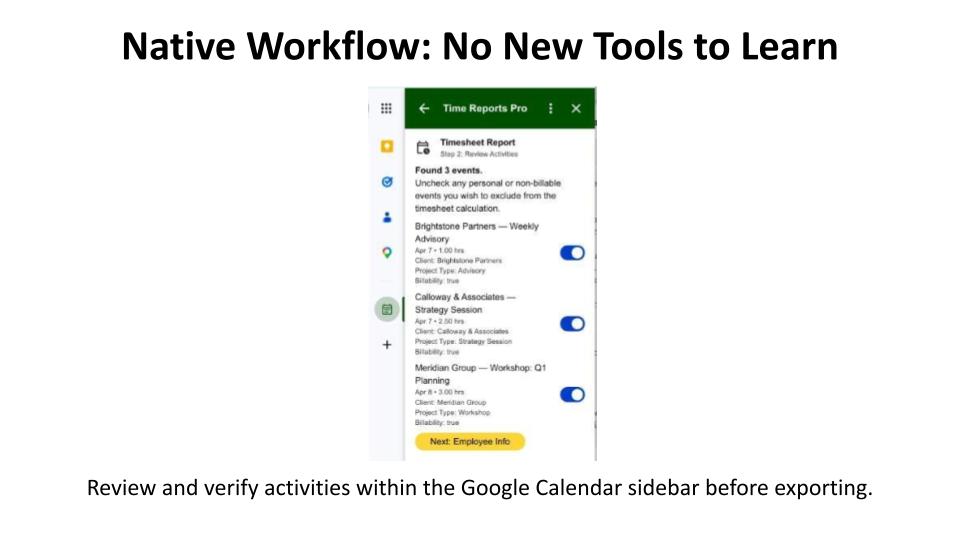
Time Reports Pro is a Google Calendar add-on that turns your team's existing calendar events into automatic timesheets, utilization reports, and time analytics—without requiring any new tools or changes to how your team works. It is built natively into Google Calendar and exports directly to Google Sheets.

THE PROBLEM IT SOLVES
Google Calendar has no built-in time reporting or timesheet functionality. Professional services teams that use Google Calendar to log meetings, client calls, and project work have no way to see where time is going or measure team utilization—until Time Reports Pro.

WHO IS IT FOR?
Designed for US-based professional services teams of 10+ people on Google Workspace, including:

Staffing & Recruiting: Track recruiter activity and client touchpoints.

HR & L&D Consultancies: Report delivery time for workshops and advisory sessions.

Marketing Agencies: Track billable hours and monthly utilization by client.

Management Consulting: View time across projects without changing workflows.

KEY FEATURES
• Automatic Team Timesheets: Export events into a structured timesheet in one click.
• Custom Fields: Add dropdowns like Client, Project, and Billable Rate to events.
• Visual Analytics: See team utilization and time allocation in easy-to-read charts.
• Team Management: Invite members via email and manage seat access centrally.
• Google Sheets Export: Send data to Sheets for custom reporting and payroll.

HOW IT WORKS

Install from the Marketplace and invite your team via email.

Add custom fields (Client, Project, etc.) to your Google Calendar.

Your team selects the relevant options on each event as they work.

Data is pulled into clean timesheets and analytics dashboards automatically.

WHY WE'RE DIFFERENT
Most tools require a separate app or a manual start/stop timer. Time Reports Pro works entirely within Google Calendar. If it is on the calendar, it is in the report. No new software to learn, no extra steps to take.

PRICING & TRIAL
• $12 per user per month.
• Includes a 7-day free trial.
• Enterprise pricing available for teams of 25+ (contact support@time-reports.com).
Google Calendar™ and Google Sheets™ are trademarks of Google LLC.
Weitere Informationen
sell
PreiseKostenloser Testzeitraum
code
Entwickler
email
lock
Datenschutzerklärung
description
Nutzungsbedingungen
flag
MeldenAls unangemessen melden






Suche
Suche löschen
Suche schließen
Google-Apps
Hauptmenü