


Timer + AI Proctor Limiter for Forms | Quilgo
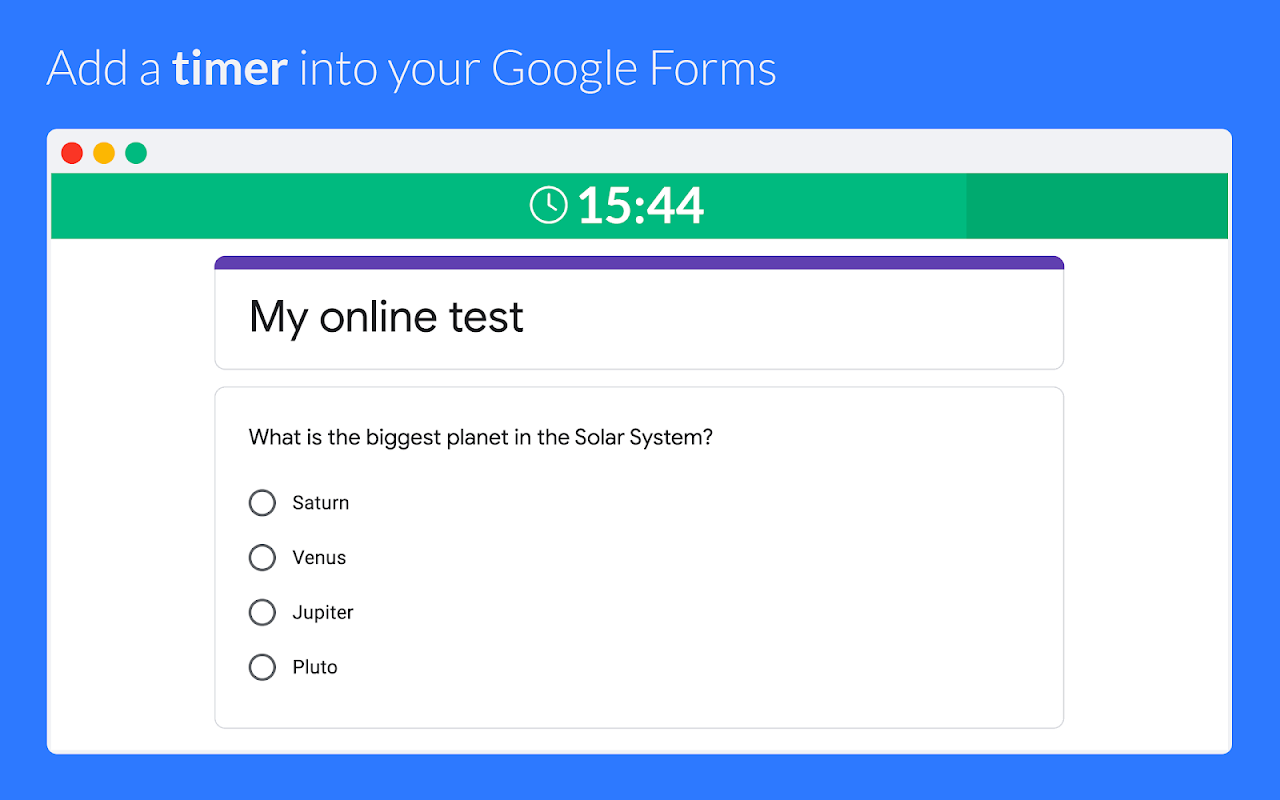
Quilgo adds a time limiter and AI proctoring in your online tests, exams and assessments. Enable camera and screen tracking to reduce cheating in your quizzes. Download reports and certificates.
Gawa ng:
Na-update ang listing noong:Abril 11, 2024
Gumagana sa:
59M+


Pangkalahatang-ideya
• Transform your Google Forms™ into assessments, tests or exams.
• Perfect for education, recruiting, businesses & HR.
• Reduce cheating by auto-proctoring via camera and screen.
• Works on any device for students, job applicants and employees.
• GDPR compliant. DPA ready. Scalable and reliable.
▼ Click "Read more". ▶ HOW TO SETUP: https://youtu.be/6TBXa2y4k5k

WHY QUILGO?

If you use Google Forms™ and want to create online tests - Quilgo is your #1 choice. It is simple, reliable and trustworthy. So far, test makers conducted over 30 million online tests with Quilgo. Quilgo is free to try. It takes a few minutes to set up. Integrate a countdown and AI proctoring with our revolutionary addon today.

FEATURES

• Timer - Enable time limit in your tests. Perfect for online assessments and exams
• Camera Tracking - Reduce cheating by capturing the faces of test-takers
• Screen Recording - Track the screen activity for increased cheating protection.
• Enforce Tracking - Require all selected tracking methods to start a session.
• Behaviour Analysis - Track suspicious actions like tab switch or multiple faces.
• Deadlines - Set a start time and time frames for your assignment.
• Secure Tests - Ensure your respondents cannot use the same test twice.
• Trust Score - Get a single trust score based on click, screen and camera tracking.
• Auto Close - Automatically turn the quiz off and stop once the time is over.
• Exam Mode - Schedule a date and time for your test and turn it into an online assessment.
• Access Control - Restrict your quiz to specific people or enable registration.
• Easy Delivery - Send personal test links via email or post a group link.
• Analytics & Reports - See the score, marked confidence levels and responses. Export in PDF.
• Excel Export - Export reports in Excel or Spreadsheets for further analytics.
• Single Dashboard - Use a secure real-time dashboard to manage your online tests.
• Notifications - Receive real-time updates in your dashboard.
• Team Collaboration - Collaborate on forms and share results and reports.
• Classroom - Integrate with Google Classroom™ and import respondents in one click.
• Branding - Add your custom logo and customize colors to your test.
• Secure - Keep the data secure and in compliance with GDPR.
• Simple - Quilgo works like native Google Forms™ on any device and browser.
• User-friendly - Quilgo provides all needed instructions and tutorial videos to respondents.
• Compliance - Screen and camera tracking mechanisms require explicit approval from test-takers.
• No additional software - Quilgo is software as a service and does not require any additional software installation.
• Support - Speak with our team if you have any questions.

HOW TO SETUP

Watch this video: https://youtu.be/6TBXa2y4k5k

1. Install this add-on
2. Go to your Google Forms™ form, click the "puzzle" icon and choose "Quilgo". Click "Configure".
3. Click "Enable Quilgo", then "Go to your Dashboard".

Free trial. No card is required.

WHO USES QUILGO

• Teachers, Schools and Universities for Students: Harvard, MIT, Oxford, Stanford, Cambridge, etc.
• Businesses and Recruiters for Employees and Job Candidates and Applicants: Google, Microsoft, Dropbox, Amazon, Canva, and other organizations.

COMPARE QUILGO TO OTHERS

Watch this video to compare to Boloforms, Extended Forms, Autoproctor, Form Limiter, Presenter, AddonForge and other similar extensions:

https://youtu.be/GmmTHMpSJAg?feature=shared

Some of Quilgo's features are:
• Unlimited team size.
• Quiz bank
• Question randomization & shuffling
• Automatic submission
• Personal and group extended reporting
• GPT quiz generation.
• AI Proctoring works on all devices, including Android. iOS (iPhones/iPads) is coming soon.
• Public and restricted modes.
• No limits on tests per month. Unlimited proctored assessments.
• Scalability. Host assessments for 1000, 5000, 10000 and more people.
• Compliance. Read our DPA here: https://quilgo.com/dpa
• Security. Your forms and responses stay in Google if you use Google Forms.

USEFUL LINKS

Installation Guide - https://quilgo.com/google-forms-integration
Privacy Policy: https://quilgo.com/privacy
Compliance and DPA: https://quilgo.com/dpa

Book a call with our representative: https://calendly.com/quilgo-igor/30min

Our team would love to see you on board!

All Yours,
Quilgo Team

- - - - - - - - - - - - - - - - - - - - - -
Google Forms™, Google Classroom™, Android™, and YouTube™ are trademarks of Google LLC.
Karagdagang impormasyon
sell
PagpepresyoLibreng trial
code
Developer
email
Suporta
lock
Patakaran sa privacy
description
Mga tuntunin ng serbisyo
flag



Search
I-clear ang paghahanap
Isara ang paghahanap
Mga app ng Google
Pangunahing menu