
Google Workspace Marketplace


TranslateSync AI
Two languages, one document. Edit a document in Google Docs™ and its translation stays in sync — text, formatting, and comments.
Fiche mise à jour le :29 juillet 2026
Compatible avec :
Aucun avis
1


Présentation
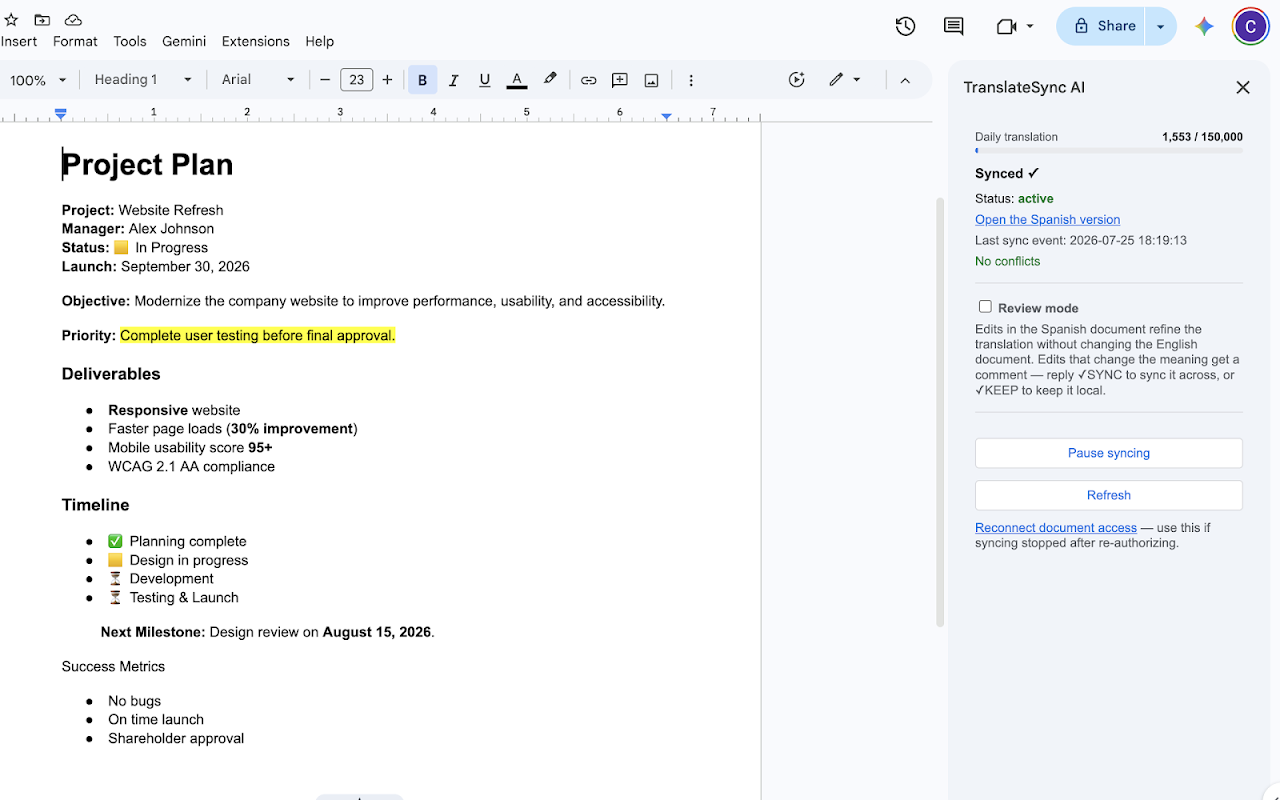
TranslateSync AI keeps a document in Google Docs™ and its translation synchronized, in both directions. Pair a document once, and two teams can each work in their own language: edits appear in the other document within seconds, translated by AI with your terminology respected.

• True two-way sync — either document can be edited
• Formatting carries over: bold, highlights, colors, links, headings, tables, lists
• Comments and replies mirror across, translated
• Conflict-safe: simultaneous edits are never overwritten — both versions are presented and a human picks
• 29 languages, any pairing
• Per-file access only: TranslateSync AI can only touch documents you explicitly connect

Setup takes under a minute: open a document in Google Docs™, open TranslateSync AI from the Extensions menu, choose a language, click once.

Google Docs™ is a trademark of Google LLC. TranslateSync AI is an independent product and is not affiliated with, endorsed by, or sponsored by Google LLC.
Informations supplémentaires
sell
TarifsSans frais avec des fonctionnalités payantes
code
Développeur
email
Assistance
lock
Règles de confidentialité
description
Conditions d'utilisation
flag
SignalerSignaler comme inappropriée




Recherche
Effacer la recherche
Fermer le champ de recherche
Applications Google
Menu principal