
Google Workspace Marketplace


Translator AI GPT (ChatGPT Gemini) - Translate All
Best translator powered by AI ChatGPT™, Google Translate™, Gemini™, Grok™, Claude™ 4.5, Llama™ for Docs™, Slides™, Sheets™, Gmail™. It can translate to 200+ languages with any tone in seconds!
דף האפליקציה עודכן בתאריך:26 ביוני 2026
האפליקציה פועלת עם:




+400K
סקירה כללית
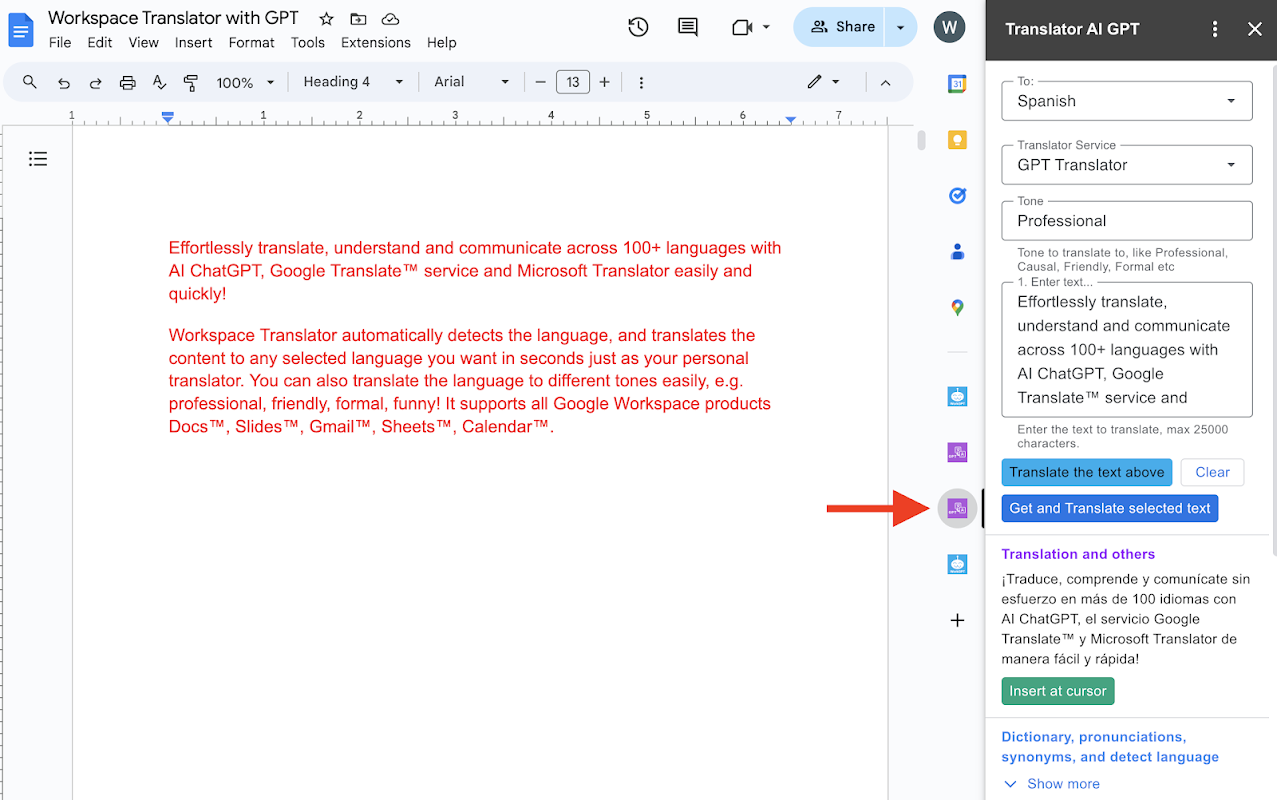
Effortlessly translate, understand and communicate across 200+ languages easily and quickly with AI ChatGPT™, Google Translate™ service,  Gemini™, Grok, Anthropic Claude™ 4.5 & 3, Meta Llama™ and Microsoft Translator™! It supports all Google Workspace products Docs™, Slides™, Gmail™, Sheets™, Calendar™.

Workspace Translator AI automatically detects the language, and translates the content to any selected language you want in several seconds just as your personal translator. You can even customize the translation or translate the language to different tones easily, e.g. professional, friendly, formal, funny!

Workspace Translator AI is the best translator with 200+ languages, most languages supported in the market. We offer 8 translation services to use:
  ✅ AI ChatGPT™ (used by 100+ million users)
  ✅ Google Translate™
  ✅ GPT-5.2, GPT5, GPT-4o, GPT-4o mini
  ✅ Gemini™ 3, Gemini 2.5
  ✅ xAI Grok 4 Fast
  ✅ Anthropic Claude™ 4.5 Sonnet, Claude™ 3 Haiku
  ✅ Meta Llama™ 4
  ✅ Mixtral™ and Mixtral8x22B
  ✅ Microsoft Translator™!


Whenever you need to translate or understand the content in document, slide, email, sheets™, or calendar™, just have Workspace Translator do it for you! It is also your perfect tool for document translation, slides translator, sheet translate, and gmail translation. It is available on both desktop and mobile. After you install the add-on, it will show in your Docs™/Slides™/Gmail™/Sheets™/Calendar™ sidebar on both desktop and mobile Android client.


● How to start after installation:
1️⃣ Open Google Docs™, Sheets™, Slides™, or Gmail™,
2️⃣ Click on the Translator GPT logo on the right sidebar or menu in the Extensions list.
3️⃣ Start translating!
See detailed instructions here: https://aiworksuite.com/translatorgpthowtostart


● MORE FEATURES
In addition to translation, It also provides you other helpful features after paid, including
- Translate in batches. Translate multiple slides or sheet cells together
- Translate the whole document, the whole sheets and slides in one click!
- Translate and replace multiple slides or sheet cells together
- Translate Image to text
- Rewrite
- Pronunciations
- Dictionary lookup
- Summarize
- Synonyms
- Detect languages
- Transliterate
- Explain


● PLANS
We offer a free trial version with free translation requests every day to help you translate. You can upgrade to the Premium service for unlimited usage, advanced Premium features, longer input, faster response and priority support. To provide good service, we pay OpenAI ChatGPT, Google and Microsoft for every translation you make.

This product is brought to you by ZQ Labs, Inc and ZQ Labs, Inc. is not affiliated with OpenAI or Microsoft.

Experience the best translator app (with Docs™ Translator, Slides™ translator, Sheets™ translator) and the power of advanced AI GPT™, Google Translate™ Service,  and Microsoft Translator™ to translate doc, translate slide and translate sheet with this addon today!


● NOTE
If you see “Permission denied” or “Authorization is required to perform that action” error.
1. Please make sure you grant the authorization to the Translator GPT addon here. https://myaccount.google.com/u/0/connections

2. If the error still exists,  this issue is probably caused by the Google bug.
  - Please log out of all your accounts in Google Workspace and Chrome profile, and log back in with ONLY the account you intend to use the Translator GPT in Google Workspace and Chrome profile.
  - Reinstall the Translator GPT addon
  - Make sure you grant the authorization. You can double check here https://myaccount.google.com/u/0/connections

Alternatively If you don't want to create a dedicated Chrome profile, you can install the add-on from an incognito window. It will then be installed from your default Chrome Profile.


● 200+ Supported languages:
English, Spanish, Chinese (Simplified), Abkhaz, Acehnese, Acholi, Afrikaans, Albanian, Alur, Amharic, Arabic, Armenian, Assamese, Awadhi, Aymara, Azerbaijani, Balinese, Bambara, Bashkir, Basque, Batak Karo, Batak Simalungun, Batak Toba, Belarusian, Bemba, Bengali, Betawi, Bhojpuri, Bikol, Bosnian, Breton, Bulgarian, Buryat, Cantonese, Catalan, Cebuano, Chichewa (Nyanja), Chinese (Simplified), Chinese (Traditional), Chuvash, Corsican, Crimean Tatar, Croatian, Czech, Danish, Dinka, Divehi, Dogri, Dombe, Dutch, Dzongkha, English, Esperanto, Estonian, Ewe, Fijian, Filipino (Tagalog), Finnish, French, French (French), French (Canadian), Frisian, Fulfulde, Ga, Galician, Ganda (Luganda), Georgian, German, Greek, Guarani, Gujarati, Haitian Creole, Hakha Chin, Hausa, Hawaiian, Hebrew, Hiligaynon, Hindi, Hmong, Hungarian, Hunsrik, Icelandic, Igbo, Iloko, Indonesian, Irish, Italian, Japanese, Javanese, Kannada, Kapampangan, Kazakh, Khmer, Kiga, Kinyarwanda, Kituba, Konkani, Korean, Krio, Kurdish (Kurmanji), Kurdish (Sorani), Kyrgyz, Lao, Latgalian, Latin, Latvian, Ligurian, Limburgan, Lingala, Lithuanian, Lombard, Luo, Luxembourgish, Macedonian, Maithili, Makassar, Malagasy, Malay, Malay (Jawi), Malayalam, Maltese, Maori, Marathi, Meadow Mari, Meiteilon (Manipuri), Minang, Mizo, Mongolian, Myanmar (Burmese), Ndebele (South), Nepalbhasa (Newari), Nepali, Northern Sotho (Sepedi), Norwegian, Nuer, Occitan, Odia (Oriya), Oromo, Pangasinan, Papiamento, Pashto, Persian, Polish, Portuguese, Portuguese (Portugal), Portuguese (Brazil), Punjabi, Punjabi (Shahmukhi), Quechua, Romani, Romanian, Rundi, Russian, Samoan, Sango, Sanskrit, Scots Gaelic, Serbian, Sesotho, Seychellois Creole, Shan, Shona, Sicilian, Silesian, Sindhi, Sinhala (Sinhalese), Slovak, Slovenian, Somali, Spanish, Sundanese, Swahili, Swati, Swedish, Tajik, Tamil, Tatar, Telugu, Tetum, Thai, Tigrinya, Tsonga, Tswana, Turkish, Turkmen, Twi (Akan), Ukrainian, Urdu, Uyghur, Uzbek, Vietnamese, Welsh, Xhosa, Yiddish, Yoruba, Yucatec Maya, Zulu


---------------------------------------------------------------------------------------------------------------------------
● Release History
Version 140 (12/20/2025), update to latest AI models, and improve experience
Version 100 (09/10/2024), migrate to latest model and backend
Version 90 (07/05/2024), multiple improvements and fixes to translate document, translate slide and translate sheet
Version 76 (04/01/2024), add more AI Translators, support batch translator with AI translator, translate and replace text in doc etc
Version 72 (02/11/2024), add the Translator editor and menu for docs, sheets and Slides. In addition, it can translate document, translate slides, translate sheets, and translate Gmail.
Version 67 (01/14/2024) - add translate multiple slides and spreadsheet cells together, translate and replace multiple slides and sheet cells together.
Version 64 (11/13/2023) - add pronunciations, dictionary lookup, synonyms
, detect languages features.
Version 56 (10/08/2023): add the functionality to choose backend service for Premium users
Version 52 (09/13/2023): Add translate current selected slide feature
Version 45: Add the explain and help me understand feature.
מידע נוסף
sell
תמחורבחינם עם תכונות בתשלום
code
email
lock
מדיניות הפרטיות
description
תנאים והגבלות
flag
דיווחסימון כבלתי הולמת






חיפוש
ניקוי החיפוש
סגירת החיפוש
אפליקציות Google
התפריט הראשי