
Google Workspace Marketplace


Translator AI GPT (ChatGPT, Google Translate)
Trình dịch tốt nhất được hỗ trợ bởi AI ChatGPT™, Google Translate™, Gemini™, Grok™, Claude™ 4.5, Llama™ dành cho Docs™, Slides™, Sheets™, Gmail™. Có thể dịch sang hơn 200 ngôn ngữ!
Nhà phát triển:
Đã cập nhật trang thông tin:26 tháng 6, 2026
Hoạt động với:




400 N+
Tổng quan
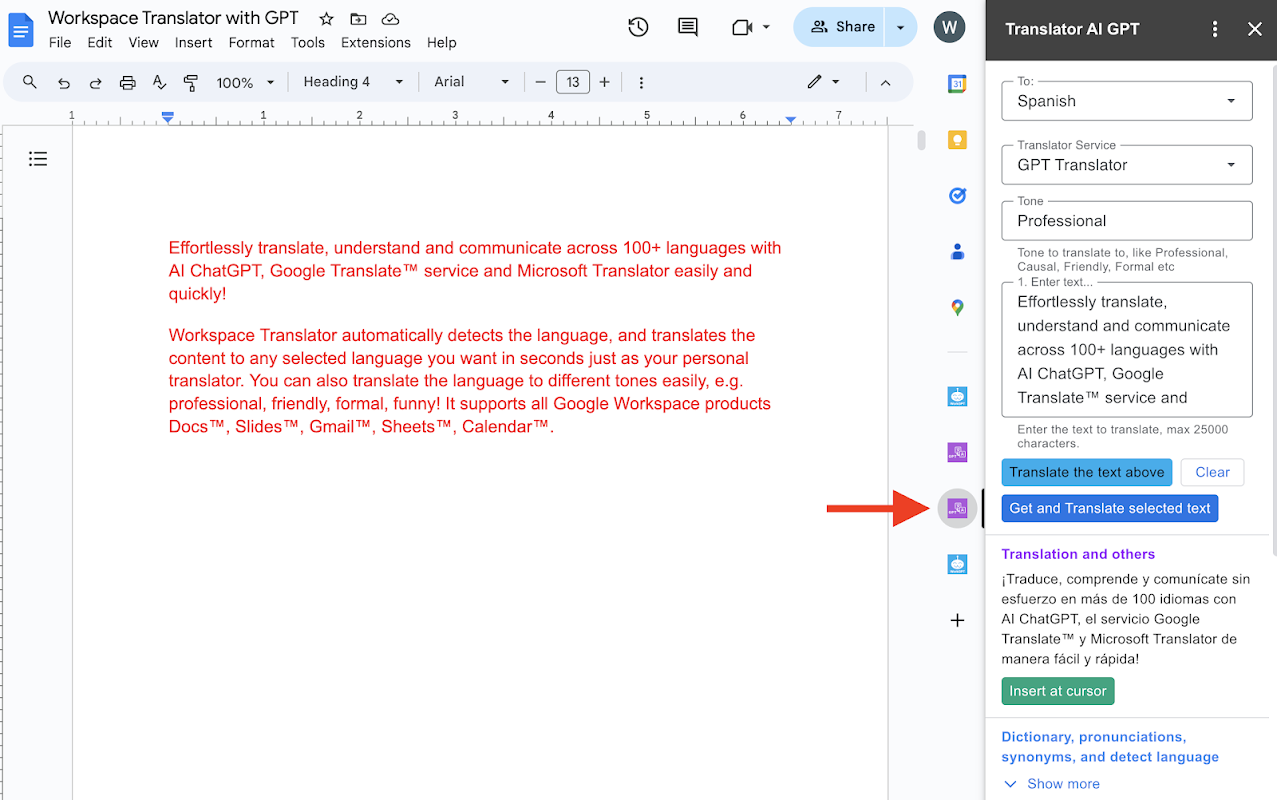
Dịch thuật, hiểu và giao tiếp dễ dàng và nhanh chóng với hơn 200 ngôn ngữ bằng AI ChatGPT™, dịch vụ Google Translate™, Gemini™, Grok, Anthropic Claude™ 4.5 & 3, Meta Llama™ và Microsoft Translator™! Ứng dụng hỗ trợ tất cả các sản phẩm Google Workspace như Docs™, Slides™, Gmail™, Sheets™, Calendar™.

Workspace Translator AI tự động phát hiện ngôn ngữ và dịch nội dung sang bất kỳ ngôn ngữ nào bạn chọn chỉ trong vài giây, giống như một người dịch cá nhân của bạn. Bạn thậm chí có thể tùy chỉnh bản dịch hoặc dịch ngôn ngữ theo nhiều giọng điệu khác nhau một cách dễ dàng, ví dụ: chuyên nghiệp, thân thiện, trang trọng, hài h hước!

Workspace Translator AI là công cụ dịch thuật tốt nhất với hơn 200 ngôn ngữ, hỗ trợ nhiều ngôn ngữ nhất trên thị trường. Chúng tôi cung cấp 8 dịch vụ dịch thuật để bạn sử dụng:
✅ AI ChatGPT™ (được sử dụng bởi hơn 100 triệu người dùng)
✅ Google Translate™
✅ GPT-5.2, GPT5, GPT-4o, GPT-4o mini
✅ Gemini™ 3, Gemini 2.5
✅ xAI Grok 4 Fast
✅ Anthropic Claude™ 4.5 Sonnet, Claude™ 3 Haiku
✅ Meta Llama™ 4
✅ Mixtral™ và Mixtral8x22B
✅ Microsoft Translator™!

Bất cứ khi nào bạn cần dịch hoặc hiểu nội dung trong tài liệu, slide, email, bảng tính hoặc lịch, hãy để Workspace Translator làm điều đó cho bạn! Đây cũng là công cụ hoàn hảo để dịch tài liệu, dịch slide, dịch bảng tính và dịch email. Ứng dụng có sẵn trên cả máy tính để bàn và thiết bị di động. Sau khi cài đặt tiện ích bổ sung, nó sẽ hiển thị trong thanh bên của Docs™/Slides™/Gmail™/Sheets™/Calendar™ trên cả máy tính để bàn và ứng dụng Android dành cho thiết bị di động.

● Cách bắt đầu sau khi cài đặt:
1️⃣ Mở Google Docs™, Sheets™, Slides™ hoặc Gmail™,
2️⃣ Nhấp vào biểu tượng Translator GPT trên thanh bên phải hoặc menu trong danh sách Tiện ích mở rộng.
3️⃣ Bắt đầu dịch!
Xem hướng dẫn chi tiết tại đây: https://aiworksuite.com/translatorgpthowtostart

● CÁC TÍNH NĂNG KHÁC
Ngoài chức năng dịch thuật, ứng dụng còn cung cấp cho bạn các tính năng hữu ích khác sau khi trả phí, bao gồm:
- Dịch theo lô. Dịch nhiều slide hoặc ô bảng tính cùng một lúc
- Dịch toàn bộ tài liệu, toàn bộ bảng tính và slide chỉ bằng một cú nhấp chuột! - Dịch và thay thế nhiều slide hoặc ô bảng tính cùng lúc
- Dịch hình ảnh thành văn bản
- Viết lại
- Phát âm
- Tra từ điển
- Tóm tắt
- Từ đồng nghĩa
- Phát hiện ngôn ngữ
- Chuyển ngữ
- Giải thích


● GÓI DỊCH VỤ
Chúng tôi cung cấp phiên bản dùng thử miễn phí với số lượng yêu cầu dịch miễn phí mỗi ngày để giúp bạn dịch thuật. Bạn có thể nâng cấp lên dịch vụ Premium để sử dụng không giới hạn, các tính năng Premium nâng cao, nhập liệu dài hơn, phản hồi nhanh hơn và hỗ trợ ưu tiên. Để cung cấp dịch vụ tốt, chúng tôi trả phí cho OpenAI ChatGPT, Google và Microsoft cho mỗi lần dịch bạn thực hiện.

Sản phẩm này được cung cấp bởi ZQ Labs, Inc và ZQ Labs, Inc không liên kết với OpenAI hoặc Microsoft.

Trải nghiệm ứng dụng dịch thuật tốt nhất (với Docs™ Translator, Slides™ translator, Sheets™ translator) và sức mạnh của AI GPT™ tiên tiến, dịch vụ Google Translate™ và Microsoft Translator™ để dịch tài liệu, dịch slide và dịch bảng tính với tiện ích bổ sung này ngay hôm nay!


● LƯU Ý
Nếu bạn thấy lỗi “Quyền bị từ chối” hoặc “Cần có quyền để thực hiện hành động đó”.
1. Vui lòng đảm bảo bạn đã cấp quyền cho tiện ích bổ sung Translator GPT tại đây: https://myaccount.google.com/u/0/connections

2. Nếu lỗi vẫn còn, vấn đề này có thể do lỗi của Google.
- Vui lòng đăng xuất khỏi tất cả các tài khoản của bạn trong Google Workspace và hồ sơ Chrome, và đăng nhập lại CHỈ với tài khoản bạn muốn sử dụng Translator GPT trong Google Workspace và hồ sơ Chrome.
- Cài đặt lại tiện ích bổ sung Translator GPT
- Đảm bảo bạn đã cấp quyền. Bạn có thể kiểm tra lại tại đây: https://myaccount.google.com/u/0/connections

Ngoài ra, nếu bạn không muốn tạo hồ sơ Chrome riêng, bạn có thể cài đặt tiện ích bổ sung từ cửa sổ ẩn danh. Sau đó, tiện ích sẽ được cài đặt từ hồ sơ Chrome mặc định của bạn. ● Hơn 200 ngôn ngữ được hỗ trợ:
Tiếng Anh, tiếng Tây Ban Nha, tiếng Trung (giản thể), tiếng Abkhaz, tiếng Aceh, tiếng Acholi, tiếng Nam Phi, tiếng Albania, tiếng Alur, tiếng Amharic, tiếng Ả Rập, tiếng Armenia, tiếng Assamese, Awadhi, Aymara, tiếng Azerbaijan, tiếng Bali, tiếng Bambara, Bashkir, tiếng Basque, Batak Karo, Batak Simalungun, Batak Toba, tiếng Belarus, Bemba, Bengali, Betawi, Bhojpuri, Bikol, tiếng Bosnia, tiếng Breton, Tiếng Bulgaria, tiếng Buryat, tiếng Quảng Đông, tiếng Catalan, tiếng Cebuano, tiếng Chichewa (Nyanja), tiếng Trung (giản thể), tiếng Trung (truyền thống), tiếng Chuvash, tiếng Corsican, tiếng Crimean Tatar, tiếng Croatia, tiếng Séc, tiếng Đan Mạch, Dinka, Divehi, Dogri, Dombe, tiếng Hà Lan, tiếng Dzongkha, tiếng Anh, Esperanto, tiếng Estonia, tiếng Ewe, tiếng Fijian, tiếng Philipin (Tagalog), tiếng Phần Lan, tiếng Pháp, tiếng Pháp (Pháp), tiếng Pháp (Canada), tiếng Frisian, Fulfulde, Ga, Galician, Ganda (Luganda), Gruzia, Đức, Hy Lạp, Guarani, Gujarati, Haiti Creole, Hakha Chin, Hausa, Hawaiian, Do Thái, Hiligaynon, Hindi, Hmong, Hungary, Hunsrik, Iceland, Igbo, Iloko, Indonesia, Ireland, Ý, Nhật Bản, Java, Kannada, Kapampangan, Kazakhstan, Khmer, Kiga, Kinyarwanda, Kituba, Konkani, tiếng Hàn, tiếng Krio, tiếng Kurd (Kurmanji), tiếng Kurd (Sorani), tiếng Kyrgyz, tiếng Lào, tiếng Latgalian, tiếng Latin, tiếng Latvia, tiếng Ligurian, tiếng Limburgan, tiếng Lingala, tiếng Litva, tiếng Lombard, tiếng Luo, tiếng Luxembourg, tiếng Macedo


---------------------------------------------------------------------------------------------------------------------------
In English Version:

Effortlessly translate, understand and communicate across 200+ languages easily and quickly with AI ChatGPT™, Google Translate™ service,  Gemini™, Grok, Anthropic Claude™ 4.5 & 3, Meta Llama™ and Microsoft Translator™! It supports all Google Workspace products Docs™, Slides™, Gmail™, Sheets™, Calendar™.

Workspace Translator AI automatically detects the language, and translates the content to any selected language you want in several seconds just as your personal translator. You can even customize the translation or translate the language to different tones easily, e.g. professional, friendly, formal, funny!

Workspace Translator AI is the best translator with 200+ languages, most languages supported in the market. We offer 8 translation services to use:
  ✅ AI ChatGPT™ (used by 100+ million users)
  ✅ Google Translate™
  ✅ GPT-5.2, GPT5, GPT-4o, GPT-4o mini
  ✅ Gemini™ 3, Gemini 2.5
  ✅ xAI Grok 4 Fast
  ✅ Anthropic Claude™ 4.5 Sonnet, Claude™ 3 Haiku
  ✅ Meta Llama™ 4
  ✅ Mixtral™ and Mixtral8x22B
  ✅ Microsoft Translator™!


Whenever you need to translate or understand the content in document, slide, email, sheets™, or calendar™, just have Workspace Translator do it for you! It is also your perfect tool for document translation, slides translator, sheet translate, and gmail translation. It is available on both desktop and mobile. After you install the add-on, it will show in your Docs™/Slides™/Gmail™/Sheets™/Calendar™ sidebar on both desktop and mobile Android client.


● How to start after installation:
1️⃣ Open Google Docs™, Sheets™, Slides™, or Gmail™,
2️⃣ Click on the Translator GPT logo on the right sidebar or menu in the Extensions list.
3️⃣ Start translating!
See detailed instructions here: https://aiworksuite.com/translatorgpthowtostart


● MORE FEATURES
In addition to translation, It also provides you other helpful features after paid, including
- Translate in batches. Translate multiple slides or sheet cells together
- Translate the whole document, the whole sheets and slides in one click!
- Translate and replace multiple slides or sheet cells together
- Translate Image to text
- Rewrite
- Pronunciations
- Dictionary lookup
- Summarize
- Synonyms
- Detect languages
- Transliterate
- Explain


● PLANS
We offer a free trial version with free translation requests every day to help you translate. You can upgrade to the Premium service for unlimited usage, advanced Premium features, longer input, faster response and priority support. To provide good service, we pay OpenAI ChatGPT, Google and Microsoft for every translation you make.

This product is brought to you by ZQ Labs, Inc and ZQ Labs, Inc. is not affiliated with OpenAI or Microsoft.

Experience the best translator app (with Docs™ Translator, Slides™ translator, Sheets™ translator) and the power of advanced AI GPT™, Google Translate™ Service,  and Microsoft Translator™ to translate doc, translate slide and translate sheet with this addon today!


● NOTE
If you see “Permission denied” or “Authorization is required to perform that action” error.
1. Please make sure you grant the authorization to the Translator GPT addon here. https://myaccount.google.com/u/0/connections

2. If the error still exists,  this issue is probably caused by the Google bug.
  - Please log out of all your accounts in Google Workspace and Chrome profile, and log back in with ONLY the account you intend to use the Translator GPT in Google Workspace and Chrome profile.
  - Reinstall the Translator GPT addon
  - Make sure you grant the authorization. You can double check here https://myaccount.google.com/u/0/connections

Alternatively If you don't want to create a dedicated Chrome profile, you can install the add-on from an incognito window. It will then be installed from your default Chrome Profile.


● 200+ Supported languages:
English, Spanish, Chinese (Simplified), Abkhaz, Acehnese, Acholi, Afrikaans, Albanian, Alur, Amharic, Arabic, Armenian, Assamese, Awadhi, Aymara, Azerbaijani, Balinese, Bambara, Bashkir, Basque, Batak Karo, Batak Simalungun, Batak Toba, Belarusian, Bemba, Bengali, Betawi, Bhojpuri, Bikol, Bosnian, Breton, Bulgarian, Buryat, Cantonese, Catalan, Cebuano, Chichewa (Nyanja), Chinese (Simplified), Chinese (Traditional), Chuvash, Corsican, Crimean Tatar, Croatian, Czech, Danish, Dinka, Divehi, Dogri, Dombe, Dutch, Dzongkha, English, Esperanto, Estonian, Ewe, Fijian, Filipino (Tagalog), Finnish, French, French (French), French (Canadian), Frisian, Fulfulde, Ga, Galician, Ganda (Luganda), Georgian, German, Greek, Guarani, Gujarati, Haitian Creole, Hakha Chin, Hausa, Hawaiian, Hebrew, Hiligaynon, Hindi, Hmong, Hungarian, Hunsrik, Icelandic, Igbo, Iloko, Indonesian, Irish, Italian, Japanese, Javanese, Kannada, Kapampangan, Kazakh, Khmer, Kiga, Kinyarwanda, Kituba, Konkani, Korean, Krio, Kurdish (Kurmanji), Kurdish (Sorani), Kyrgyz, Lao, Latgalian, Latin, Latvian, Ligurian, Limburgan, Lingala, Lithuanian, Lombard, Luo, Luxembourgish, Macedonian, Maithili, Makassar, Malagasy, Malay, Malay (Jawi), Malayalam, Maltese, Maori, Marathi, Meadow Mari, Meiteilon (Manipuri), Minang, Mizo, Mongolian, Myanmar (Burmese), Ndebele (South), Nepalbhasa (Newari), Nepali, Northern Sotho (Sepedi), Norwegian, Nuer, Occitan, Odia (Oriya), Oromo, Pangasinan, Papiamento, Pashto, Persian, Polish, Portuguese, Portuguese (Portugal), Portuguese (Brazil), Punjabi, Punjabi (Shahmukhi), Quechua, Romani, Romanian, Rundi, Russian, Samoan, Sango, Sanskrit, Scots Gaelic, Serbian, Sesotho, Seychellois Creole, Shan, Shona, Sicilian, Silesian, Sindhi, Sinhala (Sinhalese), Slovak, Slovenian, Somali, Spanish, Sundanese, Swahili, Swati, Swedish, Tajik, Tamil, Tatar, Telugu, Tetum, Thai, Tigrinya, Tsonga, Tswana, Turkish, Turkmen, Twi (Akan), Ukrainian, Urdu, Uyghur, Uzbek, Vietnamese, Welsh, Xhosa, Yiddish, Yoruba, Yucatec Maya, Zulu


---------------------------------------------------------------------------------------------------------------------------
● Release History
Version 140 (12/20/2025), update to latest AI models, and improve experience
Version 100 (09/10/2024), migrate to latest model and backend
Version 90 (07/05/2024), multiple improvements and fixes to translate document, translate slide and translate sheet
Version 76 (04/01/2024), add more AI Translators, support batch translator with AI translator, translate and replace text in doc etc
Version 72 (02/11/2024), add the Translator editor and menu for docs, sheets and Slides. In addition, it can translate document, translate slides, translate sheets, and translate Gmail.
Version 67 (01/14/2024) - add translate multiple slides and spreadsheet cells together, translate and replace multiple slides and sheet cells together.
Version 64 (11/13/2023) - add pronunciations, dictionary lookup, synonyms
, detect languages features.
Version 56 (10/08/2023): add the functionality to choose backend service for Premium users
Version 52 (09/13/2023): Add translate current selected slide feature
Version 45: Add the explain and help me understand feature.
Thông tin bổ sung
sell
GiáKhông mất phí khi dùng các tính năng có tính phí
code
Nhà phát triển
email
Hỗ trợ
lock
Chính sách quyền riêng tư
description
Điều khoản dịch vụ
flag
Báo cáoĐánh dấu là không phù hợp







Tìm kiếm
Xóa nội dung tìm kiếm
Đóng tìm kiếm
Các ứng dụng của Google
Trình đơn chính