
Google Workspace Marketplace


TripTally: Distance & Mileage Calculator in Sheets
Calculate driving distance and mileage for 1,000+ addresses instantly. Perfect for IRS mileage logs, travel reimbursement, and logistics in Google Sheets ™.
Разработчик:
Данные обновлены:18 сентября 2026 г.
Совместимо с:
27 тыс.+



Общие сведения
Calculate driving distance and mileage for 1,000+ addresses instantly in Google Sheets™. Perfect for creating IRS-compliant mileage logs, travel reimbursements, and logistics planning with real-time Google Maps™ data.

Stop wasting time on manual lookups. Whether you need distance, travel time, or turn-by-turn links, TripTally automates the entire process across driving, walking, cycling, and transit modes.

How it Works

Simply select your columns containing starting and ending addresses, and TripTally does the rest. It fetches accurate data directly from Google Maps™ and populates your sheet in seconds. No complex formulas required.

Key Features for Professionals:

Bulk Mileage Calculation: Process hundreds of address pairs at once for rapid reporting.

IRS-Ready Logs: Generate accurate mileage data for tax deductions or employer reimbursement.

Predictive Traffic Data: Use custom departure dates and times to see travel times based on historical traffic patterns.

Smart Routing: Get distances for driving, walking, bicycling, or public transit.

Direct Map Links: Automatically generate a Google Maps™ URL for every route in your list.

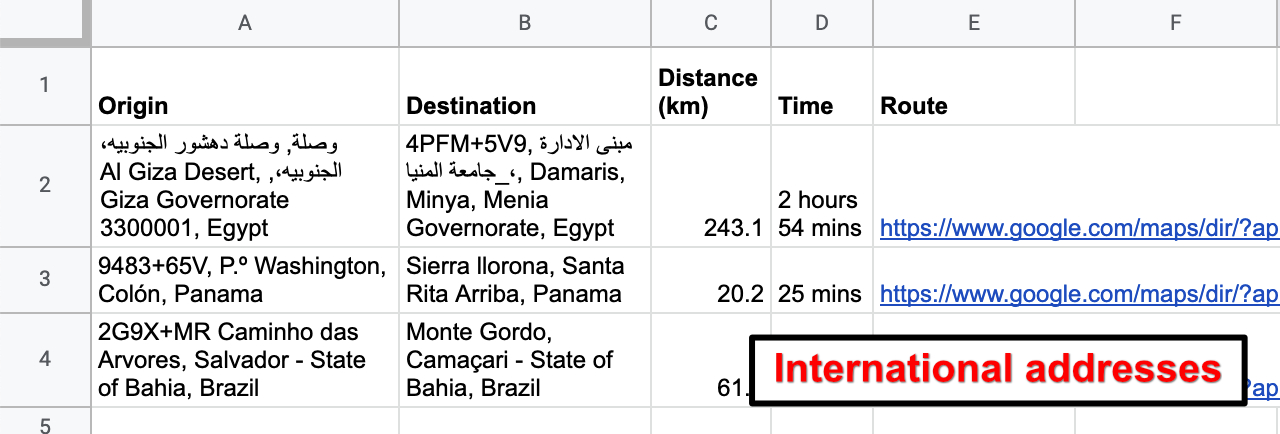
Global Support: Choose between miles and kilometers and use any location format (Addresses, Lat/Long, Plus Codes, or Points of Interest).

High Volume Limits: Process up to 1,000 queries daily (10,000 for Google Workspace accounts), with options to increase limits further.

Accepted Location Formats:

If Google Maps™ can find it, TripTally can measure it:
 - Street Addresses & Plus Codes
 - Latitude / Longitude coordinates
 - Cities, Countries, & Zip Codes
 - Airports, Parks, & Business Names

Very large lists

Because TripTally runs inside Google Sheets™, Google limits each run to 30 seconds, so very large jobs process in chunks with a Continue button between them. That works comfortably up to a few hundred rows at a time.

If you regularly run several thousand addresses at once, TripTally Plus (https://triptallyplus.com) is the companion app for exactly that: it runs on our servers and completes the whole list in a single pass. It also works with Excel Online and OneDrive, CSV/XLSX uploads, or addresses pasted straight in, and is pay-as-you-go rather than a subscription.

Pricing & Trial:

Try it risk-free for 7 days (No credit card required). After your trial, subscribe annually - $53/year

Trusted Support

TripTally is built by Sheets Help. We specialize in making Google Sheets™ more powerful for business users. If you have questions or need bulk licensing for your team, contact me at adam@sheetshelp.com.

—

Google Sheets™ and Google Maps™ are trademarks of Google LLC. TripTally is an independent add-on and is not endorsed by or affiliated with Google LLC.
Дополнительная информация
sell
ЦеныДоступен бесплатный пробный период.
code
Разработчик
email
Поддержка
lock
Политика конфиденциальности
description
Условия использования
flag
ЖалобаПожаловаться




Поиск
Очистить поле поиска
Закрыть поиск
Приложения Google
Главное меню